An Apple receipt is proof of an App Store, iTunes, or Apple Store purchase — emailed to your Apple Account and stored in your purchase history. Whether you need it to report a problem, request a refund, prove a warranty, or expense a purchase, this guide shows exactly where to find an Apple receipt, how to look one up by serial number, and how Apple Pay receipts work.
Apple Receipt
Add custom logo
Edit line items
Choose payment method
Add/remove elements
Customize business information
Choose font
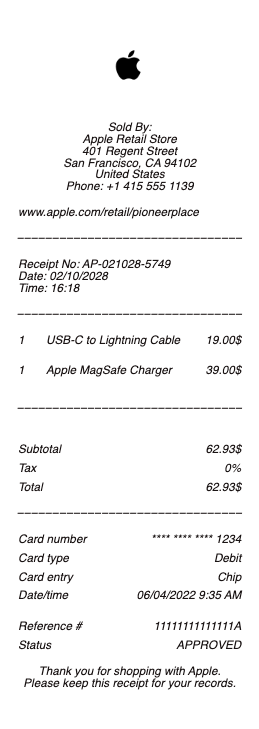
What's on an Apple receipt
An Apple email receipt (and the record in your purchase history) includes:
Apple Account & order ID — the Apple ID billed and a unique order or document number.
Date & billed-to — the purchase date and the payment method on file.
Itemized purchases — apps, subscriptions, iCloud+, music, movies, or an Apple Store device, each with its price.
Subscription details — the renewal terms for anything recurring.
Tax & total — sales tax and the amount charged.
Device details — for hardware, the model and often the serial number.
How to find your Apple receipt
Apple emails a receipt for every App Store and iTunes purchase, so searching your inbox for "Apple" or "Your receipt from Apple" is often fastest. To see the full record, check your purchase history: on an iPhone, open Settings → your name → Media & Purchases → View Account → Purchase History; on a computer, use the App Store or the Music app account page, or go to reportaproblem.apple.com and sign in. There you'll find every charge, which you can view and use as your receipt even if the original email is gone.
Family Sharing reroutes the paper trail in a way that confuses households monthly: purchases by family members bill to the organiser's payment method, so the receipt lands in the organiser's email for an app they never opened. Before treating a charge as unrecognised, the family's purchase histories are the first check — the mystery purchase is usually a teenager's game.
Report a problem or request a refund
If a charge is wrong or you want a refund for an app, subscription, or in-app purchase, go to reportaproblem.apple.com, sign in with your Apple Account, and choose the item — Apple handles most digital refunds there rather than at the App Store. The receipt (or the purchase-history entry) has the order ID you'll reference. For accidental subscription renewals, you can also manage or cancel subscriptions in Settings, and the receipt shows exactly what renewed and when.
Proof of purchase by serial number for warranty
For an iPhone, iPad, AirPods, or Mac, the receipt is your proof of purchase for warranty and AppleCare. If you bought from Apple, the order confirmation and receipt are in your Apple Store order history. To check what coverage a device has, enter its serial number at checkcoverage.apple.com — helpful when a receipt is lost, though a dated proof of purchase is still what Apple or a carrier may ask for on a warranty claim. Keep the hardware receipt with the serial number for anything still under warranty.
Related digital service receipts: see also our Spotify receipt guide and our Adobe receipt guide.
Business purchases through Apple deserve the invoice, not just the email receipt: the order page on Apple's site can produce a formal invoice with the business details needed for expense systems and, where applicable, tax reclaims — the consumer email receipt omits exactly the fields those systems ask for.
Apple Pay receipts, records, and staying safe
A quick clarification: with Apple Pay, the merchant issues the receipt, not Apple — Apple Pay is just the payment method, and the transaction also appears in your Wallet and bank statement. For your own records or an expense report, our Apple receipt template and generator can reproduce a clean copy of a purchase you actually made. One safety note: fake "Apple receipt" or "your Apple invoice" emails are a common phishing tactic — never click links in a suspicious receipt email; verify any charge directly in your purchase history instead. Use receipt tools only to document your own genuine Apple purchases, never to fabricate a charge.
Frequently asked questions
Everything you need to know about the product and billing.
How do I find my Apple receipt?
Apple emails a receipt for App Store and iTunes purchases, so search your inbox for "Apple." For the full record, open Settings → your name → Media & Purchases → Purchase History on iPhone, or sign in at reportaproblem.apple.com on any device. For business records, request the formal invoice from the order page rather than relying on the email receipt — it carries the fields expense and tax systems need.
How do I get a refund from Apple?
Go to reportaproblem.apple.com, sign in with your Apple Account, and select the app, subscription, or in-app purchase. Apple processes most digital refunds there. The receipt's order ID identifies the purchase.
How do I find an Apple receipt by serial number?
For hardware, check your Apple Store order history for the receipt. To see a device's warranty status, enter its serial number at checkcoverage.apple.com — though a dated proof of purchase is still what's usually requested on a warranty claim.
Does Apple Pay send a receipt?
No — with Apple Pay, the merchant issues the receipt, since Apple Pay is only the payment method. The transaction appears in your Wallet and on your bank statement, and the store provides the itemized receipt.
Why did I get an Apple receipt email I don't recognize?
Check your actual purchase history (Settings or reportaproblem.apple.com) before doing anything — fake "Apple receipt" emails are a common phishing scam. If the charge isn't in your history, don't click any links in the email; report it as phishing. Check Family Sharing first — members' purchases bill to the organiser, so someone else's app shows up on your receipt before anything sinister does.
Where is the order ID on an Apple receipt?
It's near the top of the email receipt and in each purchase-history entry, labeled as an order or document number. You'll use it to report a problem or reference a specific purchase with Apple.