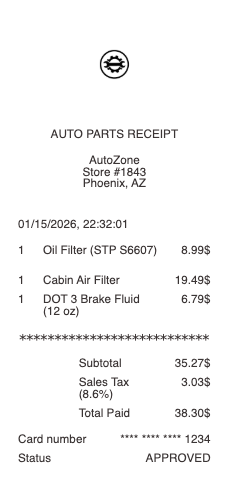
An AutoZone receipt shows proof of purchase for vehicle parts and automotive supplies bought from an AutoZone store. It is commonly used for repairs, maintenance tracking, warranty claims, and expense records.
Unlike general retail receipts, AutoZone receipts often include vehicle-specific parts such as filters, brake components, fluids, or tools. Items may be listed with part names, SKU numbers, and compatibility details related to specific car models.
What an AutoZone Receipt Includes
A typical AutoZone-style receipt includes:
store name and location
date and time of purchase
transaction or receipt number
itemized list of parts and products
product names and part numbers (SKU)
quantities and unit pricing
subtotal
sales tax
total amount paid
payment method
Some receipts may also include warranty details or return policy information.
Key Characteristics of AutoZone Receipts
What makes this format distinct is its connection to vehicle-specific purchases. Many items are tied to particular car models, requiring accurate product identification and compatibility details.
The receipt is structured to clearly display each part, its quantity, and pricing, making it useful for both immediate transactions and long-term maintenance tracking.
Common Uses of AutoZone Receipts
AutoZone receipts are frequently used for:
tracking vehicle maintenance and repair costs
warranty claims for parts and replacements
managing purchases for mechanics or garages
keeping records of parts used on specific vehicles
Because many parts are vehicle-dependent, accuracy is critical. Product names, part numbers, and quantities must be clearly listed to ensure compatibility and proper documentation.
Structure and Format
The format is practical and designed for real-world automotive use, where purchases are often linked to ongoing maintenance or repair tasks. It prioritizes clarity, detail, and ease of verification.
Important Notice (Legal Use)
This example is provided for educational, formatting, and record-keeping purposes only. It is not intended for any illegal, deceptive, or misleading use.
When This Format Is Useful
An AutoZone-style receipt format is useful when you need a structured layout for automotive parts purchases with clear itemization and vehicle-related details.
AutoZone Rewards on the Receipt
If you are enrolled in AutoZone Rewards, the receipt shows your points earned for the purchase and your running points balance. Rewards lines appear below the totals, separately from any cash or card payment lines. Redemptions made on the order are itemized just above the subtotal.
AutoZone Commercial vs Retail Receipts
Commercial customers using an AutoZone Pro (Commercial) account receive a different receipt format. The header includes the business name and Commercial account number, items are listed with trade-discounted pricing, and the rewards block is replaced with billing terms. Retail receipts list standard pricing and surface AutoZone Rewards data.
Where to Find the Store Number
The store number on an AutoZone receipt is at the top, directly under the store name and address, formatted as "Store #" followed by 4–5 digits. The same number is also printed in the bottom block beside the cashier ID and register number. This is the identifier you need when calling for a return, warranty claim, or a duplicate receipt request.
Online vs In-Store Receipt Differences
In-store AutoZone receipts are printed at the register and optionally emailed to AutoZone Rewards members. Online orders through AutoZone.com generate an email receipt automatically at checkout, and the email version includes the order number, shipping or pickup details, and an itemized list. The two formats share the same totals structure but differ in layout and small-print fields.
Legitimate Uses for a Reconstructed AutoZone Receipt
This template is useful when reconstructing a lost AutoZone receipt for an expense report, mileage log, warranty claim against a part you actually purchased, or for a personal record. Common legitimate cases include filing reimbursable shop costs, recreating a faded thermal receipt for a tax record, or producing a mockup for design or testing work.
AutoZone is a trademark of AutoZone, Inc. Any Receipt Generator is not affiliated with, endorsed by, or associated with AutoZone, Inc. This template is provided for legitimate documentation and creative use only and is not intended for fraudulent representation.