A flight receipt is not the boarding pass and not the flimsy booking confirmation — it is the airline’s itinerary receipt, the document that shows the fare paid, the taxes, and the ticket number, and the one expense systems, visa applications, and reimbursements actually require. This page covers what it contains, how it differs from the confirmation, and how to download a proper one.
Flight Receipt
Add custom logo
Edit line items
Choose payment method
Add/remove elements
Customize business information
Choose font
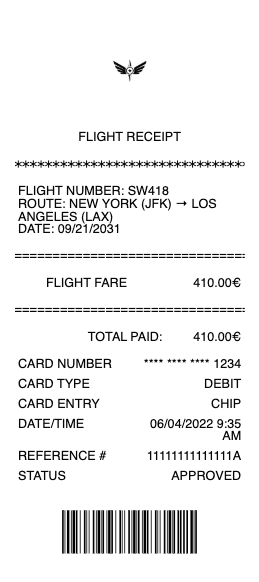
What’s on a Flight Receipt (Itinerary Receipt)
Passenger name and the airline
Booking reference / PNR — the six-character record locator
Ticket number — the 13-digit airline-issued number that proves a ticket was paid, not just held
Flights — routes, dates, flight numbers, and fare class
Fare breakdown — base fare, taxes, and carrier-imposed surcharges as separate lines
Extras — seat selection, checked bags, and other add-ons, often ticketed separately
Total paid, form of payment, and issue date
Itinerary Receipt vs. Booking Confirmation
These get confused constantly, and only one works for expenses. A booking confirmation is the “thanks, you’re booked” email — it shows the trip but often not a payment breakdown or ticket number. The itinerary receipt (sometimes “e-ticket receipt” or “tax invoice”) shows the fare paid, the tax lines, and the 13-digit ticket number, which is what proves the ticket was actually purchased. Finance teams, VAT reclaim, and visa officers want the itinerary receipt; the confirmation alone frequently gets rejected. The good news is it is always retrievable — through the airline’s Manage Booking using your PNR and surname, in the airline app, or from the travel agent or OTA that issued the ticket.
Reading the Fare: Base Fare, Taxes, and Baggage
A flight total is rarely one number. The base fare is the airline’s charge; on top sit government taxes and fees (departure tax, security, passenger facility charges) and carrier-imposed surcharges, each itemized. That breakdown matters for two real reasons: business travel often needs the tax component separated for VAT/GST reclaim, and refunds usually return the taxes even on non-refundable fares, so knowing the split tells you what you can recover. Baggage and seat fees are frequently issued as separate transactions with their own receipts — a common gap on expense reports, because the flight receipt may not include the bag you paid for at check-in. Collect those separately.
Expenses, VAT, and Getting a Copy
Flights are among the largest and most-scrutinized travel expenses, so the itinerary receipt with the ticket number and fare breakdown is essential — a booking confirmation or a card-statement line is not enough for most finance teams. For international business travel, the tax lines support VAT/GST reclaim where eligible. To retrieve a receipt, use the airline’s Manage Booking with the PNR and passenger surname to view and download the itinerary receipt as a PDF at any time, even months after the trip; tickets booked through an agent or OTA are reissued from that provider. Keep the flight receipt, plus any separate baggage and seat receipts, as one complete travel record.
Related airline receipts: see also our Delta Airlines receipt guide and our United Airlines receipt guide.
Create a Flight-Style Itinerary Receipt
Our generator rebuilds an airline-style itinerary receipt — passenger and airline, booking reference, ticket number, flights with fare class, the base-fare/tax/surcharge breakdown, and total — as a clean PDF for a records file when the original is buried.
Use it responsibly: recreate only flights you actually paid for, at their real amounts. Fabricating flight receipts for reimbursement, VAT reclaim, or visa purposes is fraud with serious consequences — the airline’s Manage Booking reissues the genuine itinerary receipt, which is always the correct document for anything official.
Frequently asked questions
Everything you need to know about the product and billing.
What is a flight itinerary receipt?
The airline document showing the fare paid, the tax breakdown, and the 13-digit ticket number — proof the ticket was purchased. It is what expense systems, VAT reclaim, and visa applications require, unlike a plain booking confirmation.
What is the difference between a flight receipt and a booking confirmation?
The confirmation shows your trip but often no payment breakdown or ticket number. The itinerary receipt shows the fare, taxes, and ticket number, and is the document finance teams and visa officers accept.
How do I get a receipt for my flight?
Use the airline’s Manage Booking with your PNR (six-character reference) and surname to view and download the itinerary receipt as a PDF, or find it in the airline app. Tickets booked through an agent or OTA are reissued from that provider.
Why is my flight total more than the base fare?
Government taxes and fees and carrier-imposed surcharges stack on top of the base fare, each itemized. Baggage and seat selection are often separate charges with their own receipts.
Are baggage fees on my flight receipt?
Often not — baggage and seat fees paid at check-in are frequently separate transactions with their own receipts, a common gap on expense reports. Collect those receipts separately from the flight receipt.
Can I reclaim tax on a flight receipt?
For eligible international business travel, the itemized tax lines on the itinerary receipt support VAT/GST reclaim. Refunds also typically return the taxes even on non-refundable fares, so the breakdown shows what is recoverable.