Kroger Receipt

Add custom logo
Edit line items
Choose payment method
Add/remove elements
Customize business information
Choose font

Overview of a Kroger Receipt

A Kroger receipt shows the details of a grocery purchase made at a Kroger store. It is commonly used for returns, expense tracking, budgeting, and personal records.

Unlike other retail receipts, Kroger receipts often include a large number of low-cost items such as food, beverages, and household essentials. Purchases may include multiple categories like fresh produce, packaged goods, and everyday necessities.

What a Kroger Receipt Includes

A typical Kroger-style receipt includes:

  • store name and location

  • date and time of purchase

  • transaction or receipt number

  • itemized list of products

  • product names and categories

  • quantities and unit pricing

  • discounts, coupons, or loyalty savings

  • subtotal

  • sales tax

  • total amount paid

  • payment method

Grocery receipts are usually longer due to the number of items purchased in a single visit.

Key Characteristics of Kroger Receipts

What makes this format distinct is the volume and variety of items. A single receipt can include many products across different categories, each with relatively low individual cost.

Many receipts also include discounts, coupons, or loyalty program savings, often listed separately to show how much was saved on the total purchase.

Common Uses of Kroger Receipts

Kroger receipts are frequently used for:

  • tracking grocery spending and budgeting

  • reviewing purchases for personal or household planning

  • returns or exchanges of items

  • keeping records of frequent purchases

Because of the number of items, clarity is important. Each product should be clearly listed with accurate pricing to ensure the total is easy to verify.

Structure and Format

The format is designed for everyday use, where purchases are frequent and often involve many small items rather than a few large ones. It prioritizes readability and completeness across longer item lists.

Important Notice (Legal Use)

This example is provided for educational, formatting, and record-keeping purposes only. It is not intended for any illegal, deceptive, or misleading use.

When This Format Is Useful

A Kroger-style receipt format is useful when you need a structured layout for grocery purchases with multiple items, discounts, and clear totals.
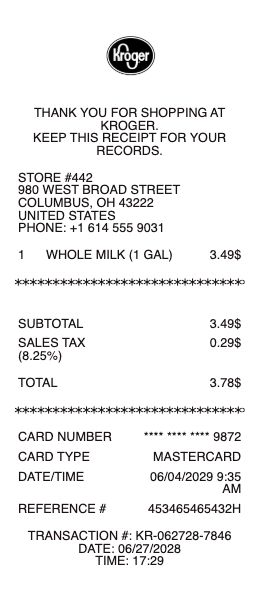
Kroger Receipt

What's on a Kroger Receipt

A Kroger receipt records a grocery purchase from Kroger or one of its family of stores. Beyond the list of items, it carries loyalty and survey details specific to Kroger. A typical Kroger receipt shows:

  • Kroger store name, address, and phone

  • Date, time, and register / transaction number

  • Itemized groceries with abbreviated product names and prices

  • Item tax flags and department codes

  • Subtotal, sales tax, and total

  • Payment method and card last four digits

  • Plus Card savings and total amount saved

  • Fuel Points earned on the trip

  • krogerfeedback survey code (the survey entry ID) near the bottom

The same receipt system runs across Kroger's whole family of stores — Ralphs, Fred Meyer, King Soopers, Smith's, Fry's, QFC and more print the same layout with the same Plus Card, fuel-points, and survey-code lines. A shopper who moves between banners keeps one loyalty account and one digital receipt history across all of them, and everything on this page reads the same on any of those slips.

Plus Card Savings, Fuel Points, and the Survey Code

What sets a Kroger receipt apart from a generic grocery slip is the loyalty section. When a Kroger Plus Card (or the linked phone number) is scanned, the receipt lists each discounted item and a total-savings line, then shows the Fuel Points earned toward the pump. Near the bottom is the krogerfeedback survey code — the entry ID shoppers use for the Kroger customer-satisfaction survey. These fields are exactly why people look for a realistic Kroger receipt template: a slip without the Plus Card savings, Fuel Points, and survey code doesn't look like a real Kroger receipt.

Reading Kroger Item Abbreviations and Codes

Kroger receipts compress product names into short abbreviations to fit the paper — a habit that sends shoppers searching to decode a line or an unfamiliar charge. Each line also carries tax flags and department codes that indicate whether an item was taxable or fell under a category like produce, deli, or general merchandise. If a code on your receipt is unclear, the most reliable way to confirm what it means is Kroger's own app or customer service, since abbreviations vary by store system and region. Keeping the receipt makes it easy to check a charge, match it to a bank statement, or return an item.

Related grocery receipts: see also our Safeway receipt guide and our Albertsons receipt guide.

Digital Receipts, Lookup, and Returns Without a Receipt

Kroger stores digital receipts in its app and account for purchases made with a Plus Card, which is how many shoppers do a Kroger receipt lookup after the fact. For returns without a receipt, Kroger sets its own conditions and they change over time, so confirm the current policy at the store or on kroger.com — but a receipt, digital or paper, always makes a return simpler and faster. People recreate a Kroger receipt when a paper copy faded, a digital receipt wasn't captured because no Plus Card was scanned, or they need a clean itemized copy for an expense or reimbursement.

Generate a Kroger Receipt — Free, No Login

Our Kroger receipt generator builds a realistic grocery receipt with every field in place: store name and address, date and time, itemized groceries with abbreviated names, subtotal, sales tax, total, payment method, Plus Card savings, Fuel Points, and the survey code line. Edit each field and download a formatted Kroger receipt template in PDF, PNG, or JPG in under a minute — no account required. It's built for replacing a faded receipt, reconstructing a trip that wasn't captured digitally, or keeping a clean itemized copy for expenses. Only create receipts for purchases that actually happened.

Related receipts: rebuild an Albertsons receipt, a Safeway receipt, or a Publix receipt the same way.

Frequently asked questions

Everything you need to know about the product and billing.

What's on a Kroger receipt?
The store name and address, date and time, itemized groceries with abbreviated names and prices, subtotal, sales tax, total, payment method, Plus Card savings, Fuel Points earned, and the krogerfeedback survey code near the bottom.
Where is the survey code on a Kroger receipt?
The krogerfeedback survey entry code is printed near the bottom of the receipt. Shoppers use it to take Kroger's customer-satisfaction survey, and a realistic Kroger receipt includes this line.
What do the abbreviations on a Kroger receipt mean?
Kroger shortens product names to fit the paper, and each line carries tax flags and department codes. Abbreviations vary by store system, so check Kroger's app or customer service to confirm an unclear line or charge.
How do I look up a Kroger receipt?
Purchases made with a Kroger Plus Card are stored as digital receipts in the Kroger app and account. If a trip wasn't captured — for example, no Plus Card was scanned — you can recreate the receipt from your purchase details. The same lookup works across the Kroger family — Ralphs, Fred Meyer, King Soopers, Smith's — since one loyalty account spans all banners.
Can I return to Kroger without a receipt?
Kroger sets its own return conditions and they change over time, so confirm the current policy at the store or on kroger.com. Having the receipt, digital or paper, always makes a return simpler.
Can I make a Kroger receipt template?
Yes. The generator builds a realistic itemized Kroger receipt — with Plus Card savings, Fuel Points, and the survey code — that you can edit and download as a PDF, PNG, or JPG, for legitimate record-keeping only.