A PayPal refund receipt confirms that a PayPal payment was returned — and where the money goes and how long it takes depend on how you originally paid. A refund is also different from a dispute or a chargeback, which trips people up when a seller won’t cooperate. This page explains what a PayPal refund shows, how the money finds its way back to your original source, and the refund-versus-dispute distinction.
PayPal Refund Receipt
Add custom logo
Edit line items
Choose payment method
Add/remove elements
Customize business information
Choose font
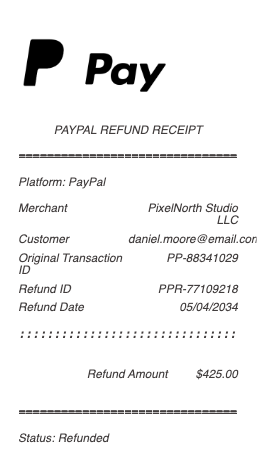
What’s on a PayPal Refund Receipt
The original transaction ID the refund relates to
The seller/merchant and the buyer
The refund amount — full or partial — and date
Where the refund was sent — the original payment source
A refund/transaction confirmation number
The status — completed or pending
Any note distinguishing a seller refund from a dispute resolution
Where the Money Goes and How Long It Takes
The key rule of a PayPal refund is that it returns to your original payment source. If you paid from your PayPal balance, the refund lands back in your balance, usually right away. If you paid with a linked bank account or your balance, it typically returns to your PayPal balance quickly. But if you funded the payment with a credit or debit card through PayPal, the refund goes back to that card, and that can take several business days (often up to 5, sometimes longer) because it routes through the card networks — the same reason any card refund is slower than a charge. This is why a refund can seem “missing”: it’s completed on PayPal’s side but still traveling back to your card. The refund receipt shows the destination and status, so checking whether it went to your balance (fast) or a card (slower) usually explains the timing before you worry.
Refund vs Dispute vs Chargeback
Three different things get called “getting my money back,” and they’re not the same. A refund is the seller voluntarily returning your money — the cleanest path, and what the receipt documents. A dispute or claim is what you open in PayPal’s Resolution Center under Buyer Protection when a seller won’t refund — for an item not received or not as described — and PayPal mediates, potentially forcing a refund; there’s a 180-day window to open one. A chargeback is when you go to your card issuer instead (only possible if you paid by card), asking them to reverse the charge. The order that usually makes sense is: ask the seller for a refund first, escalate to a PayPal dispute if they won’t, and use a card chargeback as a last resort. Knowing which mechanism you’re in tells you where to look for status — a refund receipt, a Resolution Center case, or your card issuer.
Partial Refunds, Seller Fees, and Records
A few practical points. Partial refunds are common — a price adjustment or a return of some items — and the receipt shows the partial amount against the original transaction. For sellers, there’s an important cost change to know: PayPal historically returned the transaction fee when a seller refunded a buyer, but under current policy PayPal generally keeps part of the fee (the fixed portion, and for many accounts the percentage too) on refunds — so issuing a refund can cost the seller money beyond the refunded amount, which matters for a business’s margins and records. For buyers, keeping the refund receipt with the original purchase confirms the money was returned and to where, useful if a refund is delayed or you need to prove it for an expense reconciliation. Both sides can find refunds in their PayPal activity history, downloadable for records. The refund receipt tying back to the original transaction ID is the clean proof the reversal happened.
Related digital wallet receipts: see also our PayPal receipt guide and our Venmo receipt guide.
Create a PayPal Refund Receipt
Our generator produces a clean PayPal refund receipt — original transaction ID, seller and buyer, refund amount and date, destination, and confirmation — as a PDF when you need a legible copy for your records or an expense reconciliation.
Use it responsibly: recreate only a real refund that actually occurred, with its true amount and details. Fabricating a PayPal refund receipt to falsely claim you were refunded (or that you issued a refund), support a dispute dishonestly, or mislead a buyer or seller is fraud — PayPal’s transaction records are authoritative and verifiable by the transaction ID. PayPal is a trademark of its owner; this tool is not affiliated with it and is for legitimate record-keeping only.
Frequently asked questions
Everything you need to know about the product and billing.
What does a PayPal refund receipt show?
The original transaction ID, the seller and buyer, the refund amount (full or partial) and date, where the refund was sent (your original payment source), a confirmation number, the status (completed or pending), and any note distinguishing a seller refund from a dispute resolution.
Where does a PayPal refund go?
Back to your original payment source. If you paid from your PayPal balance it returns there, usually right away; if you paid with a credit or debit card through PayPal, it goes back to that card and can take several business days because it routes through the card networks.
Why is my PayPal refund taking so long?
If the payment was card-funded, the refund returns to that card and can take up to about 5 business days (sometimes more) as it routes through the card networks — the same reason any card refund is slower. It may be completed on PayPal’s side but still traveling back to your card.
What’s the difference between a PayPal refund and a dispute?
A refund is the seller voluntarily returning your money. A dispute is what you open in PayPal’s Resolution Center under Buyer Protection when a seller won’t refund — for an item not received or not as described — within a 180-day window, and PayPal mediates. A chargeback goes to your card issuer instead.
Can PayPal refunds be partial?
Yes — partial refunds are common, for a price adjustment or a return of some items, and the receipt shows the partial amount against the original transaction. The remainder of the original payment stays with the seller.
Do sellers get their PayPal fee back on a refund?
Generally not in full anymore. PayPal historically returned the transaction fee on refunds, but current policy generally keeps part of the fee (the fixed portion, and for many accounts the percentage too), so issuing a refund can cost a seller beyond the refunded amount — relevant for a business’s records.