A rideshare receipt breaks a fare into base, time, distance, surge, and booking fees — and sometimes changes after the trip. This guide explains the fare anatomy, post-trip charges, and business profiles for expensing rides.
Ride Share Receipt
Add custom logo
Edit line items
Choose payment method
Add/remove elements
Customize business information
Choose font
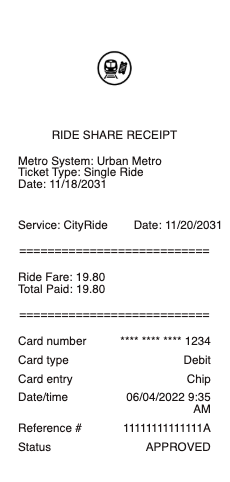
The fare is a formula, and the receipt shows its parts
A rideshare fare is not a metered rate — it is a computed price built from named components, and the app receipt is where they become visible:
Base fare — the fixed starting amount.
Time and distance — per-minute and per-mile components, computed from the actual route.
Surge or dynamic pricing — a multiplier or fixed uplift applied when demand outstrips drivers. If the price felt high, this line is usually why.
Booking or service fee — the platform's own charge, separate from what the driver earns.
Tolls and airport surcharges, passed through.
Upfront pricing means you usually saw a single number before booking — but the receipt still decomposes it, and the decomposition is what you check when the charged amount does not match the quote.
The receipt that changes after the ride
Rideshare receipts are unusual in that the total can move after the trip ends. The legitimate reasons:
A tip added later — appears as an adjustment or a second charge.
Route changes or added stops — the upfront price is recalculated when the actual trip differs materially.
Wait-time fees, when the driver waited past the free window.
Cleaning or damage fees — charged after driver reports, sometimes days later, and the most disputed line in ridesharing.
A charge you do not recognise is disputable in-app, and the trip receipt with its route map is the evidence. This is also the reason to check receipts rather than statements: the statement shows one merchant total; the receipt shows what it was made of.
Business profiles: the expensing machinery built in
The platforms solved rideshare expensing at the source. A business profile lets one account hold two payment methods — personal and work — with each ride assigned to one, and work-ride receipts auto-forwarded to a work email or straight into expense software.
The practical wins: no more forwarding receipts one by one, no personal rides accidentally on the company card, and a monthly travel summary per profile. For anyone expensing more than a few rides a month, the ten minutes of setup replaces a recurring chore — and for finance teams, the integration means ride receipts arrive itemised and categorised without anyone touching them.
What a rideshare receipt should show
Date, times, and the route — pickup and drop-off points, often with a map.
Each fare component — base, time, distance, surge, fees, tolls — itemised.
The total charged and the payment method.
The driver and vehicle identifiers.
The trip ID — what support and disputes run on.
For expense claims, the route matters as much as the amount: a receipt showing an airport-to-office trip on a workday substantiates itself in a way a bare total cannot.
Finding and keeping ride receipts
Every trip lives in the app's ride history with a downloadable or emailable receipt — rideshare records are effectively unloseable while the account exists. For business use, export or auto-forward monthly rather than at year-end: accounts get closed, phones change, and access is easiest while the trips are recent.
If a record is missing while the ride genuinely happened, your card statement establishes the date, amount, and platform, and a clear reconstructed record documents that real payment for your files, matching the charge exactly — while the trip detail (route, time, fare split) lives only in the platform's history, which is why the in-app receipt is the better document to capture in the first place.
Frequently asked questions
Everything you need to know about the product and billing.
Why was my rideshare more expensive than usual?
Almost always surge pricing — a demand-based multiplier or uplift shown as its own line on the receipt. Tolls, airport surcharges, and wait-time fees are the other usual suspects, each itemised.
Why did the charge change after my trip ended?
Legitimate causes: a tip added later, a recalculation after route changes or added stops, wait-time fees, or a cleaning/damage fee from a driver report. Anything unrecognised is disputable in-app, with the trip receipt as evidence.
What is a rideshare business profile?
A second payment context in the same account: work rides go on the work card and their receipts auto-forward to a work email or expense software. It eliminates receipt-forwarding and keeps personal rides off the company card.
What should a rideshare receipt show?
Date, times, pickup and drop-off with the route, each fare component itemised (base, time, distance, surge, fees, tolls), the total and payment method, driver and vehicle identifiers, and the trip ID.
How do I dispute a rideshare charge?
In the app, against the specific trip — the receipt and route map are the evidence. Cleaning and damage fees, the most disputed charges, are reviewed against the driver's report and photos.
Where do I find old ride receipts?
In the app's ride history, downloadable or emailable per trip. For business use, export monthly — access is easiest while the account is active and the trips are recent.