A subscription receipt documents a recurring charge for a digital service. This guide explains where to find receipts for services like ChatGPT and Apple subscriptions, how auto-renewal billing works, and what to keep for expense claims.
Subscription Receipt
Add custom logo
Edit line items
Choose payment method
Add/remove elements
Customize business information
Choose font
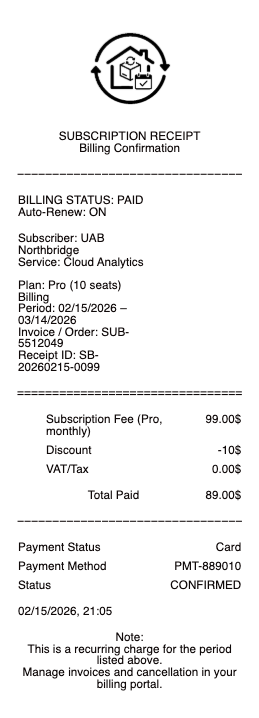
Subscriptions bill you quietly — the receipt is where you check
The defining feature of a subscription is that nobody asks you again. You approve it once, and thereafter the charge simply arrives, on a date you have probably forgotten, at a price that may have changed since you signed up.
That is precisely why the receipt matters more here than for a one-off purchase. It is the document that tells you what period the charge covers, what you are actually paying now, and when it will happen again — three facts that a line on a card statement never gives you.
Where the receipts actually live
Digital subscriptions do not post you anything. Each service keeps its billing history in a different place, and knowing the pattern saves a lot of searching:
The service's own billing portal — most SaaS and AI subscriptions (ChatGPT and similar) keep an invoice history in account settings, usually with downloadable PDFs for every past charge.
The app store that billed you — if you subscribed through Apple or Google, the receipt comes from them, not the app developer. Apple emails a receipt for each charge and keeps purchase history in your account; the developer often cannot issue you one at all, which is why asking them goes nowhere.
Your email — nearly every service emails a receipt at the moment of charge. Searching your inbox for the service name plus "receipt" or "invoice" is usually faster than logging in.
The rule of thumb: whoever took the money issues the receipt. Identify the biller on your card statement first, and go to them.
Auto-renewal is the part that catches people
Subscriptions renew by default — that is the model. Three consequences worth internalising:
The renewal price is not necessarily the signup price. Introductory and annual-discount pricing lapses, and the receipt is where you notice.
Cancelling usually does not refund the current period. You typically keep access until the period you already paid for ends, which the receipt's coverage dates make explicit.
A charge from a service you forgot is easiest to trace through the receipt, because the card descriptor is often an unrecognisable parent-company name.
Checking receipts is, in practice, the only reliable way to notice a subscription you no longer use — the card statement shows an amount, but the receipt tells you what it bought.
What a subscription receipt should show
The service and plan — which tier you are on, since pricing is tiered.
The billing period — the start and end dates this charge covers. This is the field an expense claim needs and the one people most often cannot produce.
The amount and any tax or VAT, shown separately where it applies.
The payment method and the date charged.
The next renewal date, on the better ones.
An invoice number, for anything you will be reclaiming.
Claiming subscriptions as a business expense
Software and AI subscriptions are among the most commonly expensed items for freelancers and small businesses — and among the most commonly rejected, because a card statement line is not an itemised receipt. If you are claiming, download the actual invoice from the billing portal: it carries the business name, the tax treatment, and the period, none of which the statement does.
Where a subscription is split between personal and business use, only the business portion is claimable, and the invoice is what lets you apportion it honestly. If an invoice for a charge that genuinely happened is missing, your card statement establishes the date, amount, and biller, and a clean reconstructed record documents that real payment for your files — matching the actual charge exactly, and never replacing the provider's own invoice where one can still be downloaded.
Frequently asked questions
Everything you need to know about the product and billing.
Where do I find a receipt for a digital subscription?
Whoever took the money issues it. Check the service's own billing portal for downloadable invoices, or — if you subscribed through Apple or Google — the app store that billed you, since the developer usually cannot issue a receipt for an app-store purchase.
How do I get a receipt for a ChatGPT or similar AI subscription?
Through the service's billing or account settings, where past invoices are typically listed with downloadable PDFs for each charge. A receipt is also usually emailed at the moment of each charge.
Why is the biller name on my statement unrecognisable?
Card descriptors often show a parent company rather than the product name. The receipt is what identifies the actual service, which is why it is the fastest way to trace a charge you do not recognise.
Does cancelling a subscription refund the current period?
Usually not. You typically retain access until the end of the period already paid for. The billing period shown on the receipt tells you exactly when that is.
Why did my subscription price go up?
Introductory or promotional pricing lapses at renewal, and services change prices. The receipt shows what you are actually being charged now, which a card statement line does not explain.
Can I expense a software subscription?
Yes, when it is a genuine business cost — but you generally need the itemised invoice, not just the card statement. Download it from the billing portal, and apportion it if the subscription is part personal and part business.