A university fee receipt documents payments made to a college bursar account. This guide explains qualified vs non-qualified charges, how the receipt relates to Form 1098-T Box 1, and why room and board are excluded from education credits.
University Fee Receipt
Add custom logo
Edit line items
Choose payment method
Add/remove elements
Customize business information
Choose font
The bursar account is the source of truth
College billing does not work like retail. Payments do not attach to individual items — they land in a bursar account (sometimes called the student account), which is a running ledger of charges and credits for the term. Tuition, mandatory fees, lab fees, housing, and meal plans all post to the same account, and your payment is applied against the balance as a whole.
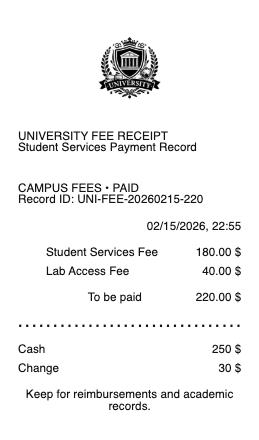
This is why a university fee receipt looks different from a shop receipt: it typically shows a payment applied to a student account for a given term, identified by student ID, rather than an itemized list of what the money bought. To see what was actually charged, you need the bursar statement alongside the payment receipt.
Qualified vs non-qualified charges — the distinction that decides your tax credit
Everything on a bursar bill falls into one of two buckets, and only one of them counts toward education tax credits:
Qualified (counts): tuition, required enrollment fees, mandatory course and lab fees, and student activity fees required of all students.
Not qualified (does not count): room and board, insurance, student health fees, transportation, and general living costs — even when they are billed through the bursar and paid in the same transaction.
That last point is the one that catches families out. Paying $18,000 to the university does not mean $18,000 of qualified expenses; if $9,000 of it was housing and a meal plan, that half is excluded from the American Opportunity Tax Credit and the Lifetime Learning Credit no matter how it was paid.
How the receipt relates to Form 1098-T
At year end, the institution issues Form 1098-T. Box 1 reports the total payments received for qualified tuition and related expenses during the calendar year — deliberately not the same as the total you paid the school, because room, board, and insurance are stripped out.
Your payment receipts are how you reconcile the two. If Box 1 looks lower than what left your bank account, the gap is usually non-qualified charges (correct) or a timing difference where a spring-term payment made in December lands in a different tax year (also correct, and a common source of confusion). Keeping the receipts and the bursar statements together lets you show exactly which payments produced the Box 1 figure.
One useful footnote: course-related books, supplies, and equipment required for attendance can count toward the AOTC even when they are bought elsewhere and never appear on the bursar bill at all — so those separate receipts matter too.
Payment plans, third-party payers, and scholarships
University payments rarely come from a single source, and the receipt should make clear which one it documents:
Installment plans. Many bursars split a term into monthly payments; each installment generates its own receipt, and you may need all of them to evidence the term's total.
Third-party payments. Employers, 529 plan distributions, and outside scholarships often pay the school directly. Those payments are not out-of-pocket, and claiming a credit on them is a common error.
Scholarships and grants reduce qualified expenses before any credit is calculated — they appear separately on the 1098-T for exactly this reason.
Retrieving or reconstructing a payment record
Start with the student portal: nearly every institution keeps a permanent payment history and downloadable bursar statements under the student account, and most can reissue receipts on request. The 1098-T itself is usually available for download there as well.
If a specific payment record is missing and you need documentation of a payment you genuinely made — for a reimbursement, a 529 withdrawal file, or your own tax records — the bank or card statement establishes the date, amount, and payee, and a clean reconstructed record from those details documents a real transaction. It should always match the underlying payment and the bursar ledger exactly, and it never replaces the institution's own 1098-T for tax filing.
Frequently asked questions
Everything you need to know about the product and billing.
What is a bursar account?
The running ledger of a student's charges and credits at a college — tuition, fees, housing, and meal plans all post to it, and payments are applied against the balance rather than to individual line items.
Does room and board count for education tax credits?
No. Room, board, insurance, student health fees, and transportation are not qualified expenses for the AOTC or Lifetime Learning Credit, even when billed through the bursar and paid in the same transaction.
Why is Box 1 on my 1098-T lower than what I paid the school?
Box 1 reports only payments received for qualified tuition and related expenses. Non-qualified charges like housing and meal plans are excluded, and payments can also fall into a different calendar year than the term they cover.
What counts as a qualified university expense?
Tuition, required enrollment fees, and mandatory course, lab, and activity fees. Course-related books, supplies, and required equipment can also count toward the AOTC even if purchased outside the school.
Can I claim a credit on tuition paid by a scholarship or my employer?
No. Scholarships, grants, and direct third-party payments reduce your qualified expenses — the credit applies to what you actually paid out of pocket.
Where do I get a copy of a university payment receipt?
The student portal keeps a permanent payment history and downloadable bursar statements, and most bursar offices will reissue a receipt on request. Form 1098-T is typically downloadable from the same portal.