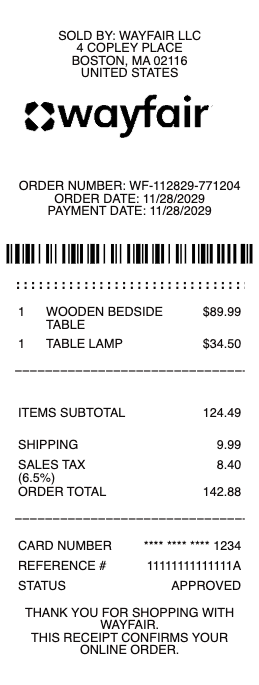
A Wayfair receipt shows the details of an online purchase made on Wayfair. It is commonly used for reimbursements, warranty claims, returns, and expense tracking. A typical Wayfair receipt includes an order number, delivery details, item list, shipping, tax, and total paid. This Wayfair receipt example follows a realistic home and furniture e-commerce format. It includes household items, clear pricing, delivery charges, and a clean order summary. The structure works well for records or recreating a missing receipt. Use a Wayfair receipt example when you need proof of purchase for furniture or home goods ordered online.
Wayfair Receipt
Add custom logo
Edit line items
Choose payment method
Add/remove elements
Customize business information
Choose font
What's on a Wayfair Receipt
Wayfair is an online home and furniture retailer, so your "receipt" is the order confirmation and the order-details page in My Orders, not a store slip. The same format applies across Wayfair's family of brands — AllModern, Joss & Main, Birch Lane and Perigold. A Wayfair receipt shows:
Order number — the identifier you use for a Wayfair order lookup, returns and support.
Order date and status — when you bought it and where it is (processing, shipped, delivered).
Item details — each product with its name, SKU, quantity and price, so a multi-item room order lists every piece.
Delivery — the shipping address and method, including freight or in-home delivery for large furniture.
Payment summary — subtotal, shipping, tax and the grand total, with the payment method.
How to find your Wayfair receipt and order details
To pull up a Wayfair receipt, sign in and open My Orders under your account, where your full order history lists every purchase; select an order to see its itemised details, which act as your receipt. Each order also triggers a confirmation email, so searching your inbox for the Wayfair order number is often the quickest route. Bought as a guest? Wayfair supports an order lookup using the order number and the email on the order, so you don't need an account to retrieve the details. From the order page you can view the breakdown, print it, or save it as a PDF for your records.
For expense reports the useful trick is the printable invoice: the order page offers an invoice/print view that lays the purchase out formally — billing address, itemized lines, taxes, order number — which reads better in an expense system than a screenshot of the confirmation email. Business buyers on Wayfair Professional get the same thing with the business account's details already on it.
Proof of purchase for returns and damaged items
Your Wayfair receipt is the proof of purchase that makes returns and claims straightforward. Wayfair's return window generally runs 30 days for most items, and the order-details page is where you start a return and get the label. Furniture and large items sometimes arrive damaged in transit, and a replacement or refund claim moves faster when you can point to the order number, the item and the price on your receipt. Keep the confirmation until the item is delivered, inspected and — if needed — returned or replaced, because that record is what ties your claim to the original purchase.
Keeping Wayfair receipts for records and expenses
If you buy from Wayfair for a business, a rental, or a home-office deduction, a clean Wayfair purchase receipt keeps your bookkeeping tidy. Because the order-details page serves as the receipt rather than a formal tax invoice, many buyers print or screenshot it to attach to an expense report or a project budget. When an older order has scrolled out of easy reach or a confirmation email was deleted, reconstructing a legible itemised copy from the order number, item, price and date you already have keeps your records complete — an accurate stand-in for a purchase that genuinely happened, never an invented one.
Related retail receipts: see also our furniture store receipt guide and our IKEA receipt guide.
Create a Wayfair-style receipt with our generator
Need a clean copy of a Wayfair receipt for an expense report, a return record or a template mock-up? Our receipt generator recreates the order-confirmation layout — order number, itemised products with SKU, shipping, tax and total — and exports a print-ready PDF, PNG or JPG in under a minute, no account required. Enter your own order details for a legible copy when the email is buried or the order has aged out of your history. Please use it lawfully and honestly: create receipts only for purchases that actually happened, for your own records and reimbursements — never to fake an order, claim a refund you're not owed, or impersonate Wayfair. "Wayfair" and its brand names belong to their owner and are referenced here only to describe the receipt format.
Frequently asked questions
Everything you need to know about the product and billing.
How do I find my Wayfair receipt?
Sign in, open My Orders, and select the order — its itemised details are your receipt. Every order also sends a confirmation email, so searching your inbox for the Wayfair order number is often the fastest way to retrieve it. From the same order page you can open the printable invoice view — the formal, itemized version expense systems prefer over a screenshot of the email.
Can I look up a Wayfair order without an account?
Yes. Wayfair supports an order lookup using the order number and the email address on the order, so guests can retrieve order details and proof of purchase without signing in.
Where is my Wayfair order number?
It's at the top of your order confirmation email and on the order-details page in My Orders. You'll need it for a return, an order lookup, a damaged-item claim, or contacting support.
Does a Wayfair receipt work as proof of purchase for a return?
Yes. The order-details page is your proof of purchase; Wayfair's return window is generally 30 days for most items, and you start the return from that page. Keep the receipt until any return or replacement is complete.
My Wayfair furniture arrived damaged — do I need the receipt?
It helps a lot. A replacement or refund claim moves faster when you can reference the order number, item and price from your receipt, so keep the confirmation until the item is delivered and inspected.
Can I use this generator to recreate a Wayfair receipt?
Yes, for legitimate purposes — replacing a lost order confirmation for your own records, expense reports or design mock-ups. It is not for faking orders, claiming refunds you're not owed, or impersonating Wayfair.