An Apple Pay receipt is the record of a contactless or in-app payment made through Apple’s Wallet — and it comes with a quirk that confuses people: the card number on the receipt often isn’t your real one. Apple Pay swaps in a device-specific number for security, so the last four digits may not match your physical card. This page explains what an Apple Pay transaction shows, why that number differs, and where to find the record.
Apple Pay Receipt
Add custom logo
Edit line items
Choose payment method
Add/remove elements
Customize business information
Choose font
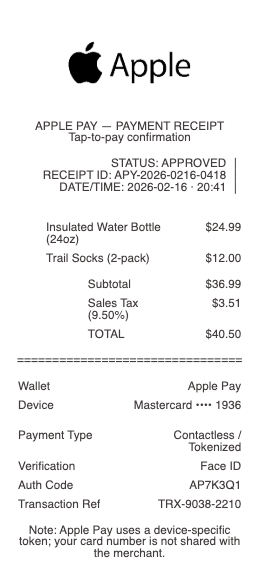
What’s on an Apple Pay Transaction Record
The merchant and the amount, date, and time
The card used from Wallet — shown by its Device Account Number, not your real card number
The device that made the payment (iPhone, Apple Watch)
Authorization via Face ID, Touch ID, or passcode
The merchant’s own receipt, which is the itemized proof of purchase
In Wallet, a running list of recent transactions per card
For Apple Card/Apple Cash, a full in-app statement
Why the Last Four Digits Don’t Match Your Card
This is the detail that trips people up. When you add a card to Apple Pay, Apple generates a Device Account Number — a unique token that stands in for your real card — and stores it in the device’s secure element. When you pay, the merchant receives that token, not your actual card number, so the last four digits on the receipt often differ from the ones printed on your physical card. This isn’t an error; it’s the core of Apple Pay’s security. Because the merchant never sees your real number, a data breach at that merchant can’t expose your actual card, and the token is specific to your device. So if a receipt or bank alert shows an unfamiliar last four, checking whether it matches your Apple Pay Device Account Number (visible in Wallet under the card) usually explains it. Understanding this prevents a false fraud scare over a number that’s working exactly as designed.
Where the Receipt Actually Lives
Apple Pay is a payment method, not a store, so the itemized receipt still comes from the merchant — printed, emailed, or in that store’s app — exactly as it would for any card. What Apple Pay adds is a transaction record in Wallet: open the card in the Wallet app and you’ll see a list of recent transactions (merchant, amount, date) for payments made with that card on that device. For Apple Card, that goes further — a full, categorized statement with Daily Cash and detailed history lives in Wallet. Apple Cash (person-to-person payments) keeps its own transaction list too. So for proof of a specific purchase, use the merchant’s receipt; for a quick record that a payment happened and to whom, the Wallet transaction list is the fast reference. Knowing which source to check saves hunting for a document Apple Pay itself doesn’t issue.
Verification, Expenses, and Disputes
The split between Apple’s record and the merchant’s matters when you need proof. For an expense report or reimbursement, the merchant’s itemized receipt is what you submit — a Wallet line showing “$42.00 at a coffee shop” isn’t itemized enough for most policies. For reconciling your statement, the Wallet transaction list (or your bank/Apple Card statement) confirms the charge and the device that made it. For a dispute, you work through the card issuer as normal; the Device Account Number and transaction details help identify the exact payment. Because Apple Pay authorizes every transaction with Face ID, Touch ID, or a passcode, an unauthorized in-person Apple Pay charge is unusual — which itself is useful context if you’re questioning one. Keeping the merchant receipt alongside the Wallet record covers both the itemized proof and the payment trail.
Related digital wallet receipts: see also our Google Pay receipt guide and our Venmo receipt guide.
Create an Apple Pay Receipt
Our generator produces a clean payment receipt for an Apple Pay transaction — merchant, amount, date, the device and tokenized card reference — as a PDF when you need a legible copy for your records or an expense file alongside the merchant’s itemized receipt.
Use it responsibly: recreate only real payments you actually made, with their true amounts. Fabricating an Apple Pay receipt to fake a purchase, support a false expense claim, or misrepresent a payment is fraud — the authoritative records are the merchant’s receipt and your card issuer’s statement, which can be verified. Apple Pay is a trademark of Apple Inc.; this tool is not affiliated with it and is for legitimate record-keeping only.
Frequently asked questions
Everything you need to know about the product and billing.
What does an Apple Pay transaction record show?
The merchant, amount, date, and time; the card used shown by its Device Account Number rather than your real card number; the device that paid (iPhone or Apple Watch); and, in Wallet, a running list of recent transactions per card. The itemized proof is the merchant’s own receipt.
Why don’t the last four digits on my Apple Pay receipt match my card?
Because Apple Pay uses a Device Account Number — a token that stands in for your real card — so the merchant receives that, not your actual number. The last four often differ by design; it’s the core of Apple Pay’s security, not an error, and you can see the token in Wallet.
Does Apple Pay give me a receipt?
Not an itemized one — Apple Pay is a payment method, so the receipt comes from the merchant (printed, emailed, or in their app). Apple Pay adds a transaction record in the Wallet app showing recent payments per card, and Apple Card provides a full statement there.
Where do I find my Apple Pay transaction history?
Open the card in the Wallet app to see a list of recent transactions (merchant, amount, date) for that card on that device. Apple Card shows a full categorized statement in Wallet, and Apple Cash keeps its own transaction list for person-to-person payments.
Can I use an Apple Pay record for an expense report?
Submit the merchant’s itemized receipt — a Wallet line like “$42.00 at a coffee shop” usually isn’t itemized enough for expense policies. Use the Wallet transaction list or your statement to reconcile and confirm the charge, but the merchant receipt is the proof.
Is Apple Pay safer than using my physical card?
It’s designed to be — the merchant never receives your real card number, only a device-specific token, so a breach at that merchant can’t expose your actual card. Every transaction is also authorized with Face ID, Touch ID, or your passcode, making unauthorized in-person use unusual.