A Google Pay receipt documents a payment made through Google Pay using a linked card or account. It is commonly used for online purchases and mobile payments.
Google Pay Receipt
Add custom logo
Edit line items
Choose payment method
Add/remove elements
Customize business information
Choose font
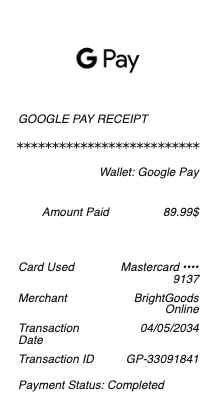
What's on a Google Pay Receipt
A Google Pay receipt confirms a payment made through Google's digital wallet — either a tap-to-pay purchase at a store or a person-to-person transfer in the app. (In the US, Google's tap-to-pay wallet is now branded Google Wallet; the standalone Google Pay app closed there on June 4, 2024, and now runs only in India and Singapore.) A Google Pay receipt or activity record generally shows:
Transaction ID or reference number
Date and time of the payment
Merchant name (for a purchase) or recipient (for a transfer)
Amount paid or sent
Funding source — the card or bank, shown by last four digits
Payment status (completed, pending)
Sender name and account, for a transfer
Tap-to-Pay Purchase vs. a Money Transfer
Google Pay produces two different kinds of records. A tap-to-pay purchase at a store settles on the merchant's terminal, so the store's own receipt is the itemized proof, while Google's app logs the transaction with the merchant name, amount, and the card used. A person-to-person transfer inside the app generates its own confirmation with a transaction ID, the recipient, and the amount. Knowing which one you need matters: for an in-store purchase, the value is a record tying the payment to a card and merchant; for a transfer, it's proof that money moved between two people.
Finding and Downloading a Google Pay Receipt
Every payment appears in the Activity section of the Google Pay or Google Wallet app, where each transaction can be opened to see its details and, in many cases, exported. A fuller payment history is also available on the web at pay.google.com, tied to the same Google account. Even so, people search for a Google Pay receipt download or PDF because neither view is always a clean, shareable document — the details are there, but not in a format that works for an expense report or a reimbursement. It also helps to remember that for an in-store purchase the merchant, not Google, issues the official itemized receipt, while Google's record simply logs the payment. That's the gap a formatted receipt fills: the same transaction ID, date, merchant or recipient, amount, and funding card, laid out as a document you can attach or print.
Why People Need a Google Pay Receipt
Digital-wallet payments are easy to make and easy to lose track of. Users need a Google Pay receipt to reconcile a purchase against a bank statement, to submit an expense for reimbursement, to confirm a person-to-person payment actually went through, or simply to keep a personal record of where money went. Because the app's activity log isn't always exportable as a tidy file, a clear receipt — with the transaction ID, date, amount, merchant or recipient, and the funding card's last four digits — turns a screen entry into usable proof of payment.
Related digital wallet receipts: see also our Apple Pay receipt guide and our Cash App receipt guide. For a simple record of any payment, see our receipt of payment guide.
Generate a Google Pay Receipt — Free, No Login
Our Google Pay receipt maker builds a clean payment confirmation with every field in place: transaction ID, date and time, merchant or recipient, amount, funding card last four digits, and status. Edit each field and download a formatted Google Pay receipt in PDF, PNG, or JPG in under a minute — no account required. It's built for turning an in-app activity entry into a shareable document, reconstructing a receipt that wouldn't export cleanly, or keeping a clear record for expenses. Only create receipts for payments that actually took place.
Frequently asked questions
Everything you need to know about the product and billing.
What's on a Google Pay receipt?
A transaction ID, the date and time, the merchant (for a purchase) or recipient (for a transfer), the amount, the funding card or bank by last four digits, and the payment status.
Where do I find a Google Pay receipt?
Open the Activity section of the Google Pay or Google Wallet app and tap the transaction to see its details. Many transactions can be exported, though the in-app view isn't always a clean document.
How do I download a Google Pay receipt as a PDF?
The app's activity view doesn't always export as a tidy file, which is why people recreate the receipt — laying out the transaction ID, date, amount, and merchant or recipient as a formatted PDF, PNG, or JPG.
Is a Google Pay receipt the same as the store's receipt?
No. For a tap-to-pay purchase, the store's receipt is the itemized proof; Google's record logs the merchant, amount, and card used. For a transfer, Google's confirmation is the primary record.
Is Google Pay the same as Google Wallet?
In the US, Google's tap-to-pay wallet is now Google Wallet. The standalone Google Pay app closed there on June 4, 2024, and now runs only in India and Singapore. Receipts and activity records cover the same core details either way.
Can I make a Google Pay receipt?
Yes. The generator builds a clean confirmation with the transaction ID, date, amount, merchant or recipient, and funding card, which you can download as a PDF, PNG, or JPG — for legitimate record-keeping only.