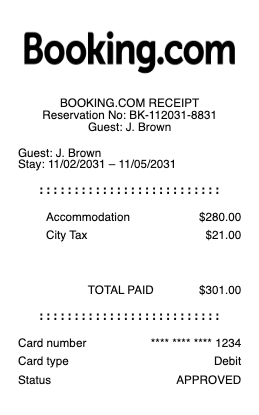
A Booking.com receipt confirms payment for accommodation booked through Booking.com. It is commonly used for reimbursements, accounting, and travel records. A Booking.com receipt includes the reservation number, accommodation cost, local taxes, and total paid. Use a Booking.com receipt when you need proof of an online accommodation booking.
Booking.com Receipt
Add custom logo
Edit line items
Choose payment method
Add/remove elements
Customize business information
Choose font
What's on a Booking.com Receipt
Booking.com is a travel platform rather than the hotel itself, so your "receipt" is the booking confirmation tied to your reservation. It arrives by email and lives in your account under Bookings (or Trips), and a Booking.com receipt shows:
Confirmation and PIN numbers — the reservation's confirmation number and PIN, used to look it up or check in.
Property details — the hotel or rental's name and address, and the contact for the stay.
Dates and room — check-in and check-out, the number of nights, and the room type and occupancy.
Price breakdown — the nightly rate, taxes and any fees, plus the total for the stay.
Cancellation policy — whether it's free cancellation or non-refundable, and the deadline.
How to get a receipt from Booking.com
Wondering how to get a receipt from Booking.com? Sign in, open Bookings (or Trips in the app), and select the reservation — the confirmation page shows the full breakdown and can be printed or saved as a PDF. The confirmation email Booking.com sends when you reserve is a second copy, so searching your inbox for the property name or confirmation number is the fastest route when you can't reach your account. Booked without an account? Use the Booking.com receipt lookup with your confirmation number and PIN, both printed in the email, to open the reservation directly.
Booking.com confirmation vs the hotel's paid receipt
Here's the detail that trips up expense claims: for many reservations you pay the property directly at check-out, not Booking.com. In that case the confirmation from Booking.com proves the booking, but the itemised paid receipt — the folio showing what you were actually charged — comes from the hotel when you leave. For prepaid or "pay now" bookings, Booking.com (or the property through it) takes the payment, and the confirmation doubles as your proof of payment. If you need a formal invoice for a company, ask the property for its VAT or tax receipt, since the hotel, not the platform, is usually the one that issues it.
Using a Booking.com receipt for expenses
For business travel, a clean Booking.com expense receipt is what gets a hotel stay reimbursed. Most finance teams accept the confirmation with the property, dates, nightly rate and total, though some require the hotel's itemised folio to separate room charges from incidentals like parking or meals. To keep your report clean, save the confirmation as a PDF at the time of booking, keep the hotel checkout receipt too, and note the business purpose and travel dates. When a confirmation email has been lost and you need a legible itemised copy for a report, reconstructing it from the real reservation details keeps your record complete — a stand-in for a stay that genuinely happened, not an invented one.
Related hotel receipts: see also our Booking.com receipt guide and our Expedia receipt guide.
Create a Booking.com-style receipt with our generator
Need a clean copy of a Booking.com receipt for an expense report, a reimbursement or a template mock-up? Our receipt generator recreates the confirmation layout — confirmation number, property, check-in and check-out dates, room type, nightly rate, taxes and total — and exports a print-ready PDF, PNG or JPG in under a minute, no account required. Enter your own reservation details for a legible copy when the original email is buried. Please use it lawfully and honestly: create receipts only for stays that actually happened, for your own records and reimbursements — never to fake a booking, claim an expense you didn't incur, or impersonate Booking.com or a property. "Booking.com" is a trademark of its owner, referenced here only to describe the receipt format.
Frequently asked questions
Everything you need to know about the product and billing.
How do I get a receipt from Booking.com?
Sign in, open Bookings (or Trips in the app), select the reservation, and print or save the confirmation as a PDF. The confirmation email is a second copy — search your inbox for the property name or confirmation number.
Can I look up a Booking.com receipt without an account?
Yes. Use the confirmation number and PIN from your confirmation email to open the reservation through Booking.com's booking lookup, then view or print the details.
Why isn't my Booking.com confirmation an itemized paid receipt?
Because for many stays you pay the property directly at check-out, so the itemized paid folio comes from the hotel, not Booking.com. The confirmation proves the booking; the hotel's receipt proves what you were charged.
How do I get an invoice for a Booking.com stay?
For a formal VAT or tax invoice, ask the property directly — the hotel usually issues it, since it's the one providing the stay. For prepaid bookings, the Booking.com confirmation serves as proof of payment.
Does a Booking.com receipt work for an expense report?
Usually yes. Most finance teams accept the confirmation with the property, dates, rate and total, though some also want the hotel's itemized folio to separate the room charge from incidentals. Keep both to be safe.
Can I use this generator to recreate a Booking.com receipt?
Yes, for legitimate purposes — replacing a lost confirmation for your own records, expense reports or design mock-ups. It is not for faking bookings, claiming expenses you didn't incur, or impersonating Booking.com or a property.