A movie ticket receipt is not the stub — and that distinction is exactly why people go looking for one. The stub proves admission; the receipt proves payment, and it is the document expense reports, hosting write-offs, and refund requests actually need. This page covers what a cinema receipt shows, where the digital copy hides, and how concessions fit in.
Cinema Ticket Receipt
Add custom logo
Edit line items
Choose payment method
Add/remove elements
Customize business information
Choose font
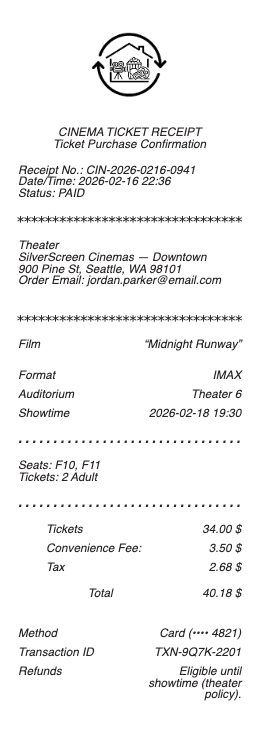
What’s on a Movie Ticket Receipt
Theater name and location
Movie title, showtime, and screen — with seat numbers at reserved-seating cinemas
Ticket types and prices — adult, child, senior, matinee, or premium-format surcharges (IMAX, 3D, recliner)
Order or confirmation number for online bookings
Booking or convenience fee — the online-purchase line people forget to expense
Tax, total, and payment method
Ticket Stub vs. Receipt: Which One You Actually Need
The stub (or the QR code on your phone) is admission — it gets you past the usher and proves you attended. The receipt is the financial record: what was paid, for how many seats, with which card. Anyone reimbursing you wants the receipt, and the two often separate at the exact moment you need them: box-office purchases print both together, while app and website bookings admit you by QR code and quietly file the receipt in your email. If a reimbursement or dispute is even remotely possible, capture the payment side before you archive the night.
Gift-card and voucher admissions complicate it further: the stub looks identical, but the receipt shows a zero or reduced card charge — exactly the detail an expense reviewer will ask about.
Where Digital Movie Receipts Hide
Book through a cinema app or a ticketing platform and the receipt is the order confirmation email — theater, showtime, tickets, fees, and total — plus a copy in the account’s order history that survives inbox cleanups. Chains’ loyalty accounts (AMC Stubs, Regal Crown Club, Cinemark Movie Rewards) keep purchase history too, which doubles as the reprint path for box-office buys tied to your member number. The commonly missed line is the per-ticket booking fee: it is part of the real cost of the evening, it belongs on the expense report, and it only appears on the payment receipt — never on the stub.
Cinema loyalty program accounts quietly solve most receipt problems: chains with membership schemes record every booking against the account, so a movie ticket receipt that never arrived by email usually still exists in the app's purchase history, ready to resend. Booking as a guest is the choice that leaves no trail — the convenience trade nobody mentions at checkout.
Concessions, Business Outings, and Refunds
Concessions ring up as a separate register receipt, so a fully documented team outing or client evening is two slips: tickets plus snacks. For business claims, hosting and team-event policies generally want both, itemized, with the attendee context your expense tool asks for. Refunds and exchanges run on the order number — most chains handle showtime changes and cancellations through the app or box office against the original payment, so the confirmation email is also your refund key. Keep both documents until the card statement clears and any reimbursement pays out.
Private screenings and group bookings follow the invoice path instead: the cinema issues an event confirmation and a receipt on payment, and those documents replace the per-seat slips entirely.
Related entertainment receipts: see also our Concert Ticket receipt guide and our Bar receipt guide.
Group and private-screening bookings produce the other kind of movie receipt: an invoice-style document naming the organiser, the screen hire or block of seats, and any minimum spend. For a work social or a client event, that document — not a stack of individual ticket stubs — is what the expense report wants.
Create a Movie Ticket Receipt
Our generator rebuilds a cinema-style receipt — theater block, film and showtime, ticket lines with types and prices, booking fee, tax, and total — as a clean PDF when the confirmation email is gone and your expense file needs the payment record.
Use it responsibly: recreate only purchases that actually happened, with real amounts. Submitting fabricated entertainment receipts for reimbursement is expense fraud — and theaters can reissue genuine order confirmations from your account or member history.
Frequently asked questions
Everything you need to know about the product and billing.
Is a movie ticket stub the same as a receipt?
No — the stub or QR code proves admission, the receipt proves payment. Expense reports and refunds run on the receipt, which shows ticket prices, fees, tax, and the card used.
Where do I find my movie ticket receipt from an app booking?
In the order confirmation email and in the app or site’s order history. Loyalty accounts like AMC Stubs or Regal Crown Club also keep purchase history tied to your member number. If you booked while signed in to the cinema's loyalty program, the purchase history in the app holds every receipt and can resend any of them.
Are booking fees on movie tickets expensable?
Generally yes — the per-ticket convenience fee is part of the purchase cost and appears on the payment receipt. Policies differ, so include it itemized and let the approver decide.
Why did my movie snacks not appear on the ticket receipt?
Concessions ring up separately at the counter. A fully documented outing is two receipts: the ticket order and the concessions slip.
Can I get a refund with just my ticket stub?
Usually not — refunds and exchanges are processed against the order number and original payment. The confirmation email or order history entry is what the box office or app needs.
Do movie theaters reprint receipts?
Online orders can be reprinted from the confirmation email or account history anytime. Box-office purchases are reprintable when tied to a loyalty account; otherwise the printed slip is the record, so photograph it. Guest bookings are the hard case — with no account behind the purchase, recovery depends on the confirmation email, so search for the ticketing platform's name rather than the cinema's.