A concert ticket receipt is proof you paid for a live-music event — and it’s worth understanding because the price you pay is rarely the face value. A stack of service and facility fees pushes the total up, the ticket and the receipt are two different things, and refund and resale rules are strict. This page explains what a concert ticket receipt shows, why the fees inflate the total, and how mobile tickets, transfers, and refunds work.
Concert Ticket Receipt
Add custom logo
Edit line items
Choose payment method
Add/remove elements
Customize business information
Choose font
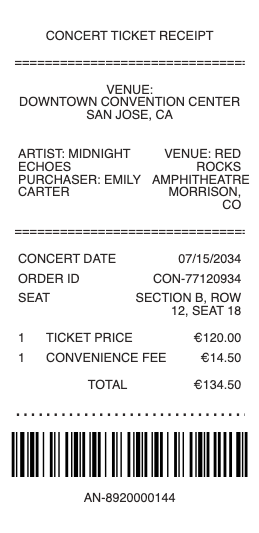
What’s on a Concert Ticket Receipt
The event — artist, venue, date, and time
Seat details — section, row, and seat, or general admission
The face value per ticket and the number of tickets
Fees — service, facility, and order processing charges
The order total and payment method
The delivery method — mobile, e-ticket, will-call, or physical
An order number for lookups, transfers, and support
Face Value vs the Fees — Why the Total Is Higher
The single biggest surprise on a concert receipt is the gap between face value and what you pay. On top of the ticket’s face price, marketplaces like Ticketmaster, AXS, and SeatGeek add a service fee (per ticket), a facility fee (to the venue), and an order processing fee — which together can add a substantial percentage to the total. That’s why a “$80 ticket” can ring up well over $100. Some sellers now show all-in pricing (the fee-inclusive total up front), but the receipt still itemizes the components so you can see where the money went. Popular shows may also use dynamic or “platinum” pricing, where face value itself rises with demand — separate from the fees. Reading the fee breakdown on the receipt is how you understand the real cost of a concert, and it’s the itemization you’d want for a reimbursement or an expense record.
The Ticket vs the Receipt, and Mobile Delivery
A concert involves two different things: the ticket (your admission credential) and the receipt (proof you paid). Increasingly the ticket is a mobile ticket in an app, often with a rotating/secure barcode (Ticketmaster’s SafeTix, for example) that can’t be screenshotted to prevent counterfeiting — so you enter by phone, not paper. Others are e-ticket PDFs, will-call (picked up at the box office with ID), or physical tickets. The order confirmation / receipt is separate from the entry ticket: it’s your record of the purchase, useful if the ticket doesn’t load, for a reimbursement, or as proof of a legitimate buy. Knowing the difference matters at the door — you scan the mobile ticket to get in, but you keep the receipt for your records. If a mobile ticket ever fails to appear, the order number from the receipt is what support uses to find it.
Transfers, Resale, and Refund Rules
Concert tickets have specific rules worth knowing. Transfer lets you send a ticket to a friend through the platform (the barcode reissues to them), while resale is selling it, ideally through verified/official resale (Ticketmaster, StubHub, SeatGeek) so the buyer gets a valid ticket — some tickets are restricted (non-transferable, mobile-only) specifically to curb scalping and fraud. On refunds: concert tickets are generally non-refundable. If an event is cancelled, you’re typically refunded automatically; if it’s rescheduled, your ticket usually stays valid for the new date and a refund may or may not be offered. Buying from unofficial resellers risks invalid or counterfeit tickets, which is why the receipt from an official source matters — it’s your proof of a legitimate purchase and your basis for a dispute or chargeback if a resold ticket turns out to be fake. Keep the order confirmation until after the show.
Related entertainment receipts: see also our Cinema Ticket receipt guide and our Bar receipt guide.
Create a Concert Ticket Receipt
Our generator produces a clean concert ticket receipt — event and seat details, face value, itemized fees, and total — as a PDF when you need a legible copy for a reimbursement, an expense record, or your own files, separate from the entry ticket.
Use it responsibly: recreate only real purchases you actually made, with their true amounts. Fabricating a concert ticket or receipt to fake an admission credential, resell a counterfeit, support a false reimbursement, or gain entry you didn’t pay for is fraud — venues scan valid, often secure barcodes, and the marketplace’s order records are authoritative. A generated receipt is a record of a purchase, not a valid entry ticket. This tool is for legitimate record-keeping only.
Frequently asked questions
Everything you need to know about the product and billing.
What does a concert ticket receipt show?
The event (artist, venue, date, time), seat details or general admission, the face value and number of tickets, itemized fees (service, facility, order processing), the order total and payment method, the delivery method (mobile, e-ticket, will-call, physical), and an order number.
Why is my concert ticket total higher than the face value?
Because marketplaces add a service fee, a facility fee, and an order processing fee on top of face value, which together can add a large percentage. Some sellers now show all-in pricing, but the receipt still itemizes the fees. Popular shows may also use dynamic pricing that raises face value with demand.
What’s the difference between a concert ticket and the receipt?
The ticket is your admission credential — increasingly a mobile ticket with a secure rotating barcode you scan to enter. The receipt (order confirmation) is proof you paid, kept for your records. You enter with the ticket but keep the receipt for reimbursement or proof of a legitimate purchase.
Can I transfer or resell a concert ticket?
Usually — transfer sends a ticket to someone through the platform (the barcode reissues to them), and resale sells it, ideally through verified/official resale so the buyer gets a valid ticket. Some tickets are restricted as non-transferable or mobile-only to curb scalping and fraud.
Are concert tickets refundable?
Generally no. If an event is cancelled you’re typically refunded automatically; if it’s rescheduled, your ticket usually stays valid for the new date and a refund may or may not be offered. Change-of-mind returns aren’t normally allowed, which is why resale exists.
Why buy concert tickets from an official source?
Because unofficial resellers risk invalid or counterfeit tickets. An official or verified-resale purchase gives you a valid ticket and a receipt that’s your proof of a legitimate buy — and your basis for a dispute or chargeback if a resold ticket turns out to be fake.