A Clover POS receipt is printed by Clover Station, Mini, Flex, or Compact terminals. This guide covers the correct thermal paper size for each device, how to look up and reprint a transaction from the Clover Dashboard, and how to fix a printer that stops printing.
Clover POS Receipt
Add custom logo
Edit line items
Choose payment method
Add/remove elements
Customize business information
Choose font
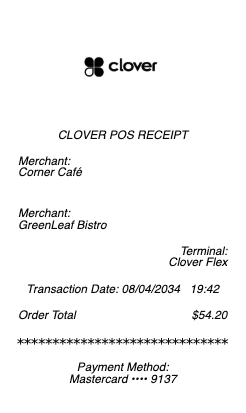
Clover receipt paper: the size depends on your device
Almost every Clover paper problem comes down to buying the wrong roll. Clover terminals split into two printer families, and they are not interchangeable:
Clover Station (including Station Duo) uses the wide format: 3 1/8" thermal rolls — the same width as a standard countertop receipt printer, sold in lengths around 220–230 feet.
Clover Mini, Clover Flex, and Clover Compact use the narrow built-in printer: 2 1/4" thermal rolls, typically about 55–85 feet per roll because the paper chamber is small.
All of it is thermal paper — there is no ink or ribbon in these printers. If a receipt comes out blank, ink is never the problem, which is the single most useful thing to know before troubleshooting.
Why a Clover printer stops printing
Thermal printing works by heating a coated side of the paper, and that mechanism explains nearly every failure:
The roll is in upside down. Only one side of thermal paper is coated. If the coated side faces away from the print head, the printer runs perfectly and produces a blank receipt. Flip the roll — this is the most common cause by a wide margin.
Wrong width. A 2 1/4" roll rattling around in a Station, or a 3 1/8" roll jammed into a Mini, causes feed errors and misalignment.
Paper-out or open-cover sensor. The cover must click fully shut; a partially seated roll reads as empty.
A dirty or worn print head produces faded or streaked output — usually a cleaning issue rather than a hardware failure.
A quick test of the coated side: scratch the paper with a coin or a fingernail. The side that leaves a dark mark is the thermal side, and it must face the print head.
Looking up and reprinting a past transaction
Clover keeps a full transaction history, so a customer asking for a copy of a receipt after the fact is a routine request rather than a problem. From the Clover Dashboard (the web back office) or the Transactions app on the device, you can search past payments by date, amount, card last four digits, or order number, then reissue the receipt.
Clover can deliver a receipt three ways: printed, emailed, or sent by text message. Digital delivery is worth enabling — it produces a permanent record on both sides of the transaction and quietly reduces the paper problem that this page opened with.
What a Clover receipt actually contains
Beyond the merchant's name and the line items, a Clover receipt carries the fields that matter when a transaction is later disputed or reconciled:
Order number — Clover's reference for the sale, the fastest way to find it again.
Payment method and card last four digits — never the full card number.
Authorization code and the entry method (chip, contactless, swipe, or keyed).
Tip line or tip amount, depending on how the merchant configured tipping.
Employee or device name, when the merchant tracks per-staff or per-terminal sales.
For a merchant, those identifiers are what make a chargeback defensible; for a customer, they are what make an expense claim verifiable.
Keeping a copy when the paper one is gone
Thermal receipts fade — that is a property of the paper, not a defect. A Clover receipt kept in a wallet or a hot car can become unreadable within months, which is a genuine problem when the purchase needs to support a warranty, an expense report, or a tax record.
The durable fix is to capture the receipt digitally at the point of sale: ask for the emailed or texted copy, which Clover can send instead of, or in addition to, printing. If a paper original is already lost or has faded and the purchase genuinely happened, you can reconstruct a clear record of your own transaction from your card statement, which carries the date, amount, and merchant. That documents a real payment you made and should match the underlying charge exactly — it is a record for your files, not a substitute for the merchant's own transaction history.
Frequently asked questions
Everything you need to know about the product and billing.
What size receipt paper does a Clover Mini or Flex use?
Both use 2 1/4-inch thermal rolls, typically around 55 to 85 feet per roll. The Clover Station uses the wider 3 1/8-inch format instead — the two are not interchangeable.
What size paper does the Clover Station use?
3 1/8-inch thermal rolls, commonly sold in 220 to 230 foot lengths. Clover Mini, Flex, and Compact use the narrower 2 1/4-inch rolls.
Why is my Clover printing blank receipts?
Almost always because the thermal roll is loaded upside down. Only one side of thermal paper is heat-coated; if it faces away from the print head, the printer works but prints nothing. Scratch the paper with a coin — the side that marks is the side that must face the print head.
Does a Clover printer need ink or a ribbon?
No. Clover receipt printers are thermal — they use heat on coated paper. There is no ink, toner, or ribbon to replace, so a blank or faded receipt is never an ink problem.
How do I look up an old Clover receipt?
Search the transaction in the Clover Dashboard or the Transactions app by date, amount, card last four digits, or order number, then reprint it or resend it by email or text.
Can Clover send digital receipts?
Yes — Clover can email or text a receipt instead of, or in addition to, printing one. Digital delivery avoids the fading problem that affects all thermal paper.