A Costco online receipt is the order confirmation for a Costco.com purchase — distinct from the long printed slip you get in the warehouse. Because online orders are tied to your membership and account, the receipt, order history, and returns all work a little differently from an in-store buy. This page explains what a Costco.com receipt shows, how to retrieve it from your account, and how Costco’s famously generous returns apply online.
Costco Online Order Receipt
Add custom logo
Edit line items
Choose payment method
Add/remove elements
Customize business information
Choose font
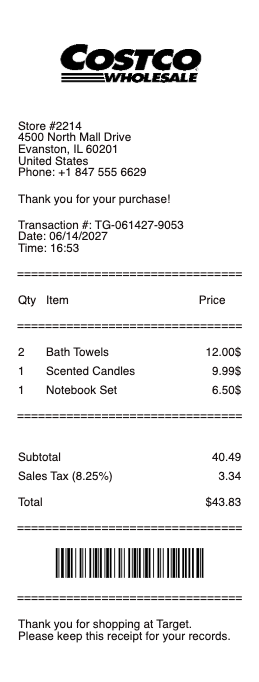
What’s on a Costco Online Receipt
An order number and order date
Itemized products with Costco item numbers, quantities, and prices
Shipping method and address — many items ship free for members
Subtotal, tax, and total
The membership the order is tied to
Payment method and any promotions or instant savings applied
Links to track, return, or reorder from your account
Online vs Warehouse — Why the Receipt Differs
A Costco.com receipt isn’t the same as the in-warehouse register slip. Online, the purchase is an order tied to your membership account, delivered as a confirmation email and stored in your Order History at Costco.com — so you don’t have to keep the paper. Pricing and selection can differ too: online prices sometimes vary from warehouse prices, many items include shipping for members, and Costco.com carries items (and bulk-ship packs) not stocked in-store. Each item still shows Costco’s distinctive item number rather than a typical UPC, which is how Costco references products across online and in-warehouse. Because everything is linked to your account, retrieving a receipt is a matter of signing in rather than digging through a drawer — a real advantage for expense tracking and returns compared with the easily-lost printed warehouse receipt.
Returns, the Satisfaction Guarantee, and No-Receipt Lookups
Costco’s “Risk-Free 100% Satisfaction Guarantee” is famously generous, and it applies to online orders — most items can be returned for a full refund, with a few exceptions like electronics (a 90-day window on TVs, computers, and similar) and certain limited categories. For a Costco.com order, you can initiate the return online from your Order History, often printing a shipping label or arranging pickup for larger items, and the refund goes back to your original payment. And because purchases are tied to your membership, Costco can frequently look up a purchase without the receipt — the account is the record. That membership link is why keeping the exact receipt matters less at Costco than almost anywhere: your order history and membership stand in for it, though the itemized confirmation is still the cleanest document for expenses or warranty claims.
Membership, Executive Rewards, and Records
A Costco.com order is inseparable from membership — you sign in as a Gold Star, Business, or Executive member, and that tier affects the order. Executive members earn an annual 2% reward on qualifying purchases (online and in-warehouse), which accrues on these orders and is worth tracking against your receipts. For business buyers, Costco Business Center orders and itemized online receipts serve as expense and tax records, with the item detail an accountant needs. To get a copy, sign in and open Order History, where you can view, print, or download the receipt for any online order, and reorder in a click. Keeping the itemized confirmation — item numbers, prices, tax, and total — is the practical record for reimbursement, warranty, or simply remembering what a bulk order contained, even though your account already stores it.
Related retail receipts: see also our Walmart receipt guide and our Target receipt guide.
Create a Costco Online Receipt
Our generator reproduces a Costco.com-style order receipt — order number, itemized products with item numbers, shipping, tax, and total — as a clean PDF when you need a legible copy for expenses, a warranty claim, or your own records.
Use it responsibly: recreate only real orders you actually placed, with their true items and amounts. Fabricating a Costco receipt to fake a purchase, support a false return or expense claim, or misrepresent an order is fraud — Costco ties every purchase to your membership and its own order records, which it can look up and verify. Costco is a trademark of its owner; this tool is not affiliated with it and is for legitimate record-keeping only.
Frequently asked questions
Everything you need to know about the product and billing.
What does a Costco online receipt show?
An order number and date, itemized products with Costco item numbers and prices, the shipping method and address, subtotal, tax, and total, the membership the order is tied to, the payment method and any instant savings, and links to track, return, or reorder from your account.
How is a Costco.com receipt different from the warehouse receipt?
Online, the purchase is an order tied to your membership account and stored in Order History, rather than a printed register slip. Online prices can differ from warehouse prices, many items ship free for members, and Costco.com carries items not stocked in-store.
How do I get a copy of a Costco online order receipt?
Sign in at Costco.com and open Order History, where you can view, print, or download the receipt for any online order and reorder in a click. Because orders are tied to your account, you don’t need to keep the confirmation email.
Can I return a Costco.com order without the receipt?
Often yes — purchases are tied to your membership, so Costco can look up an order without the receipt. Returns can be initiated online from Order History under the Risk-Free 100% Satisfaction Guarantee, with exceptions like a 90-day window on electronics.
What is the Costco item number on the receipt?
Costco references products by its own item number rather than a typical UPC, and it appears on both online and warehouse receipts. It’s how Costco identifies a product across channels, useful for reordering or matching an item to a return.
Do Costco online orders earn the Executive 2% reward?
Yes — Executive members earn an annual 2% reward on qualifying purchases both online and in-warehouse, and Costco.com orders accrue toward it. It’s worth tracking against your receipts, and business buyers can use itemized online receipts as expense records.