CVS Receipt

Add custom logo
Edit line items
Choose payment method
Add/remove elements
Customize business information
Choose font

Overview of a CVS Receipt

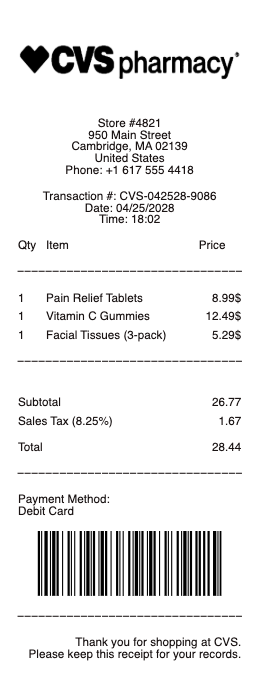
A CVS-style receipt reflects a mix of everyday retail and pharmacy-related purchases. It captures both general consumer items and health-related products in a single transaction. The format is practical and data-focused, prioritizing clarity over presentation.

What a CVS Receipt Includes

A typical CVS-style receipt includes:

  • store identification (location, number, contact details)

  • transaction reference or receipt number

  • date and time of purchase

  • itemized list of products

  • unit prices and quantities

  • subtotal and tax

  • total amount paid

  • payment method

  • barcode or internal reference

Depending on the purchase, descriptions may include:

  • over-the-counter medication

  • personal care items

  • household essentials

  • wellness-related products

Item naming is usually functional, not branded for marketing. The goal is clarity and identification.

Why CVS Receipts Are Often Kept

These receipts are frequently used beyond simple purchase confirmation.

They are commonly required for:

  • health expense tracking

  • reimbursement for medical-related purchases

  • insurance documentation (in some cases)

  • personal records for supplements or medication

  • returns and product verification

Because of the nature of items sold, receipts may carry more long-term relevance than typical retail transactions.

Structure and Format

CVS receipts tend to follow a linear and data-heavy layout.

They prioritize:

  • readability

  • traceability

  • transaction verification

Not design.

In many cases, they also include additional printed sections such as promotions or store-generated offers. These are separate from the actual transaction data and do not affect the financial record.

Important Notice (Legal Use)

Receipts from pharmacy environments can relate to health and personal data.

This example is provided strictly for:

  • illustrative

  • educational

  • formatting reference

It does not represent an official CVS-issued document.
It does not confirm any real purchase, prescription, or medical transaction.

It must not be used to:

  • fabricate health-related records

  • misrepresent medical or pharmacy purchases

  • support reimbursement claims based on false data

  • create documentation for insurance or tax purposes that is not accurate

Any receipt used in real scenarios must reflect a legitimate transaction and comply with applicable regulations, including financial, tax, and health-related reporting requirements.

When This Format Is Useful

A CVS-style receipt format is most relevant when you need:

  • a clear retail + pharmacy hybrid structure

  • itemized everyday and health-related purchases

  • simple but traceable transaction records

It reflects a category where retail meets basic healthcare documentation.
CVS Receipt

What's on a CVS Receipt

A CVS receipt combines an ordinary store receipt with ExtraCare rewards, which is why it carries more lines than most. A CVS receipt typically shows:

  • Store number, date, and register or transaction number — identifying where and when you shopped.

  • Items, quantities, and prices — each product with its department.

  • ExtraCare card — your rewards number and the savings applied.

  • ExtraBucks and coupons — earned rewards and manufacturer or CVS coupons printed at the bottom, the main reason CVS receipts run long.

  • Payment and totals — subtotal, tax, total, and the card or cash tendered.

  • Survey invitation and ID — the code near the bottom used to enter the CVS customer survey.

Pharmacy purchases print a separate, itemized prescription receipt with the drug, quantity, and amount paid — the version you keep for insurance or an FSA or HSA claim.

Why CVS Receipts Are So Long

CVS receipts are famous for their length — long enough that shoppers have turned them into memes, scarves, and Halloween costumes. The reason is the ExtraCare program: the receipt prints your earned ExtraBucks, personalized coupons, and manufacturer offers alongside the purchase, so even a small basket can produce a long strip of paper. If you would rather skip the roll, CVS lets you switch to digital receipts — link your ExtraCare card and opt in through the CVS app or at the register, and receipts and coupons arrive by email or in the app instead of on paper. Going digital also keeps a searchable record, which is easier than filing the paper version for a return or reimbursement.

CVS Returns: With and Without a Receipt

With a receipt, most CVS items can be returned within the store's return window for a refund to the original payment method. If you paid with an ExtraCare card or the CVS app, a store associate can often look the purchase up even if you lost the paper receipt. Returning without a receipt is possible for many items but limited: CVS may ask for a photo ID and issue store credit rather than cash, and some products — like dispensed prescriptions — cannot be returned. Keeping the receipt, or shopping with ExtraCare so the purchase is on file, makes any return far smoother.

CVS Pharmacy and Prescription Receipts

A CVS pharmacy receipt is its own document and matters most for money you can claim back. It itemizes the prescription — drug name, quantity, days' supply, and the amount you paid after insurance — which is exactly what an FSA or HSA administrator needs to reimburse the cost. It is also the proof you submit for a flexible-spending claim or a medical-expense deduction. If you need a full-year summary rather than single receipts, the CVS pharmacy can print a prescription payment history for taxes or insurance. Keep prescription receipts separate from the store receipt so the eligible medical amounts are easy to total.

Related pharmacy receipts: see also our Walgreens receipt guide and our pharmacy receipt guide.

Generate a CVS-Style Receipt

Use the generator above to build a CVS-style receipt with store details, itemized products, ExtraCare savings, and totals laid out clearly — handy for reconstructing a receipt you lost, keeping an expense or reimbursement record, or previewing the layout.

Any Receipt Generator is a document tool, and CVS is a trademark of its owner with no affiliation here. Create receipts only for real purchases you actually made, and never to fake proof of purchase, an insurance or FSA claim, or a return.

Frequently asked questions

Everything you need to know about the product and billing.

Why are CVS receipts so long?
The length comes from the ExtraCare program — the receipt prints your ExtraBucks rewards, personalized coupons, and manufacturer offers along with the items, so even a small purchase produces a long receipt.
Can I get a digital CVS receipt?
Yes. Link your ExtraCare card and opt in through the CVS app or at the register, and your receipts and coupons arrive by email or in the app instead of on paper, with a searchable history.
Can I return to CVS without a receipt?
Often yes, but with limits. CVS may ask for a photo ID and issue store credit instead of a cash refund, and if you used an ExtraCare card the store can usually look up the purchase. Dispensed prescriptions cannot be returned.
Where is the survey ID on a CVS receipt?
Look near the bottom of the receipt, around the invitation to take the CVS customer survey — the survey or transaction ID needed to enter is printed there with the store and register numbers.
Can I use a CVS pharmacy receipt for FSA or HSA?
Yes. A CVS prescription receipt itemizes the drug, quantity, and amount paid after insurance, which is what an FSA or HSA administrator needs to reimburse an eligible medical expense.
How do I look up a past CVS purchase?
If you used your ExtraCare card or the CVS app, a store associate can look up the transaction, and digital-receipt users can find it in the app — useful when you need proof of purchase for a return.