A Walgreens receipt is proof of purchase for returns, rewards, insurance and FSA/HSA claims, and expense records. It shows your items, myWalgreens rewards, tax, and store details — and pharmacy receipts carry the extra information needed for prescription reimbursement. This guide covers what's on a Walgreens receipt, the return policy with and without one, how to get prescription receipts for FSA/HSA and taxes, and how to look up a copy.
Walgreens Receipt
Add custom logo
Edit line items
Choose payment method
Add/remove elements
Customize business information
Choose font
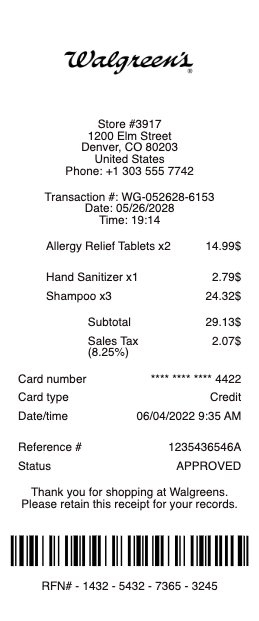
What's on a Walgreens receipt
A Walgreens receipt packs in more than a simple item list:
Store number & address — the location, date, and register.
Itemized purchases — each product with its price and any sale price.
myWalgreens rewards — Walgreens Cash rewards earned or redeemed on the order.
Subtotal, tax & total — the amount before tax, sales tax, and total paid, with payment method.
Pharmacy details — on a pharmacy receipt, the prescription number (Rx#), drug name, and amount paid, which insurance and FSA/HSA claims require.
Survey invitation — a message inviting you to the Walgreens customer survey.
Walgreens return policy, with and without a receipt
Walgreens generally accepts returns within 30 days with the original receipt, refunding to your original payment method. Without a receipt, you can often still return an item, but you'll typically need a photo ID, and the refund comes as store credit (a Walgreens merchandise card) at the item's lowest advertised price rather than cash. If you paid with a card or scanned your myWalgreens account, the store may be able to look the purchase up. Some items — like certain sale, clearance, or opened health products — have stricter rules.
The rewards arithmetic leaves its own trail: myWalgreens cash register rewards print on the receipt as both earned and redeemed amounts, and a return recalculates them — refunds are reduced by rewards the purchase earned, or the rewards are clawed back. The receipt showing what a discount actually applied to is the only way to predict what a return will actually pay back.
Prescription receipts for FSA, HSA, insurance, and taxes
Pharmacy receipts do double duty as reimbursement records. To claim a prescription against an FSA or HSA, or to deduct medical costs, you need a receipt showing the Rx number, medication, date, and amount you paid — a standard cash-register slip often isn't enough. Ask the Walgreens pharmacy for a prescription receipt or a year-end prescription payment summary, which lists everything you paid across the year in one document. You can also view prescription history and print receipts from your account at walgreens.com or in the Walgreens app.
One split habit keeps pharmacy paperwork clean: pay for prescriptions separately from the shampoo-and-snacks part of the trip. A receipt that is entirely pharmacy is FSA/HSA-ready as printed; a mixed slip means circling eligible lines and hoping the administrator agrees with your pen.
How to get a copy of a Walgreens receipt
For a lost receipt, you have a few options. If you're a myWalgreens member or paid by card, the store or pharmacy can often look up and reprint the transaction. Online and app orders keep receipts in your order history at walgreens.com. For pharmacy purchases, the pharmacy counter can reprint a prescription receipt or payment history on request. Retail receipts also carry a survey invitation — completing the Walgreens customer survey is separate from getting a receipt copy, but uses the store and transaction numbers printed on your slip.
Related pharmacy receipts: see also our CVS receipt guide and our prescription receipt guide.
Walgreens receipt templates and copies
If a receipt has faded — thermal receipts often do — our receipt template and generator can reproduce a clean, itemized copy for your records, an expense report, or a reimbursement file.
For legitimate record-keeping only. Recreating a receipt for a purchase you didn't make, or to claim a return, reimbursement, or benefit you're not entitled to, is fraud. Use this only to reproduce or organize your own genuine Walgreens purchases.
Frequently asked questions
Everything you need to know about the product and billing.
What is the Walgreens return policy without a receipt?
You can often return an item without a receipt, but you'll usually need a photo ID and receive store credit (a Walgreens merchandise card) at the item's lowest advertised price rather than a cash refund. Paying by card or scanning myWalgreens may let the store look the purchase up. Rewards complicate refunds slightly — amounts earned or redeemed on the purchase are recalculated, so the receipt's rewards lines predict what a return actually pays back.
How do I get a prescription receipt from Walgreens for my FSA or HSA?
Ask the pharmacy for a prescription receipt or a year-end prescription payment summary, which shows the Rx number, medication, date, and amount paid — the details FSA, HSA, and insurance claims require. You can also print prescription receipts from your account at walgreens.com or the app.
How long do I have to return something to Walgreens?
Generally 30 days with the original receipt, refunded to your original payment method. Certain sale, clearance, or opened health items may have stricter rules.
Can Walgreens look up my receipt?
Often yes — if you're a myWalgreens member or paid by card, the store or pharmacy can usually look up and reprint the transaction. Online and app orders are stored in your order history at walgreens.com.
What is on a Walgreens pharmacy receipt?
A pharmacy receipt shows the prescription number (Rx#), the medication, the date, and the amount you paid, along with the store details — the information needed for insurance, FSA/HSA claims, and medical expense records. Paying for pharmacy items separately from general merchandise keeps that receipt claim-ready — mixed slips need line-by-line sorting for FSA and HSA paperwork.
Does a Walgreens receipt have a survey code?
Yes, retail receipts usually carry an invitation to the Walgreens customer survey, using the store and transaction numbers printed on your receipt. The survey is separate from getting a receipt copy.