How to get a copy of a Days Inn receipt
Wyndham's help center has no article about receipts or folios (we searched it on November 15, 2026). These are the tools Wyndham does publish, in the order that tends to work:
Find your confirmation number. The Days Inn "Find a Reservation" page asks for your first name, last name and confirmation number and lets you review the reservation. Wyndham Rewards members can also sign in and choose Book, then Find My Reservation.
Ask the hotel where you stayed. Each hotel keeps its own guest bills, so the front desk is usually the fastest place to get the folio by email. Give them your name, your dates and the confirmation number.
Use the Days Inn contact form. If the hotel does not answer, or the bill looks wrong, the "About My Stay" form on the Days Inn website has a "Billing Issues" category. It looks up your stay by name and confirmation number.
No confirmation number? The same form has a box that says "I Don't Know My Confirmation Number", so you can still start the request.
What to check on a Days Inn folio
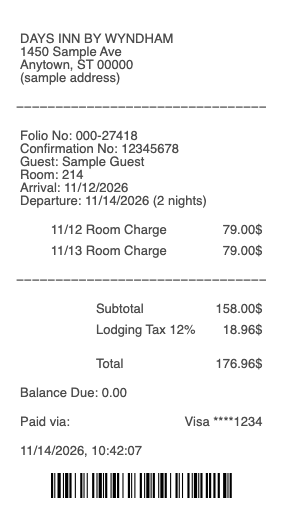
A booking confirmation shows the price you were quoted. The folio shows what was actually charged, night by night. When your copy arrives, check:
Arrival and departure dates and the number of nights
One room charge per night — rates can differ between weekdays and weekends
Lodging taxes on their own lines; the rate depends on the city and state
Extra charges, each on its own line with a date
The payment line — card type, last four digits and a zero balance
Your confirmation number, and your Wyndham Rewards number if you gave one
If a night or a fee is on the folio that you do not recognize, raise it with the hotel first, then use the Billing Issues form.
Booked on Expedia or another travel site?
Then you may need two papers. If you paid the travel site, the payment receipt comes from that site, because it charged your card. The hotel folio proves the dates you stayed and may show no room rate at all.
It also changes your points. Wyndham says a third-party reservation, and it names Expedia.com, Travelocity.com and Orbitz.com as examples, does not earn Wyndham Rewards points. For an expense report, send both: the travel site's receipt for the amount and the Days Inn folio for the stay.
Your Days Inn folio and missing Wyndham Rewards points
The folio is also the record to keep if your points never show up. Wyndham says that if you checked out of one of its hotels more than five days ago and the points have not posted, you can send a missing stay form. It also lists the usual reasons a stay earns nothing:
The total for the stay was under $25
The room was booked through a third-party site
You paid with points for a free night
Your folio has the dates, the total and the confirmation number in one place, which is what you need to fill in that form.
Make a Days Inn-style receipt for a stay you had
Our Days Inn receipt template lays out the hotel block, folio and confirmation numbers, guest name, room, arrival and departure, one line per night, lodging tax, total and payment. Use it to rebuild the record of a real stay when you cannot wait for the hotel, then replace it with the official folio when it arrives.
For stays that really happened. Enter the true dates, rate and total. A hotel receipt for nights you did not stay, or for more than you paid, is fraud, whether it goes to an employer, an insurer or a tax return.
For the general guide to folios, resort fees and lodging tax see the hotel receipt; for another budget chain, the Motel 6 receipt.