A Domino’s receipt records a pizza order placed for delivery or carryout — and because Domino’s is one of the most digital-first chains, that receipt usually lives in your email and app rather than on paper. This page covers what it shows, how it ties into Domino’s Rewards and the Pizza Tracker, and how to get a copy for an expense or a survey.
Domino’s Receipt
Add custom logo
Edit line items
Choose payment method
Add/remove elements
Customize business information
Choose font
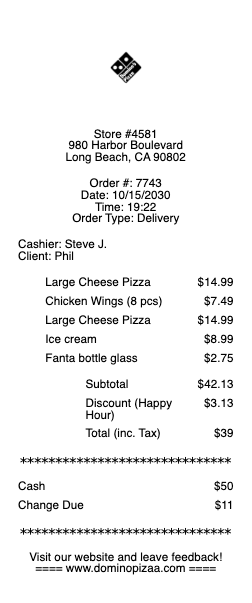
What’s on a Domino’s Receipt
Store number and location — needed for the feedback survey and any support call
Order number and the date/time
Each item — pizzas with size, crust, and toppings, plus sides, drinks, and dips
Deal and coupon lines — Domino’s runs heavy promotions, shown as discounts against menu price
Delivery fee and tip line on delivery orders
Subtotal, tax, and total, with the payment method
Order type — delivery or carryout, which affects fees and rewards
Domino’s Rewards and the Points on Your Order
Domino’s runs a loyalty program — Domino’s Rewards — and orders placed while signed in earn points toward free food, which is why keeping the digital order matters more than the paper slip. Points accrue automatically on qualifying online and app orders; walk-in and phone orders often do not credit unless tied to your account, so if points are missing, the receipt’s store number, date, and order total are what customer care needs to apply them. The receipt also carries the guest-satisfaction survey invitation on many orders — enter the store number and order details to receive a validation offer for a future purchase. As with any survey code, it lives only on that receipt.
The Pizza Tracker, Digital Receipts, and Getting a Copy
Domino’s built its ordering around the app and website, so the receipt is digital by default. The order confirmation email is your itemized receipt, and a copy sits in your account’s order history alongside the famous Pizza Tracker that follows the order from prep to delivery. That means a lost receipt is rarely a problem for online orders — reprint it from your account or resend the email. Orders placed through third-party platforms (where available) are billed by that app, so the receipt lives there instead. For a register or phone order with no account, the printed slip or a store reprint is the only record, so capture it if you’ll need it.
Delivery Fees, Tips, and Expensing Pizza
Two lines on a Domino’s delivery receipt cause the most confusion. The delivery fee is a store charge, not the driver’s tip — the tip is separate, and a receipt that shows both is what a careful expense reviewer wants to see. For work — team lunches, event orders — the itemized receipt is the reimbursement document, not the card-statement line that shows only a total, and group orders need every item visible for the attendee context an expense tool asks for. If a card charge doesn’t match the receipt, it’s usually the pre-authorization placed at order time; the final amount, including any tip adjustment, settles within a few business days.
Related fast food receipts: see also our Subway receipt guide and our Burger King receipt guide.
Create a Domino’s-Style Receipt
Our generator rebuilds a pizza-order receipt in the Domino’s style — store header, itemized pizzas and sides, deal lines, delivery fee, tax, and total — as a clean PDF when the confirmation email is gone and an expense file needs the itemized copy.
Use it responsibly: recreate only orders you actually placed, at their real amounts. Fabricating receipts for reimbursement, refunds, or rewards is fraud — and Domino’s keeps every genuine order in your account history to reprint. Domino’s is a trademark of its owner; this tool is not affiliated with the company.
Frequently asked questions
Everything you need to know about the product and billing.
How do I get a receipt from Domino’s?
The order confirmation email is your itemized receipt, and a copy sits in your Domino’s account order history to view, resend, or print. For a register or phone order without an account, ask the store to reprint the slip.
How do I earn or recover Domino’s Rewards points from a receipt?
Points accrue automatically on online and app orders placed while signed in. Walk-in and phone orders often don’t credit — contact customer care with the receipt’s store number, date, and order total to have missing points applied.
Is the delivery fee on my Domino’s receipt the driver’s tip?
No — the delivery fee is a store charge and is listed separately from the tip. If you want to tip the driver, add it at checkout or on the slip; both appear as distinct lines.
Where is the survey code on my Domino’s receipt?
On many orders, near the store details. Enter the store number and order information at the survey site to receive a validation offer for a future purchase. The code lives only on that receipt.
Why is my card charge different from my Domino’s receipt?
The first charge is often a pre-authorization taken when you ordered. The final settled amount — including any tip you added — replaces it within a few business days.
Can I expense a Domino’s order?
Yes — use the itemized receipt from your order history, not the card statement line, so every item and the fees are visible. Group orders should show all items for attendee documentation.