A Grubhub receipt is the itemized record of a food-delivery order — the document you pull for an expense report or a refund after ordering through Grubhub or its sister brand Seamless. This page covers where to find it, the fee lines that make delivery totals confusing, and how corporate ordering through Grubhub changes the paperwork.
Grubhub Receipt
Add custom logo
Edit line items
Choose payment method
Add/remove elements
Customize business information
Choose font
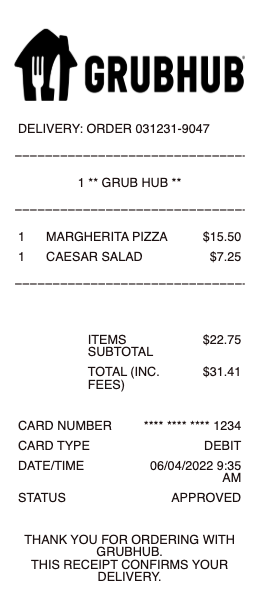
What’s on a Grubhub Receipt
Restaurant name and the order number
Each item with modifiers and price
Delivery fee and service fee — two separate lines
Small-order fee when the subtotal is below the restaurant’s minimum
Tax, tip, and total
Grubhub+ line showing waived delivery fees for members
Delivery address and payment method
How to Get and Print a Grubhub Receipt
Grubhub emails an order confirmation the moment you check out, and the itemized receipt lives in the app and website under your order history — open any past order and the full breakdown is there to view, email to yourself, or print. Because Grubhub also powers Seamless (the same company, the same account behind a different name in some cities), orders placed on either surface show up in the same history with identical receipts. The most-searched task here is printing one for reimbursement: the order-history page prints cleanly to PDF, which is the copy an expense system wants — not a screenshot of the confirmation banner.
One caution when printing for expenses: the driver tip is part of your cost but some policies exclude it, so keep it as its own visible line rather than folded into the total — an approver who cannot see the tip separately often bounces the claim back.
Grubhub Corporate and Grubhub for Work
The paperwork changes for business ordering. Grubhub Corporate (Grubhub for Work) routes employee meal orders to a company line of credit with centralized, consolidated billing — individual receipts roll up into an admin invoice, so employees on a corporate account often do not expense per-order at all. If your company uses it, the receipt you need may be the corporate statement, not the single-order email. Riders on a personal account expensing work meals take the opposite path: the per-order itemized receipt from order history, with the delivery and service fees left visible because reimbursement policies treat those differently from the food.
Fees, Refunds, and Missing Items
Grubhub totals surprise people because the fees stack: the delivery fee is the platform’s, the service fee is a percentage on top, and a small-order fee appears under the restaurant’s minimum — Grubhub+ waives the delivery fee but not the others. When an order arrives wrong or incomplete, the receipt anchors the claim: refunds and credits are requested against the specific order in the app, and the itemized breakdown is what proves what was charged versus what arrived. Keep the receipt until any refund posts, since Grubhub credits sometimes return as account credit rather than to the original card.
Group and office orders add one more wrinkle: a single Grubhub order paid on one card still itemizes every dish, which is what lets a team lead split the reimbursement or attach the attendee list an expense tool asks for.
Related food delivery receipts: see also our Uber Eats receipt guide and our Food Delivery receipt guide.
Recreate a Grubhub-Style Receipt
Our generator rebuilds a delivery-order receipt — restaurant and order block, itemized food, delivery and service fees, tax, tip, and total — as a clean PDF when the original email is gone and an expense claim needs the itemized copy.
Use it responsibly: recreate only orders you actually placed, at their real amounts. Fabricating delivery receipts for reimbursement is expense fraud, and Grubhub keeps every genuine receipt in your order history to reprint.
Frequently asked questions
Everything you need to know about the product and billing.
How do I get a receipt from Grubhub?
Grubhub emails a confirmation at checkout, and the itemized receipt sits in your order history in the app or website. Open the order to view, email, or print the full breakdown.
How do I print a Grubhub receipt for reimbursement?
Open the order in your Grubhub order history and print the page to PDF — that itemized copy, with the fee lines visible, is what expense systems accept, rather than a screenshot of the confirmation.
Are Grubhub and Seamless receipts the same?
Yes — they are the same company, and orders on either appear in the same account history with identical itemized receipts.
What are all the fees on my Grubhub receipt?
A delivery fee (the platform’s), a service fee (a percentage on top), and a small-order fee below the restaurant’s minimum. Grubhub+ waives the delivery fee but not the service or small-order fees.
How does Grubhub Corporate change receipts?
Grubhub Corporate (Grubhub for Work) bills employee orders to a company line of credit with consolidated invoicing, so per-order receipts roll into an admin statement — often the document to expense instead of a single order.
How do I get a refund for a wrong Grubhub order?
Request it against the specific order in the app; the itemized receipt proves what was charged versus delivered. Keep it until the refund posts, as credits sometimes return as Grubhub account credit.