An Uber Eats receipt is the itemized record of a food delivery — the dishes, taxes, delivery and service fees, tip, and any Uber One savings. Whether you need it for an expense report, a reimbursement, or a refund dispute, this guide shows how to find, download, and print an Uber Eats receipt, and what every fee on it means.
Uber Eats Receipt
Add custom logo
Edit line items
Choose payment method
Add/remove elements
Customize business information
Choose font
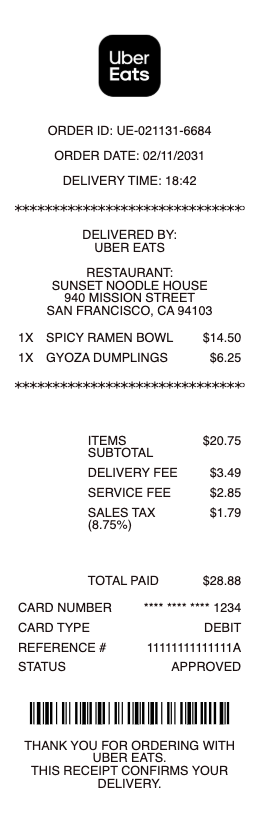
What's on an Uber Eats receipt
An Uber Eats receipt breaks a delivery order into its parts:
Itemized food & subtotal — each dish and add-on with its menu price.
Taxes — sales tax on the order.
Delivery fee — the charge for bringing the order, varying by distance and demand.
Service fee — a percentage-based platform fee on the subtotal.
Small-basket or other fees — added when an order is below the minimum, plus any local fees.
Tip & Uber One savings — your courier tip, and reduced fees if you're an Uber One member.
Total & payment method — the final charge and the card or credits used.
Group orders complicate the tidy list: when several people add to one basket, the receipt belongs to the account that paid, with no per-person split. For shared work meals, the practical fix is the order organiser expensing the whole receipt and naming the attendees — the same who-was-there discipline any business meal already requires.
How to find and get your Uber Eats receipt
Every completed order keeps its receipt in your account. In the Uber Eats app: tap Orders, select the order, and choose View receipt for the full breakdown. On the web: sign in at ubereats.com and open your orders. Because Uber Eats runs on your Uber account, receipts also appear in the Uber app's account activity, and Uber emails a receipt to your account address after each order — so searching your inbox for "Uber" surfaces older orders fast.
Downloading or printing an Uber Eats receipt as a PDF
For an expense report, open the order on ubereats.com in a browser, then use Print → "Save as PDF" to produce a clean, itemized file. The emailed receipt prints the same way, and you can also resend a receipt from the order screen. On a phone, the emailed version with your device's share/print options makes a serviceable PDF, but the web version formats most cleanly — worth the extra minute when a finance team will read it.
Uber Eats receipts for work, reimbursement, and refunds
Late-night work meals, team lunches, and client orders all end in the same request: an itemized receipt — the food, fees, and tip broken out, not just a card charge. Companies using Uber for Business get meal receipts routed automatically to the business profile; for everyone else, the PDF from your order history does the job. The receipt is also your evidence for a refund request when items are missing or wrong — report the issue from the order screen, and the itemized receipt documents exactly what you paid for.
Related food delivery receipts: see also our DoorDash receipt guide and our Grubhub receipt guide.
Refunds on delivery orders produce an adjusted receipt rather than a separate credit slip: when support refunds a missing or wrong item, the order's receipt in the app updates to show the adjustment, and the email trail holds the before and after. For an expensed meal, submit the adjusted version — claiming the original total after a refund landed is the kind of small mismatch expense audits are built to catch.
Create an Uber Eats-style receipt copy
If an original is lost or unreadable, our receipt template and generator reproduces a clean, itemized delivery receipt — food lines, taxes, delivery and service fees, tip, and total — for an order you actually placed, formatted for easy filing.
For legitimate record-keeping only. Creating a receipt for an order you didn't place, or to fake a refund or reimbursement claim, is fraud. Use this only to reproduce or organize your own genuine Uber Eats orders.
Related receipts: the DoorDash receipt and Grubhub receipt templates cover the other big delivery apps.
Frequently asked questions
Everything you need to know about the product and billing.
How do I get a receipt from Uber Eats?
In the Uber Eats app, tap Orders, select the order, and choose View receipt. You can also sign in at ubereats.com, and Uber emails a receipt to your account address after each order — receipts appear in the Uber app's activity too.
How do I download an Uber Eats receipt as a PDF?
Open the order on ubereats.com in a browser and use Print → "Save as PDF" for a clean, itemized file. The emailed receipt can be printed to PDF the same way.
Why is my Uber Eats total higher than the menu prices?
Delivery adds its own charges: a delivery fee, a percentage-based service fee, sometimes a small-basket fee, taxes, and your courier tip. Uber One membership reduces delivery and service fees, which shows as savings on the receipt.
Can I get an itemized Uber Eats receipt for an expense report?
Yes — the receipt in your order history itemizes the food, taxes, each fee, and the tip, which is what employers require. Uber for Business profiles route work-meal receipts automatically. For group orders, the payer's receipt is the only receipt — expense it whole and name the attendees, as with any business meal.
How do I find an old Uber Eats order?
All completed orders stay under Orders in the Uber Eats app and at ubereats.com, and the emailed receipts are searchable in your inbox. Since Uber Eats uses your Uber account, the Uber app's account activity lists them as well.
What if my Uber Eats order was wrong — does the receipt help?
Yes. Report the issue from the order screen; the itemized receipt documents exactly what you ordered and paid, which supports a refund or credit for missing or incorrect items. When support refunds part of an order, the receipt updates in place — use the adjusted version for any expense claim, not the original total.