A Ledger receipt spans two things: the record of buying the hardware device itself, and the transactions you later sign with it. Both matter for different reasons — the purchase receipt is a security document proving your device is genuine and covered by warranty, while transaction records track the crypto you protect with it. Ledger is a cold wallet, so this page explains what each record shows and why buying from the right place is itself a safety step.
Ledger Wallet Receipt
Add custom logo
Edit line items
Choose payment method
Add/remove elements
Customize business information
Choose font
What a Ledger Receipt Covers
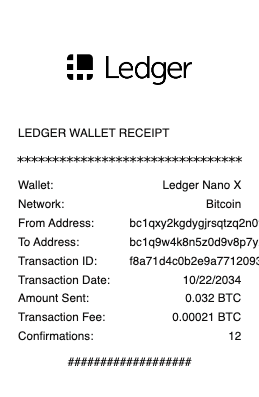
The device purchase — model (Nano S Plus, Nano X, Stax), price, and seller
Proof of a genuine, sealed device and the warranty start date
The order/receipt number from Ledger or an authorized reseller
For transactions — the asset, amount, and destination signed on the device
The network and gas/fee of each transfer
The transaction hash, verifiable on-chain
The date and status of each action
Cold Storage: the Secure Element and On-Device Signing
A Ledger is a hardware (cold) wallet, and its whole value is keeping your private keys offline. The keys live inside a secure element — a tamper-resistant chip like those in passports and bank cards — and they never leave the device, even when it’s plugged into an infected computer. To move funds, a transaction is prepared in Ledger Live (or a connected wallet) but must be physically confirmed on the device by checking the details on its screen and pressing its buttons. That physical step is what defends against malware: a hacker can’t sign a transaction without the device in hand. Your 24-word recovery phrase is generated on the device and, like any self-custody wallet, is the ultimate backup — never to be typed into a computer or website. The receipt for a transaction reflects an action that only a person holding the device could have authorized.
Why the Purchase Receipt Is a Security Document
Here’s what makes a Ledger purchase receipt unusual: it’s part of your security. The most dangerous attack on a hardware wallet is a tampered or pre-configured device — a scammer sells a “new” or second-hand Ledger that already has a recovery phrase they know, then drains it once you deposit funds. The defense is to buy only from Ledger directly or an authorized reseller, and your purchase receipt is the proof of that provenance. A genuine device sets up its recovery phrase fresh, on first use — it never arrives with a pre-printed phrase or a “default PIN,” and any device that does is a scam to be discarded. The receipt also anchors the warranty. Keeping it isn’t just for returns; it documents that your cold wallet came through a trusted channel, which is the foundation the device’s entire security rests on. Provenance is protection.
Transaction Records, Verification, and Taxes
Once your Ledger secures a wallet, its transactions are ordinary on-chain activity — verifiable by hash on a block explorer just like any crypto transaction, and viewable in Ledger Live, which can export your history. Because a Ledger is self-custody, no company tracks your cost basis: keeping records is on you, and each disposal is a taxable gain or loss. Ledger Live’s export, or importing the wallet’s public addresses into crypto tax software, is how most people reconstruct it. Note that a hardware wallet protects your keys, not your privacy — your public addresses and their history are visible on-chain, and Ledger’s own 2020 customer-data breach led to phishing attempts, a reminder to treat any “Ledger” email asking for your phrase as fraud. For records, the transaction hash, amount, USD value, and date are what you keep — the device secures the funds; your notes secure the accounting.
Related crypto receipts: see also our MetaMask wallet receipt guide and our Bitcoin receipt guide.
Create a Ledger-Style Receipt
Our generator produces a clean receipt in the Ledger style — whether a device purchase (model, price, seller, order number) or a signed transaction (asset, amount, network, fee, hash) — as a readable PDF for your records, a warranty file, or a crypto tax file.
Use it responsibly: recreate only real purchases or transactions that actually occurred, with their true details. Fabricating a receipt to fake a device’s provenance, invent a transaction, or misstate crypto gains is fraud — on-chain transactions are publicly verifiable and genuine purchase records come from Ledger or authorized sellers. Never share or enter your 24-word recovery phrase anywhere. Ledger is a trademark of its owner; this tool is not affiliated with it and is for legitimate record-keeping only.
Frequently asked questions
Everything you need to know about the product and billing.
What does a Ledger receipt cover?
Two things: the device purchase (model, price, seller, order number, warranty) and later transactions signed with it (asset, amount, network, fee, and hash). The purchase receipt is a security and warranty document; the transaction records track the crypto the device protects.
How does a Ledger hardware wallet keep crypto safe?
It stores private keys offline in a tamper-resistant secure element, and the keys never leave the device. Moving funds requires physically confirming the transaction on the device’s screen and buttons, so malware on your computer can’t sign a transaction without the device in hand.
Why does it matter where I buy a Ledger?
Because a tampered or pre-configured device is the main attack — a scammer sells a device with a recovery phrase they already know, then drains it. Buying only from Ledger or an authorized reseller, with a purchase receipt as proof of provenance, is a core security step.
Should a new Ledger come with a recovery phrase?
Never. A genuine device generates its 24-word recovery phrase fresh, on first setup. Any device that arrives with a pre-printed phrase, a “default PIN,” or instructions to use a provided phrase is a scam — discard it and buy from an official source.
Are Ledger transactions private?
No — a hardware wallet protects your keys, not your privacy. Your public addresses and their history are visible on-chain. Ledger’s 2020 customer-data breach also led to phishing, so treat any email asking for your recovery phrase as fraud, no matter who it claims to be from.
How do I handle Ledger transactions for taxes?
Since it’s self-custody, no company tracks your basis. Transactions are verifiable on-chain by hash and viewable in Ledger Live, which exports your history. Import that or your public addresses into crypto tax software, and keep the asset, amount, USD value, date, and hash for each disposal.