A Lyft receipt is the itemized record of a ride — pickup and drop-off, distance and time, the fare breakdown, and any tip — sent to your email and stored in the app. Riders most often need it as a PDF for an expense report or reimbursement. This guide shows how to get, download, and email a Lyft receipt, how to save it as a PDF, and what every line on it means.
Lyft Receipt
Add custom logo
Edit line items
Choose payment method
Add/remove elements
Customize business information
Choose font
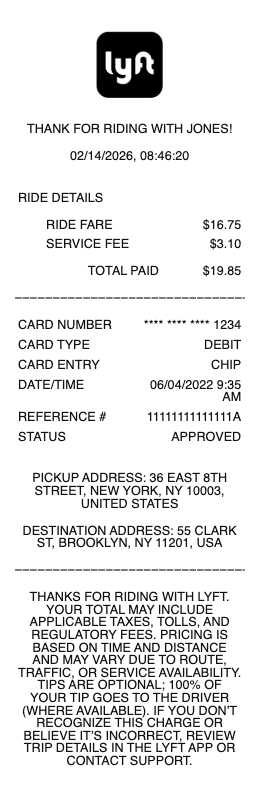
What's on a Lyft receipt
A Lyft ride receipt lays out exactly what you paid for and where you went:
Date, time & route — the ride date, pickup and drop-off addresses, and a small trip map.
Distance & duration — the miles traveled and how long the ride took.
Fare breakdown — the base ride charge plus a service fee, and any tolls, airport fees, or Prime Time (surge) pricing.
Tip — the amount you added for your driver, which you can add or adjust for a limited time after the ride.
Discounts & Lyft Pink — any promo credit or savings from a Lyft Pink membership.
Total & payment method — the final charge and the card, Lyft Cash, or PayPal used.
How to get a Lyft receipt
Every completed ride generates a receipt automatically. In the app: open the menu, tap Ride history, select the ride, and you'll see the full breakdown with an option to email the receipt to yourself. On the web: sign in at account.lyft.com, open Ride history, and view or resend any past ride's receipt. Lyft also emails a receipt to your account address shortly after each ride ends, so searching your inbox for "Lyft" is the quickest way to find an older trip.
How to download or save a Lyft receipt as a PDF
For an expense report, you'll usually need a PDF. Open the ride in Ride history on the Lyft website (account.lyft.com), then use your browser's Print command and choose "Save as PDF" — that gives you a clean, itemized file to attach to a reimbursement claim. From the emailed receipt you can print to PDF the same way. On a phone, opening the emailed receipt and using your device's share or print options produces a PDF too. The web version prints most cleanly, which is why it's the go-to for business travelers.
Lyft receipts for business travel and expenses
If you ride for work, a Lyft Business profile keeps work trips separate from personal ones and can automatically send itemized receipts to the right address. For occasional business rides, tag the ride in the app and export the receipt as a PDF. At tax time or for a monthly report, you can pull all past rides from Ride history rather than hunting through email. Keeping the itemized Lyft receipt — not just the card charge — matters because finance teams need to see the fare, fees, and tip broken out.
Related rideshare & taxi receipts: see also our Uber receipt guide and our Bolt receipt guide.
Related rideshare and taxi receipts: see also our Uber receipt guide and our Bolt receipt guide.
Lyft receipt templates and copies
If a receipt is missing or an emailed copy is hard to read, our Lyft receipt template and generator reproduces a clean, itemized copy of a ride you actually took — route, distance, fare breakdown, tip, and total — in a format that's easy to file for expenses.
For legitimate record-keeping only. Creating a receipt for a ride you didn't take, or to claim an expense that never happened, is fraud. Use this only to reproduce or organize your own genuine Lyft trips.
Frequently asked questions
Everything you need to know about the product and billing.
How do I get a receipt from Lyft?
Open the Lyft app, tap the menu, choose Ride history, select the trip, and use the option to email the receipt. You can also sign in at account.lyft.com to view or resend any past ride's receipt, and Lyft emails one to your account address after each ride.
How do I download a Lyft receipt as a PDF?
Open the ride in Ride history on the Lyft website, use your browser's Print command, and choose "Save as PDF." That produces a clean, itemized PDF that's ideal for expense reports and reimbursement.
What's included in a Lyft fare on the receipt?
The base ride charge, a service fee, and any tolls, airport fees, or Prime Time (surge) pricing, plus your tip. Any promo credit or Lyft Pink savings and the final total with your payment method are also shown.
Can I get a Lyft receipt for an old ride?
Yes. Every completed ride stays in Ride history in the app and at account.lyft.com, and the emailed receipts are searchable in your inbox. Open any past ride to view or resend its receipt.
How do I get Lyft receipts for expense reports?
Use a Lyft Business profile to auto-send work-trip receipts, or open each ride in Ride history and save it as a PDF. Keep the itemized receipt rather than just the card charge, since expense systems need the fare, fees, and tip separated.
Can I change the tip on a Lyft receipt?
Yes — you can add or adjust a tip for a limited window after a ride. Once you do, the receipt updates to reflect the new tip and total.