A Bolt receipt is the ride record the app emails after every trip — the document expense reports ask for when work travel happens in one of the hundreds of cities where Bolt, not Uber, is the ride-hailing default. This page covers what the receipt shows, where the PDF hides in the app, and how business profiles change the paperwork.
Bolt Receipt
Add custom logo
Edit line items
Choose payment method
Add/remove elements
Customize business information
Choose font
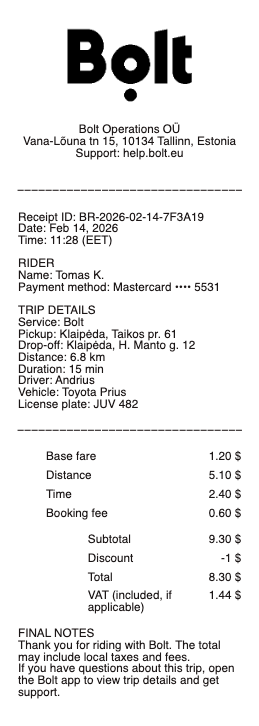
What’s on a Bolt Receipt
Date, time, and city of the ride
Pickup and drop-off addresses with the route distance and duration
Fare breakdown — base fare, per-kilometre and per-minute components, booking fee, and any surge multiplier
Discounts or campaign codes applied to the trip
Payment method — card, cash where available, or Bolt Balance
Driver’s name and the trip identifier support uses
Local tax lines, where the market requires them
Getting Your Bolt Receipt as a PDF
Bolt sends the receipt automatically to the email on your account minutes after each trip ends — search the inbox for “Bolt” and the city name if it went missing. The durable copy lives in the app: Ride history lists every trip, and opening one shows the full fare breakdown with the option to resend or download the receipt. That in-app copy is the answer to the classic problem of expense season — receipts from months ago don’t need to be dug out of email, they can be re-sent one by one from history to whatever address your finance tool ingests.
Scheduled rides and airport transfers receipt the same way once the trip completes. If receipts never arrive at all, check the email address on the account — a typo there is the usual culprit, and support can correct it and resend past trips.
The email route has one failure mode worth knowing: receipts go to the address on the Bolt account, not the one in your head — an account registered years ago to an old email quietly sends every Bolt receipt there. If receipts seem to never arrive, the account's email setting is the first thing to check, and the app's ride history is the recovery path either way.
Bolt Business and Work Rides
Riders who expense regularly should split profiles: a work profile (or a company Bolt Business account) routes work trips to a company email or dashboard automatically, with monthly consolidated statements that replace one-by-one receipt chasing. Companies on Bolt Business get centralized billing, ride policies, and exportable trip reports — which means the receipt question disappears entirely for staff. If you ride on a personal profile for work, the per-trip PDFs from ride history remain your evidence; just keep the home–office trips out of the claim.
Bolt's other verticals file into the same account: scooters and rentals produce per-ride receipts in the identical email-plus-app pattern as car rides, so a commuter mixing modes ends the month with one receipt archive instead of three. For expense purposes the mode matters — some employers reimburse rides but not scooters — so the receipt naming the service is the line reviewers check.
Reading the Fare — and Bolt Food Orders
When a receipt total surprises, the breakdown explains it: surge multipliers apply to the time-and-distance components, the booking fee is fixed per trip, and route changes or waiting time add measurable lines. Cancelled-trip fees generate their own receipt. Bolt Food is a separate service with separate receipts — order confirmations and delivery receipts live in the Food side of the app and its emails, so an expense evening of a ride plus dinner is two documents, not one. Currency follows the market: receipts print in the local currency of the city where the ride happened.
Tips, where the market supports them, print as their own line after the fare — worth knowing because some expense policies reimburse the fare but cap or exclude the tip.
Related rideshare & taxi receipts: see also our Uber receipt guide and our taxi receipt guide.
Related rideshare and taxi receipts: see also our Uber receipt guide and our taxi receipt guide.
Create a Bolt-Style Ride Receipt
Our generator rebuilds a ride-hailing receipt — date and route block, fare breakdown with booking fee, payment method, and total — as a clean PDF when the original email is gone and the expense file will not wait for a resend.
Use it responsibly: recreate only trips you actually took, at their real fares. Fabricating ride receipts for reimbursement is expense fraud, and Bolt’s own ride history can reissue every genuine receipt in your account.
Frequently asked questions
Everything you need to know about the product and billing.
How do I get a receipt from Bolt?
Bolt emails it automatically after each trip. For older rides, open Ride history in the app, select the trip, and resend or download the receipt from there. If they never seem to arrive, check which email the account actually holds — receipts go to the registered address, and old accounts often point at old inboxes.
How do I download a Bolt receipt as a PDF?
Open the trip in Ride history and use the receipt option to download or resend it — the emailed version arrives as a PDF suitable for expense tools.
What does a Bolt receipt show?
The date, route, and city, the fare broken into base, distance, and time components with the booking fee and any surge, discounts applied, the payment method, and the driver and trip identifiers.
How do work rides on Bolt get receipted?
A work profile or Bolt Business account routes trip receipts to a company email or dashboard with consolidated statements — otherwise, per-trip PDFs from Ride history serve as evidence.
Are Bolt Food receipts in the same place?
No — Bolt Food is a separate service with its own order confirmations and receipts, in the Food section of the app and its emails. Scooter and rental receipts follow the same pattern in the same account — the receipt names the service, which matters where employers reimburse rides but not scooters.
Why is my Bolt receipt total higher than the estimate?
The estimate assumes the predicted route and demand. Surge multipliers, waiting time, route changes, and the fixed booking fee all print as lines on the final receipt.