A McDonald's receipt is the record of your order — the items, taxes, total, store number, and order number — and often an invitation to the McDVoice survey or a way to add MyMcDonald's Rewards points. This guide explains what's on a McDonald's receipt, how the survey and points work, where to find the order number, and how to get a copy.
McDonald’s Receipt
Add custom logo
Edit line items
Choose payment method
Add/remove elements
Customize business information
Choose font
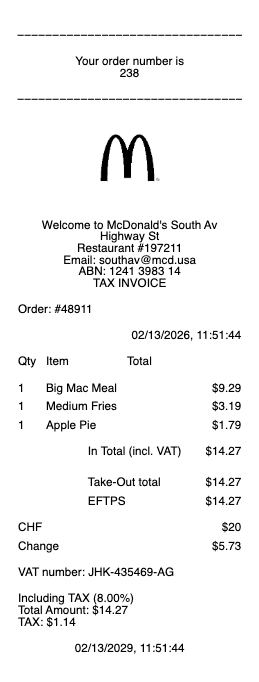
What's on a McDonald's receipt
A McDonald's receipt is a standard quick-service ticket with a few details that matter for surveys and rewards:
Store (restaurant) number & address — the location that served you, usually near the top.
Order number — the number called for your order, also used to look it up.
Date, time & register/kiosk — when and where the order was placed.
Itemized food — each item and combo with its price.
Subtotal, tax & total — the food total, sales tax, and amount paid, with payment type.
Survey invitation & code — many receipts include a McDVoice survey invitation and code near the bottom.
McDVoice: the 26-Digit Code Worth Typing
McDonald’s prints one of the longest survey codes in fast food — a 26-digit number near the bottom of the receipt — and it feeds McDVoice, the chain’s guest survey. The mechanics reward speed: visit mcdvoice.com within 7 days of the purchase, key in the code (or the store number, date, and time if your receipt lacks one), answer the questions about your visit, and the site returns a validation code. Jot it on the receipt and it converts to the offer printed there on your next visit — commonly a buy-one-get-one or a discounted sandwich, redeemable once per receipt. It’s a small loop, but for regulars it effectively turns each ticket into a coupon, and it’s the main reason to glance at a McDonald’s receipt before binning it.
Adding MyMcDonald's Rewards points from a receipt
Beyond the survey, many guests want to earn points. With MyMcDonald's Rewards in the McDonald's app, you earn points on qualifying orders to redeem for free menu items. Orders placed through the app earn points automatically; for an in-restaurant order, you may be able to add points by entering a code from your receipt or scanning it in the app, where that option is offered. If points didn't post, the app's support and your receipt — with its order number and date — are what you'll need to sort it out.
Finding the order number and getting a copy
The order number is usually printed prominently in the middle of the receipt — the same number shown on the pickup screen. If you ordered on the McDonald's app or through delivery (Uber Eats, DoorDash), the itemized receipt lives in that app's order history and your email confirmation, which is the easiest place to get a copy for an expense or refund. For an in-store order, ask the counter to reprint the last transaction. A card statement shows the charge but won't itemize the food.
Related fast food receipts: see also our Burger King receipt guide and our Popeyes receipt guide.
Recreate a McDonald’s-Style Ticket
Golden-Arches tickets fade fast and vanish faster — into cup holders, bags, and bins. Our generator rebuilds a McDonald’s-style register ticket for your records: store number and address line, the kiosk or counter order number, itemized meals and McCafé lines, tax, total, and payment method, exported as a clean PDF for an expense file or per-diem log.
Honest use only: reproduce a purchase that actually happened, with its real items and total. Inventing fast-food receipts to pad mileage-day meals, per-diems, or reimbursements is fraud — franchise systems log every sale by store, register, and minute, and small-ticket padding is precisely what expense audits sample. McDonald’s is a trademark of its owner; this tool is not affiliated with it.
Frequently asked questions
Everything you need to know about the product and billing.
How does the McDonald's receipt survey work?
Many receipts invite you to McDVoice at mcdvoice.com. Enter the survey code (or store number, date, and time), answer a few questions, and get a validation code to write on the receipt and redeem the printed offer — often a discount or free item with a qualifying purchase.
How do I add McDonald's points from a receipt?
Orders placed through the McDonald's app earn MyMcDonald's Rewards points automatically. For in-restaurant orders, you may be able to add points by entering a code from the receipt or scanning it in the app where that option is available.
Where is the order number on a McDonald's receipt?
It's usually printed prominently in the middle of the receipt — the same number shown on the pickup screen. It identifies your order for pickup, points, or a complaint.
How do I get a copy of a McDonald's receipt?
For app or delivery orders, the itemized receipt is in the app's order history and your email confirmation. For in-store orders, ask the counter to reprint the last transaction.
What is McDVoice?
McDVoice is McDonald's customer satisfaction survey at mcdvoice.com. You enter details from your receipt, answer questions about your visit, and receive a validation code for an offer to redeem on your next purchase.
Why didn't my McDonald's receipt have a survey code?
Either that location isn't running the survey, or your slip is an order or kitchen copy rather than the customer receipt. The McDVoice invitation and code appear on the customer receipt, usually near the bottom.