An online purchase receipt is the record of an e-commerce order — and it usually arrives as an order confirmation email, not a printed slip. There’s a subtlety worth knowing: the confirmation, the shipping notice, and the actual receipt aren’t always the same thing, and online sales tax now works differently than it used to. This page explains what an online purchase receipt shows, the documents an order generates, and how to keep proof for returns and records.
Online Purchase Receipt
Add custom logo
Edit line items
Choose payment method
Add/remove elements
Customize business information
Choose font
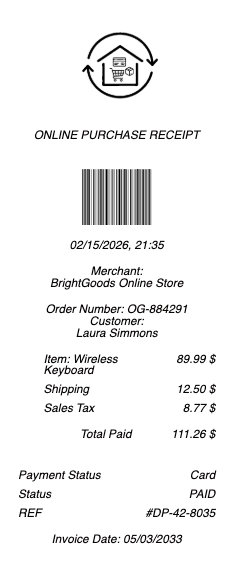
What’s on an Online Purchase Receipt
An order number and the order date
Itemized products with quantities and prices
Shipping method, cost, and the shipping address
Sales tax and the order total
The billing address and payment method (masked)
Estimated delivery and, once shipped, tracking
Links to view the order, return an item, or contact support
Confirmation, Shipping Notice, and Receipt
An online order typically generates several emails, and it helps to know which is which. The order confirmation arrives immediately, confirming what you ordered and the total — it usually doubles as your receipt since payment is taken at checkout. A shipping confirmation follows when the item dispatches, carrying the tracking number — it’s about delivery, not payment. Some retailers also send a separate invoice or receipt, or include a packing slip (often without prices) in the box. For proof of what you paid, the order confirmation with the total and payment method is the document to keep; for delivery status, the shipping email’s tracking is what you want. Knowing the difference saves confusion when you’re hunting for “the receipt” — it’s usually the confirmation email, and your account’s order history holds a durable copy of all of it.
Online Sales Tax — Why You’re Charged It Now
A change many shoppers noticed: online purchases now almost always include sales tax, where years ago many didn’t. This follows the 2018 Supreme Court decision South Dakota v. Wayfair, which let states require online retailers to collect sales tax based on the buyer’s location (economic nexus), even without a physical store in that state. So the tax on your receipt is set by your shipping state and locality, not the seller’s — which is why the same item can carry different tax for different buyers, and why marketplaces and stores now calculate tax at checkout. For most purchases this is automatic and nothing to do, but it explains the tax line and is worth understanding for business buyers tracking deductible costs, or anyone reconciling why an online total is higher than the listed price. The receipt’s itemized tax line reflects this destination-based rule.
Returns, Records, and Getting a Copy
The online purchase receipt is your key to returns: most retailers let you start a return from your order history using the order number, generating a prepaid label or QR code, within the store’s return window and policy (some items final-sale). Refunds go back to your original payment, referencing the order. For records — expenses, warranties, disputes, or a possible chargeback if goods never arrive — the itemized confirmation is the proof of what you bought, when, and for how much. Because it’s digital, an online receipt won’t fade and is searchable in your email or account, and most stores keep order history for a long time, so a copy is a download away. For expense reporting, the order confirmation showing items, tax, and total is what you submit. Keeping (or being able to retrieve) the confirmation for each order is simple insurance against a return, a warranty claim, or a delivery that goes wrong.
Related payment receipts: see also our Personal Expense receipt guide and our Cash receipt guide.
Create an Online Purchase Receipt
Our generator produces a clean online purchase receipt — order number, itemized products, shipping, sales tax, and total — as a PDF when you need a legible copy for a return, an expense report, a warranty claim, or your own records.
Use it responsibly: recreate only real orders you actually placed, with their true items and amounts. Fabricating an online purchase receipt to fake an order, support a false return, refund, or chargeback, or claim an expense you didn’t incur is fraud — the retailer’s own order records and the payment processor’s data are authoritative and verifiable. This tool is for legitimate record-keeping only.
Frequently asked questions
Everything you need to know about the product and billing.
What does an online purchase receipt show?
An order number and date, itemized products with quantities and prices, the shipping method, cost, and address, sales tax and total, the billing address and masked payment method, estimated delivery and tracking once shipped, and links to view the order, return an item, or contact support.
Is the order confirmation the same as the receipt?
Usually yes — the order confirmation arrives immediately and doubles as your receipt, since payment is taken at checkout. A separate shipping confirmation follows with the tracking number (about delivery, not payment), and some retailers send an additional invoice or include a packing slip.
Why do I now pay sales tax on online purchases?
Because of the 2018 South Dakota v. Wayfair decision, which lets states require online retailers to collect sales tax based on the buyer’s location, even without a physical store there. So the tax on your receipt is set by your shipping state and locality, not the seller’s.
How do I return an online purchase?
Start the return from your order history using the order number, which generates a prepaid label or QR code, within the store’s return window and policy (some items are final-sale). Refunds go back to your original payment method, referencing the order.
How do I get a copy of an online purchase receipt?
Check the order confirmation email or your account’s order history, which stores a durable copy you can download — a digital receipt won’t fade and is searchable. Most stores keep order history for a long time, so retrieving a copy for a return or expense is easy.
Which email is my proof of payment for an online order?
The order confirmation with the total and payment method — that’s your receipt. The shipping confirmation is about delivery and carries tracking, not payment proof. For expenses, submit the confirmation showing items, tax, and total; for delivery, use the shipping email’s tracking.