A parking receipt is proof of a parking charge — the lot, the times, the rate, and the total — that travelers and commuters need for expense reports and reimbursement. This guide explains what's on a parking receipt, how to get one from a pay station, app, or airport lot, and how to recover a receipt you didn't take.
Parking Receipt
Add custom logo
Edit line items
Choose payment method
Add/remove elements
Customize business information
Choose font
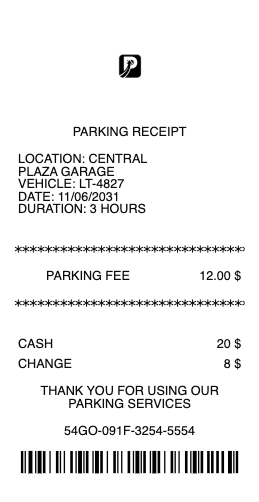
What's on a parking receipt
A parking receipt should show enough to prove where and how long you parked:
Lot or garage name & location — the operator (Flash, Premium Parking, The Parking Spot, or an airport lot) and address.
Entry & exit times — when you arrived and left, or the session start and duration.
Rate & duration — the hourly or daily rate and total time parked.
Total & taxes/fees — the amount charged, including any facility or city parking tax.
Date & payment method — the date and the card used.
Space or ticket number — a reference for the session.
How to get a parking receipt
Where you get the receipt depends on how you paid. At a pay station or meter, choose the receipt option after paying, or check for a printed slip. If you paid through a parking app (many garages and cities use apps like Flash, ParkMobile, or Premium Parking), the receipt is emailed and saved in the app's history — the cleanest version for expenses. In an attended garage, ask the booth for a receipt when you pay. Many operators also have a website where you enter your ticket number, location, and date to retrieve a receipt after the fact.
Airport parking receipts and expense reports
Airport parking is one of the most common reasons people need a parking receipt, because a work trip means reimbursement. Big airport lots — DFW, Denver (DIA), Pittsburgh, Atlanta and others, plus off-airport operators like The Parking Spot — issue receipts at exit or by email, and most let you look one up online with your entry and exit dates or a confirmation number. For an expense claim, the receipt needs to show the lot, dates, and total; a credit-card charge alone usually isn't enough for a finance team. Grab the exit receipt or download the emailed one before you file.
Recovering a parking receipt you didn't take
Drove off without a receipt? Many parking operators — Flash, Premium Parking, PMC, and airport lots — keep transactions online, so you can enter the location, date, and license plate or ticket number to pull up and email the receipt. If you paid an attendant in cash with no slip, contact the operator with the date, time, and amount. For app-based parking, the receipt is already in your account. The sooner you look, the better, since some lookup tools only keep recent sessions.
Related transport receipts: see also our toll receipt guide and our airport parking receipt guide.
Create a parking receipt
Our parking receipt template and generator produces a clean receipt — lot, location, entry and exit times, rate, taxes, and total — in a printable format, so you can rebuild a record of a session you actually parked when the original is lost or faded.
For legitimate record-keeping only. A parking receipt should reflect parking you actually paid for; creating one for a session that didn't happen, or inflating the charge to pad an expense claim, is fraud. Use this only to reproduce or organize your own genuine parking.
Frequently asked questions
Everything you need to know about the product and billing.
How do I get a parking receipt?
At a pay station or meter, choose the receipt option after paying. If you used a parking app, the receipt is emailed and saved in the app history. In an attended garage, ask the booth when you pay. Many operators also let you retrieve a receipt online with your ticket number and date.
How do I get an airport parking receipt?
Airport lots (DFW, DIA, Pittsburgh, Atlanta, and off-airport operators like The Parking Spot) issue a receipt at exit or by email, and most let you look one up online with your entry and exit dates or a confirmation number.
What should a parking receipt include for an expense report?
The lot or garage name and location, the entry and exit times or duration, the rate, the total with any taxes or fees, the date, and the payment method — enough to prove where and how long you parked, not just a card charge.
Can I get a parking receipt after I've left?
Often yes. Operators like Flash, Premium Parking, and airport lots keep transactions online, so you can enter the location, date, and ticket number or plate to retrieve and email the receipt. App-based parking already stores it in your account.
How do I get a receipt from a parking app?
Open the app's history or receipts section and select the session — the itemized receipt is stored there and can be emailed or saved as a PDF, which is the cleanest version for reimbursement.
Do I need a parking receipt for reimbursement?
Usually yes. Finance teams want a receipt showing the lot, dates, and total, since a credit-card charge alone doesn't show where or how long you parked. Airport and work-trip parking typically qualifies when documented this way.