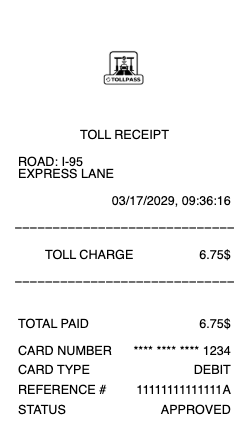
A toll receipt shows proof of payment for highway, bridge, or tunnel tolls. It is commonly used for travel reimbursements, mileage records, and expense tracking. A typical toll receipt includes the road or bridge name, date, toll amount, and total paid. Use a toll receipt when documenting road usage charges.
Toll Receipt
Add custom logo
Edit line items
Choose payment method
Add/remove elements
Customize business information
Choose font
What's on a Toll Receipt
A toll receipt is proof you paid a road, bridge, or tunnel toll — whether through an electronic transponder, a bill mailed to your plate, or a rental car's toll program. Depending on how the toll was paid, a complete toll receipt includes:
Toll agency or program (e.g. E-ZPass, SunPass, FasTrak, or a rental toll service)
Date and time of the toll
Toll location or plaza, and often the entry and exit points
License plate number and/or transponder/account number
Toll amount per crossing
Any administrative or convenience fee
Total charged and the payment method
E-ZPass, Toll-by-Plate, and Cash Tolls
Most tolls are paid one of three ways. An electronic transponder — E-ZPass in the Northeast and Midwest, SunPass in Florida, FasTrak in California — deducts the toll automatically and logs each crossing to your account. Toll-by-plate (also called toll-by-mail) photographs your license plate and mails a bill, usually with a small administrative fee and no transponder discount. A few plazas still take cash. Each method produces a slightly different record, but all should show the plaza, date, amount, and either the plate or transponder that was charged.
Rental Car Toll Receipts: PlatePass, e-Toll, and ERAC
Rental cars handle tolls through the company's own program, and those charges land after the trip. Hertz, Dollar, and Thrifty use PlatePass; Avis and Budget use e-Toll; Enterprise, National, and Alamo use the ERAC toll program. Each adds the toll itself plus a daily convenience fee for the days you incur tolls, so a rental toll receipt can be noticeably higher than the raw toll. Renters frequently need the itemized toll charge — the plate, dates, plazas, tolls, and fees — for an expense report or to check the total, since the summary on a rental invoice is often just one lump line.
Toll Receipts for Expense Reports and Disputes
Tolls are a routine reimbursable expense, so the receipt often has to satisfy an employer or accountant. For an expense report, they want the date, route or plaza, and amount clearly shown to confirm the toll was work-related. The same itemized record helps when you need to dispute a charge — a toll billed twice, a wrong plate, or an unexpected administrative fee — because it pins down exactly what was charged and when. A clean, itemized toll receipt is far easier to file or contest than a vague line on a statement or a faded mailed notice.
Related transport receipts: see also our parking receipt guide and our bus ticket receipt guide.
Generate a Toll Receipt — Free, No Login
Our toll receipt generator lays out every field of a toll charge: agency or program, date and time, toll plaza or location, plate and transponder or account number, toll amount, any administrative or convenience fee, total, and payment method. Edit each field and download a formatted file in PDF, PNG, or JPG in under a minute — no account required. It's ideal for reconstructing a toll charge you couldn't export cleanly, itemizing rental or personal tolls for an expense or reimbursement claim, or keeping an organized travel record.
Legal note: Any Receipt Generator is not affiliated with, endorsed by, or associated with any toll authority or rental toll program, and does not validate or certify the authenticity of any generated document. This tool is strictly for legitimate record-keeping, reimbursement, and bookkeeping purposes. Creating a receipt for a toll that was not incurred, altering an amount, or using a document to commit fraud is prohibited; users assume full responsibility for the accuracy and intended use of the files they generate.
Frequently asked questions
Everything you need to know about the product and billing.
What is a toll receipt?
A toll receipt is proof you paid a road, bridge, or tunnel toll — by transponder, toll-by-plate, cash, or a rental car's toll program — showing the agency, date, plaza, plate or account, amount, and any fee.
What details are on a toll receipt?
The toll agency or program, date and time, toll location or plaza, license plate and/or transponder or account number, the toll amount, any administrative or convenience fee, the total, and the payment method.
How do rental car toll charges work?
Rental companies bill tolls through their own programs — PlatePass (Hertz, Dollar, Thrifty), e-Toll (Avis, Budget), or ERAC (Enterprise, National, Alamo) — adding the toll plus a daily convenience fee for the days you incur tolls.
Can I get an itemized toll receipt for a rental car?
Rental toll programs usually let you view charges online, but the rental invoice often shows tolls as one lump line. Many renters reconstruct the itemized detail — plate, dates, plazas, tolls, and fees — into a clean receipt for expense reports.
Can I use a toll receipt for an expense report?
Yes. For reimbursement or a tax deduction, the receipt should clearly show the date, route or plaza, and amount so the toll can be verified as a business expense.
What formats can I download, and is it free?
You can export toll receipts as PDF, PNG, or JPG for free, with no login. Watermark-free downloads are available with a paid upgrade.