A Shein receipt shows the details of an online fashion purchase made on Shein. It is commonly used for returns, reimbursements, expense tracking, and personal records. A typical Shein receipt includes an order number, item list, discounts, shipping, tax, and total paid. This Shein receipt example follows a realistic fast-fashion e-commerce format. It includes multiple apparel items, a promotional discount, shipping, and a clear order total. The structure works well for records or recreating a missing receipt. Use a Shein receipt example when you need proof of purchase for an online clothing order.
Shein Receipt
Add custom logo
Edit line items
Choose payment method
Add/remove elements
Customize business information
Choose font
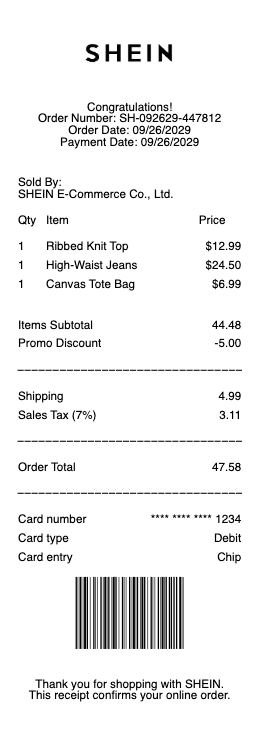
What's on a SHEIN Receipt
Because SHEIN is an online-only fast-fashion store, your "receipt" is the order confirmation and invoice rather than a printed till slip. It arrives by email when you check out and lives in the SHEIN app under My Orders, and it carries the proof-of-purchase details you'd expect:
Order number — the long SHEIN order ID (often starting with "GS") that identifies the purchase for support, returns and tracking.
Order date and status — when you placed it and where it is in the pipeline (processing, shipped, delivered).
Itemised list — each product with its name, colour, size, quantity and price, so a five-item haul shows five lines.
Payment summary — subtotal, any coupon or points discount, shipping, and the grand total in your currency, plus the payment method used.
Shipping details — the delivery address and the carrier handoff that later drives the tracking timeline.
How to get a receipt from SHEIN
Wondering how to get a receipt from SHEIN? The quickest route is the app: open My Orders, tap the order you need, and the order detail page shows the full itemised breakdown and totals that act as your receipt. The confirmation email SHEIN sends at checkout is a second copy — search your inbox for the order number if you can't find it. For expenses or reimbursement you can screenshot the order detail or the email, since SHEIN doesn't always attach a formal PDF invoice; the on-screen order summary carries the same information a SHEIN order receipt needs. If an order has disappeared from your list, it's usually because you checked out as a guest — look up the confirmation email instead, or contact support with the order number.
What "Receipt Scan" and "ORD Receipt Scan" mean on SHEIN tracking
One of the most-searched SHEIN questions has nothing to do with the purchase receipt: shoppers see a status like "Receipt Scan" or "ORD Receipt Scan" in their tracking timeline and wonder what it means. It's a logistics milestone — a carrier or sorting facility has scanned your parcel into its system, confirming it has been received and is moving through the network. When the entry reads something like "LAX Receipt Scan" or mentions USPS, that's simply the location or carrier where the scan happened (for example, a Los Angeles gateway or the US postal handoff). In short, a receipt scan is good news: your package exists in the system and is progressing, even if the status hasn't yet changed to "shipped" or "out for delivery."
Returns, refunds and your SHEIN return receipt
Your order receipt is also the starting point for a return. Within SHEIN's return window, open the order in My Orders, choose the items to send back, and the app generates a return label and a SHEIN return receipt confirming what you're returning. Keep that return confirmation until the refund posts, because it's your proof the items were sent. Refunds go back to your original payment method or SHEIN wallet, and the order detail page updates to show the refunded amount. Note that some items — such as underwear, swimwear and certain final-sale pieces — are typically non-returnable, so check the item's return eligibility on the product or order page before you start.
Related fashion retailer receipts: see also our Zara receipt guide and our H&M receipt guide.
Create a SHEIN-style receipt with our generator
Need a clean copy of a SHEIN receipt for an expense report, a reimbursement claim, bookkeeping or a template mock-up? Our receipt generator recreates the order-confirmation layout — order number, itemised products with size and colour, discounts, shipping and totals — and exports a print-ready PDF, PNG or JPG in under a minute, no account required. Enter your own order details, items and prices for a legible copy when the original email is buried or the app entry has gone. Please use it lawfully and honestly: create receipts only for purchases that actually happened, for your own records — never to fake an order, claim a refund you're not owed, or impersonate SHEIN. "SHEIN" is a trademark of its owner, referenced here only to describe the receipt format shoppers recognise.
Frequently asked questions
Everything you need to know about the product and billing.
How do I get a receipt from SHEIN?
Open My Orders in the SHEIN app, tap the order, and the order detail page shows the itemised receipt and totals. The checkout confirmation email is a second copy — search your inbox for the order number. Screenshot either one for an expense claim, since SHEIN doesn't always provide a PDF invoice.
What does "Receipt Scan" mean on SHEIN?
It's a tracking milestone, not the purchase receipt — a carrier or sorting facility has scanned your parcel into its system, confirming it was received and is moving. Prefixes like "LAX" or "USPS" just name the facility or carrier where the scan happened.
What does "ORD Receipt Scan" mean on a SHEIN order?
The same thing — "ORD" refers to your order, and "receipt scan" means the parcel has been logged (received) at a facility in the shipping network. It's a normal, positive step on the way to delivery.
Where do I find my SHEIN order number?
It's at the top of the order confirmation email and on the order detail page under My Orders — a long ID (often beginning with "GS") used for tracking, returns and support.
Does a SHEIN receipt work for a return?
Yes. Start the return from My Orders within the return window; the app creates a return label and a return receipt. Keep that confirmation until your refund posts. Some items like swimwear and final-sale pieces are usually non-returnable.
Can I use this generator to recreate a SHEIN receipt?
Yes, for legitimate purposes — replacing a lost order confirmation for your own records, expense reports or design mock-ups. It is not for faking orders, claiming refunds you're not owed, or impersonating SHEIN.