A software services receipt covers two very different things under one name: a recurring SaaS subscription you pay every month, and custom development billed by project. The receipt looks different for each, because a per-seat subscription and a milestone-billed build are opposite billing models. This page explains what each shows, so you can tell a renewing subscription charge from a one-time development fee — and read either correctly for your books.
Software Services Receipt
Add custom logo
Edit line items
Choose payment method
Add/remove elements
Customize business information
Choose font
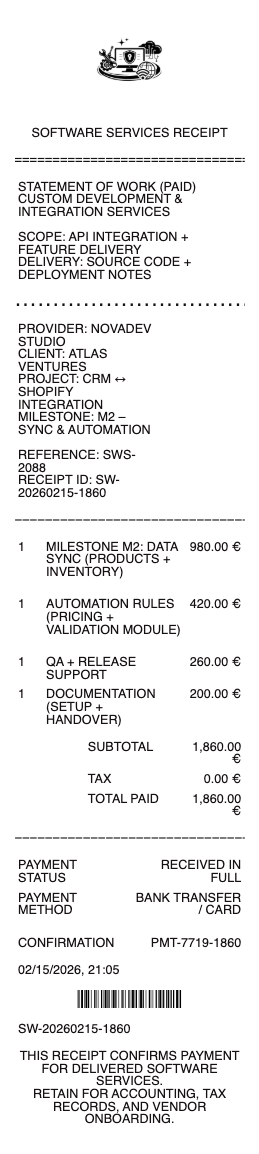
What’s on a Software Services Receipt
Provider and customer, with an invoice or account reference
The model — a SaaS subscription or a custom development/service fee
For subscriptions — plan tier, number of seats/users, and the billing cycle
The billing period covered, and the renewal date
For custom work — the project phase or hours, and milestone
Proration or credits for mid-cycle changes
Amount paid, tax/VAT where applicable, and method
SaaS Subscription vs Custom Development
The first thing to read on a software receipt is which model it is. A SaaS subscription is recurring: you pay monthly or annually for access, usually priced per seat (per user) on a plan tier, and it renews automatically until canceled. Its receipt shows the plan, the seat count, and the period covered. Custom development or consulting is the opposite — a one-time or milestone-billed project to build or integrate software, priced by fixed bid or hourly, often with a deposit and staged payments. Its receipt shows the phase and the work delivered, not a renewing plan. Mixing them up causes real budgeting errors: a subscription is an ongoing operating cost that recurs forever, while a development fee is a one-off (or capitalized) expense. The receipt’s model — recurring plan versus project milestone — is what tells the two apart at a glance.
Seats, Proration, and Renewals
Subscription receipts have quirks worth understanding. Pricing is typically per seat, so adding users mid-cycle triggers a prorated charge for the partial period, and removing them may create a credit — both of which appear as adjustment lines rather than the flat plan price. Annual plans often bill once for a discount versus monthly, so an annual receipt is a larger single charge covering twelve months. The renewal date matters because auto-renewal is the default: the receipt showing the period covered is how you catch an unwanted renewal before the next one. Upgrades and downgrades between tiers also prorate. For a business tracking software costs, reading the seat count and period on each receipt is how you reconcile what you’re actually paying against how many people use the tool — a common place to find waste in unused seats.
Business Expenses, VAT, and Records
Software is a deductible business expense, and how it’s treated can differ: a SaaS subscription is a straightforward operating cost, while a large custom-software build may be capitalized and treated differently for tax — the receipt’s model helps your accountant classify it. Cross-border SaaS adds a wrinkle: many providers charge VAT or GST based on the customer’s country and may need your VAT/tax ID to zero-rate a B2B sale, so a compliant receipt shows the tax and IDs for reclaim. Subscriptions generate a receipt every cycle, so keeping them organized — or pulling the annual billing history from the provider’s account — is what supports the deduction. For custom development, pair each milestone receipt with the statement of work. Either way, the receipt naming the plan or project, the period, and the tax is the record your books need.
Related creative service receipts: see also our Marketing Services receipt guide and our Freelance receipt guide.
Create a Software Services Receipt
Our generator produces a clean software services receipt — provider and customer, the subscription plan and seats or the project milestone, the period, tax, and total — as a PDF you can send a customer or keep for your expense records.
Use it responsibly: recreate only real subscriptions or work and payments, with their true amounts. Fabricating software receipts to inflate a business deduction, misstate income, or invent a subscription is fraud — the figures should match the provider’s billing records and your return, which can be verified. This tool is for legitimate record-keeping only.
Frequently asked questions
Everything you need to know about the product and billing.
What does a software services receipt show?
The provider and customer with a reference, the model (SaaS subscription or custom development), for subscriptions the plan tier, seats, and billing cycle, the period covered and renewal date, for custom work the project phase or hours, any proration or credits, and the total with tax.
What’s the difference between a SaaS subscription and custom software billing?
A SaaS subscription recurs — you pay monthly or annually per seat for access, and it renews automatically. Custom development is a one-time or milestone-billed project to build software, priced by fixed bid or hours. One is an ongoing operating cost; the other is a one-off expense.
Why does my software subscription show a prorated charge?
Per-seat pricing means adding users mid-cycle triggers a prorated charge for the partial period, and removing them can create a credit. Tier upgrades and downgrades prorate too, appearing as adjustment lines rather than the flat plan price.
Why is my annual software receipt a single large charge?
Annual plans usually bill once for a discount versus paying monthly, so the receipt is one larger charge covering twelve months. Check the renewal date on it, since auto-renewal is the default and the period shown is how you catch an unwanted renewal.
Is software a deductible business expense?
Yes. A SaaS subscription is a straightforward deductible operating cost, while a large custom-software build may be capitalized and treated differently for tax. The receipt’s model helps your accountant classify it correctly, so keep it with the billing period shown.
Why does a software receipt charge VAT or ask for a tax ID?
Cross-border SaaS providers charge VAT or GST based on your country and may need your VAT/tax ID to zero-rate a B2B sale. A compliant receipt shows the tax and IDs, which you need to reclaim the VAT or substantiate the expense.