A Starbucks receipt is the record of your order — and for many customers, the question is how to turn it into Stars in the Starbucks app. This guide explains what's on a Starbucks receipt, how to claim missing Stars from a receipt if you forgot to scan, how receipt lookup works, and how to get a copy for an expense or your records.
Starbucks Receipt
Add custom logo
Edit line items
Choose payment method
Add/remove elements
Customize business information
Choose font
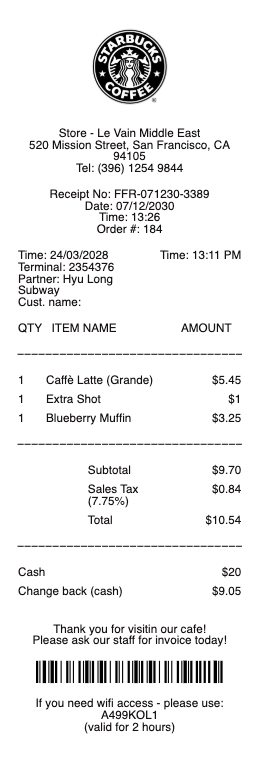
What's on a Starbucks receipt
A Starbucks receipt is a standard café ticket with the details that matter for rewards and records:
Store number & address — the location that served you, near the top.
Transaction / receipt number — the number identifying your order, needed to claim missing Stars.
Date, time & register — when and where the order was placed.
Itemized drinks & food — each item, size, and customization with its price.
Subtotal, tax & total — the total before tax, sales tax, and amount paid.
Payment method — Starbucks Card, mobile app, or credit/debit card.
How to add a receipt to the Starbucks app for Stars
The most common reason people keep a Starbucks receipt is to earn Stars they missed. You normally earn Stars by paying with a registered Starbucks Card or scanning the app at the time of purchase, so the best habit is to scan or pay in-app every time. If you forgot, you can often claim the missing Stars afterward: contact Starbucks Rewards customer service (through the app or website) with the receipt's store number, date, time, and transaction number, and they can add the Stars for that visit. This generally has to be done within a limited window after the purchase, so don't wait.
Starbucks receipt lookup and getting a copy
Need the receipt itself? If you paid in the Starbucks app or with a registered Starbucks Card, your purchase history is in the app under your account activity. If you paid with a credit or debit card in store, the location can often reprint the transaction from its register if you have the approximate date and time. For a mobile order, the order confirmation is in the app and your email. A card statement shows the charge amount but won't itemize your drinks, so the in-store reprint or app history is what you need for a detailed copy.
Stars, Rewards, and using a Starbucks receipt for expenses
Starbucks Rewards members earn Stars that add up to free drinks and food, which is why capturing every purchase matters. Beyond rewards, people keep Starbucks receipts for business expenses — a client coffee or a work trip — where an itemized receipt (not just the card charge) is what an employer or finance team needs. For either use, the itemized receipt with the store, date, items, and total is the document to hold onto; snap a photo before the thermal paper fades.
Related cafe receipts: see also our Bakery receipt guide and our Coffee Shop receipt guide.
Starbucks receipt templates and copies
If your receipt has faded or you need a clean itemized copy for an expense report, our receipt template and generator can reproduce a Starbucks-style receipt — store details, itemized drinks and food, tax, and total — in a readable format.
For legitimate record-keeping only. Recreating a receipt for a purchase you didn't make, or to claim Stars, rewards, or an expense you're not entitled to, is fraud. Use this only to reproduce or organize your own genuine Starbucks purchases.
Frequently asked questions
Everything you need to know about the product and billing.
How do I add a Starbucks receipt to the app for Stars?
You normally earn Stars by paying with a registered Starbucks Card or scanning the app at purchase. If you forgot, you can often claim the missing Stars by contacting Starbucks Rewards customer service with the receipt's store number, date, time, and transaction number, usually within a limited window.
How do I get Stars from a receipt I forgot to scan?
Reach out to Starbucks Rewards support through the app or website and provide the transaction details from your receipt (store number, date, time, transaction number). They can add the Stars for that visit if it's within the allowed timeframe.
Can I look up a Starbucks receipt?
If you paid in the app or with a registered Starbucks Card, your purchases are in your app account activity. If you paid by credit or debit card in store, the location can often reprint the transaction from the approximate date and time.
What's on a Starbucks receipt?
The store number and address, a transaction/receipt number, date and time, your itemized drinks and food with sizes and customizations, the subtotal, tax, total, and payment method.
How do I get a Starbucks receipt for an expense report?
Use the itemized receipt — from the app for mobile orders, or an in-store reprint if you paid by card. The itemized version (with items and total) is what employers require, since a card statement only shows the charge amount.
Why didn't I earn Stars on my purchase?
Stars are earned when you pay with a registered Starbucks Card or scan the app at checkout. If you paid another way or forgot to scan, the Stars won't post automatically, but you can often claim them afterward with your receipt details.