A voided receipt documents a transaction that was cancelled before it finalized — a sale caught and reversed the same day, before the money actually moved. It’s different from a refund, and understanding that difference explains why a charge can appear and then vanish from your account. This page explains what a voided receipt is, how a void differs from a refund, why transactions get voided, and why the record is kept rather than deleted.
Voided Receipt
Add custom logo
Edit line items
Choose payment method
Add/remove elements
Customize business information
Choose font
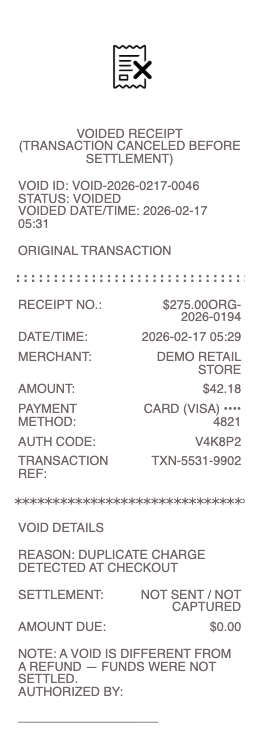
What’s on a Voided Receipt
A “VOID” or “VOIDED” marking across the receipt
The original transaction details — merchant, items, amount, date
The original transaction/reference number
The void date and time, and who authorized it
A reason, on some systems (error, cancellation)
A resulting amount of $0, or the original amount marked cancelled
The register/terminal and cashier ID
Void vs Refund — the Key Difference
These get confused, but they’re mechanically different. A void cancels a transaction before it settles — before the day’s payments are batched and sent to the bank, typically the same business day. Because the payment never actually completes, a voided card charge often just drops off as a pending authorization, and the customer may never see a real charge at all. A refund reverses a transaction that has already settled — the money went through, and a separate transaction sends it back, which takes several business days to appear. So the practical difference is timing and whether money moved: a void is a clean cancellation of a not-yet-final sale; a refund is an undo of a completed one. This is why, if you catch an error at the register, asking for a void (before you leave / before the batch closes) is faster and cleaner than a refund — nothing has to travel through the banking system and back.
Why Transactions Get Voided
Voids happen for routine, legitimate reasons. The most common is a cashier or entry error — the wrong amount was keyed, the wrong item scanned, or a price was incorrect — caught immediately and voided to redo it correctly. A customer change of mind before the sale is finalized, a duplicate charge spotted at the moment it happens, or a test transaction are others. In restaurants and retail, voids are a normal part of a shift. Because they can also be a vector for internal fraud (a dishonest employee voiding a real sale to pocket cash), most POS systems require manager authorization for a void and log who did it — which is why a voided receipt often shows an authorizing ID. That control is exactly why voids are tracked closely: they’re a normal correction tool, but one that has to be accountable, so the record of each void matters to a business’s controls.
Records, Reconciliation, and What It Means for You
A crucial accounting principle: a transaction is voided, not deleted. You can’t simply erase a receipt or sale from the record — doing so would break the audit trail and look like hidden fraud. Instead the sale is marked void and kept, appearing on the daily batch/reconciliation report so the numbers still tie out and every transaction is accounted for. For a business, voids are part of end-of-day reconciliation and are reviewed for patterns. For a customer, understanding voids explains a common experience: seeing a pending charge appear and then disappear — that’s often a voided transaction (or a released authorization hold), not a refund you need to chase. If you were told a sale was voided but a real charge later posts, the voided receipt is your evidence that it shouldn’t have. Keeping it in that case protects you; otherwise a void simply means the sale never truly happened.
Related transaction receipts: see also our Duplicate receipt guide and our Gift receipt guide.
Create a Voided Receipt
Our generator can produce a voided receipt — the original transaction details clearly marked VOID, with the void date and reference — as a clean PDF when you need a legible record of a cancelled transaction for your files or reconciliation.
Use it responsibly: recreate only a transaction that was genuinely voided, reflecting what actually happened. Fabricating a voided receipt to hide a real sale, disguise a completed transaction as cancelled, or misrepresent a business’s records is fraud — and falsifying voids is a classic form of retail and accounting fraud that audits are designed to catch. The POS and payment-processor records are the authoritative source; this tool is for legitimate record-keeping only.
Frequently asked questions
Everything you need to know about the product and billing.
What is a voided receipt?
The record of a transaction cancelled before it finalized — a sale reversed the same day, before the payment actually settled. It shows the original transaction details marked “VOID,” with the void date and reference, and typically a resulting amount of $0.
What’s the difference between a void and a refund?
A void cancels a transaction before it settles (usually the same day), so the payment never completes and a pending card charge often just drops off. A refund reverses an already-settled transaction, sending money back over several business days. A void is faster and cleaner because no money moved.
Why do transactions get voided?
Usually a cashier or entry error caught immediately — wrong amount, wrong item, or price — voided to redo it correctly. Also a customer changing their mind before the sale finalizes, a duplicate charge spotted at once, or a test transaction. Voids are a normal correction tool.
Why do voided receipts need manager approval?
Because voids can be a vector for internal fraud — a dishonest employee voiding a real sale to pocket the cash — most POS systems require manager authorization and log who performed the void. That’s why a voided receipt often shows an authorizing ID; the control keeps voids accountable.
Why can’t a sale just be deleted instead of voided?
Because deleting a transaction would break the audit trail and resemble hidden fraud. The sale is marked void and kept, appearing on the daily reconciliation report so every transaction is accounted for and the numbers tie out. Voiding preserves the record; deleting would destroy it.
I saw a charge appear then disappear — was it voided?
Often yes — a pending charge that appears and then vanishes is commonly a voided transaction or a released authorization hold, not a refund you need to chase. If you were told a sale was voided but a real charge later posts, the voided receipt is your evidence it shouldn’t have.