A Zelle receipt from Chase shows proof of a Zelle transfer sent from a Chase account. It is commonly used for rent, reimbursements, and peer-to-peer payments.
Zelle (Chase) Receipt
Add custom logo
Edit line items
Choose payment method
Add/remove elements
Customize business information
Choose font
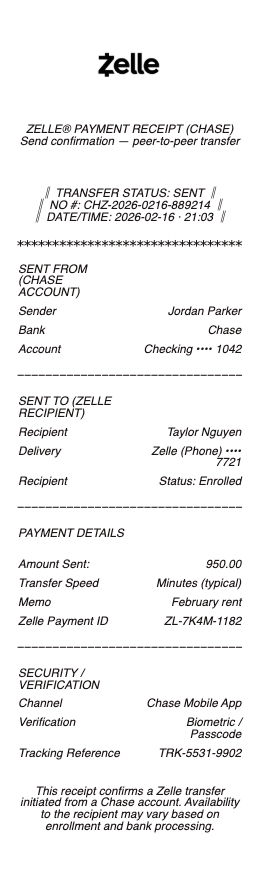
What's on a Zelle Payment Receipt
A Zelle receipt confirms an instant person-to-person payment sent through the Zelle network — in the Chase app, on chase.com, or from any Zelle-enabled bank. Because Zelle moves money in minutes using an email or phone number instead of account numbers, a Zelle payment receipt is short, but a complete one includes:
Confirmation number for the payment
Date and time the payment was sent
Sender name and the sending bank (e.g. Chase)
Recipient name and the email or U.S. mobile number they're enrolled with
Amount and an optional memo or note
Status — Delivered, Pending, or Invitation Sent
An indication it was "Sent with Zelle"
What a Zelle Receipt Looks Like
Unlike a bank statement line, a Zelle receipt is compact. It shows who sent the money, who received it, the amount, the date, and a confirmation number — and little else, because Zelle deliberately hides account numbers and identifies people by an enrolled email or phone. A Zelle transaction receipt also marks whether the payment is Delivered (the recipient is enrolled and the money arrived), Pending, or an Invitation Sent (the recipient still needs to enroll to receive it). Knowing what a Zelle receipt looks like matters when you recreate one: the fields are few, but each — especially the confirmation number and delivered status — needs to be right.
How Zelle Works Through Chase
Chase helped build Zelle, so it's fully integrated in the Chase app. You send by choosing a recipient's enrolled email or U.S. mobile number, and if they already bank with a Zelle-network institution the money typically lands in minutes. If they're not enrolled, they get an invitation and the payment completes once they sign up. Zelle payments through Chase carry no fee, and Chase applies daily and monthly sending limits. Because the transfer is near-instant and pulls straight from checking, a delivered Zelle payment generally can't be cancelled — which is exactly why keeping the confirmation matters.
Why People Need a Zelle Payment Receipt
Zelle is used constantly for everyday money — rent to a landlord, a share of a bill, paying a contractor or tutor, or reimbursing a friend. The catch is that the in-app confirmation is minimal and easy to lose in the activity feed, and Zelle doesn't offer a tidy printable document. A clean Zelle transfer receipt showing the confirmation number, date, both parties, amount, and memo gives the other side clear proof of payment — useful for a landlord's records, a reimbursement, bookkeeping, or settling a "did you pay me?" dispute — instead of a screenshot of a payment tile.
Related digital wallet receipts: see also our Zelle receipt guide and our Venmo receipt guide.
Generate a Zelle Receipt — Free, No Login
If you need a Zelle receipt and can't easily export one, our Zelle receipt generator builds a clean payment confirmation with every field in place: confirmation number, date and time, sender name, recipient name and enrolled email or phone, amount, memo, and delivered status. Fill in the Zelle receipt template and download a formatted file in PDF, PNG, or JPG in under a minute — no account required. It's ideal for reconstructing a confirmation you can't pull from the app, giving someone clear proof of a transfer, or keeping a tidy record of payments.
Legal note: Any Receipt Generator is not affiliated with Zelle, Early Warning Services, or JPMorgan Chase, and does not process payments or validate the authenticity of any generated document. This tool is strictly for legitimate record-keeping, reimbursement, and bookkeeping purposes. Creating a receipt for a payment that did not occur, altering an amount, or using a document to commit fraud is prohibited; users assume full responsibility for the accuracy and intended use of the files they generate.
Frequently asked questions
Everything you need to know about the product and billing.
What is a Zelle receipt?
A Zelle receipt is the confirmation of an instant person-to-person payment sent through Zelle, showing the confirmation number, date, sender, recipient's enrolled email or phone, amount, memo, and status.
What does a Zelle receipt look like?
It's compact — sender, recipient, amount, date, a confirmation number, and a status of Delivered, Pending, or Invitation Sent. There are no account or routing numbers, because Zelle identifies people by an enrolled email or phone.
How do I get a Zelle receipt?
Zelle payments appear in your bank app's activity, but there's no tidy printable document. Many people reconstruct the details — confirmation number, date, both parties, and amount — into a clean receipt they can save or share as proof.
Does Chase charge a fee for Zelle?
No. Chase doesn't charge a fee to send or receive money with Zelle, though it applies daily and monthly sending limits.
Can I cancel a Zelle payment on Chase?
Usually not once the recipient is enrolled, because the payment is near-instant. If the recipient hasn't enrolled yet, a pending payment can often be cancelled before it completes.
What formats can I download, and is it free?
You can export Zelle receipts as PDF, PNG, or JPG for free, with no login. Watermark-free downloads are available with a paid upgrade.