A Zelle "receipt" isn't a traditional receipt — Zelle moves money bank to bank, so your proof of payment is the confirmation and transaction record in your banking app. This guide explains what a Zelle payment confirmation shows, how to get proof of a Zelle payment, and an important warning: fake Zelle "payment sent" screenshots are a common scam, so real proof means checking that the money actually arrived.
Zelle Receipt
Add custom logo
Edit line items
Choose payment method
Add/remove elements
Customize business information
Choose font
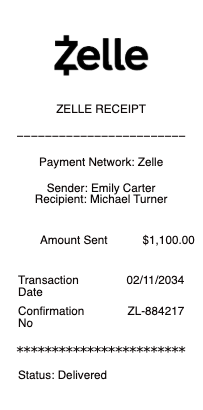
What a Zelle payment confirmation shows
Because Zelle runs inside your bank, the "receipt" is the transaction record it creates:
Confirmation number — a reference ID for the transfer.
Sender & recipient — your name and the recipient's name, email, or US mobile number.
Amount & date — how much was sent and when.
Status — pending, sent, or completed (and whether the recipient is enrolled).
Memo — an optional note describing what the payment is for.
Your bank's details — the record lives in your bank or Zelle app's activity, tied to your account.
How to get proof of a Zelle payment
To document a Zelle payment, open your banking app or the Zelle app and find the transaction in your activity or transfer history. It shows the recipient, amount, date, confirmation number, and status — and you can screenshot it or, in many banks, view it on the transaction detail screen. Because Zelle doesn't email a formal receipt, this in-app record is your receipt. For a payment someone owes you proof of, the confirmation number and the transaction in your history are the strongest evidence the transfer was initiated from your account.
Warning: fake Zelle receipts are a common scam
This matters if you're receiving a payment. Scammers frequently send a fake "Zelle payment sent" screenshot — especially to marketplace sellers — to trick you into handing over an item before any money arrives. A screenshot is not proof of receipt. Because Zelle transfers are usually near-instant and can't be reversed, the only reliable confirmation is that the funds actually appear in your own bank account. Never release goods, services, or cash based on a screenshot or a "pending" email alone; verify the deposit in your bank first, and treat any request to "refund" an overpayment as a red flag.
Why Zelle works differently from a card receipt
Unlike a card purchase, a Zelle transfer has no merchant, no itemization, and no buyer protection — it's designed for sending money to people you know and trust, like splitting rent or paying a friend. That's why there's no store-style receipt: the transaction record in your bank is the whole story. For your own record-keeping — tracking rent paid, reimbursing a roommate, or documenting a person-to-person payment — save the confirmation number and a note of what it was for, so you have a clear history even though Zelle itself keeps things minimal.
Related digital wallet receipts: see also our Venmo receipt guide and our Cash App receipt guide.
Documenting a genuine Zelle payment
Our receipt template and generator can help you keep an organized record of a real Zelle payment you made or received — the confirmation number, sender and recipient, amount, date, and purpose — for your own rent or reimbursement files.
Legitimate record-keeping only — and a firm warning. Creating a fake Zelle "payment sent" receipt to deceive a seller or anyone else is fraud and a crime. This tool is only for organizing your own genuine transactions, never for fabricating proof of a payment that didn't happen.
Sent it another way? The Cash App receipt, wire transfer receipt, and cash payment receipt pages cover those trails.
For phone-wallet payments, see the Google Pay receipt.
Frequently asked questions
Everything you need to know about the product and billing.
Does Zelle give you a receipt?
Not a traditional one. Because Zelle moves money bank to bank, your "receipt" is the transaction record in your banking or Zelle app — showing the recipient, amount, date, confirmation number, and status. You can screenshot that record as proof you sent the payment.
How do I get proof of a Zelle payment?
Open your banking or Zelle app, find the payment in your activity or transfer history, and use the confirmation number and transaction details. That in-app record is your proof, since Zelle doesn't email a formal receipt.
Is a Zelle screenshot proof that I received money?
No. A "payment sent" screenshot can be faked and is a common scam. The only reliable proof of receipt is the money actually appearing in your own bank account — never release goods or cash based on a screenshot alone.
Why are fake Zelle receipts a scam?
Scammers send fake "Zelle sent" screenshots to marketplace sellers to get an item before any money arrives. Because Zelle is near-instant and hard to reverse, always confirm funds landed in your account before handing anything over.
What does a Zelle receipt look like?
It's the transaction entry in your bank or Zelle app: a confirmation number, the sender and recipient, the amount, the date, a status (sent or completed), and an optional memo. There's no merchant or itemized list because Zelle is a person-to-person transfer.
Can I get a Zelle payment reversed?
Generally no. Zelle transfers are usually near-instant and can't be canceled once the recipient is enrolled, which is why Zelle advises only sending money to people you know and trust.