Need an Adobe receipt or invoice for Creative Cloud, Acrobat Pro, or Document Cloud subscriptions? Adobe's annual billing surprises many users — sign up monthly, get billed annually for a 12-month commitment, then face $100+ cancellation fees if you leave early. The invoice you actually need for an expense report lives in a buried section of account.adobe.com, and the default invoice format misses fields business users routinely require. Generate a clean, expense-ready Adobe receipt in seconds using our tool above.
Adobe Receipt & Invoice
Add custom logo
Edit line items
Choose payment method
Add/remove elements
Customize business information
Choose font
Where Adobe Hides Your Invoice
Adobe's billing structure is unusual:
Monthly billing on annual commitment plans (you pay monthly but are locked into 12 months)
Annual prepaid billing (one upfront charge of $599.88 for Creative Cloud All Apps yearly)
Monthly month-to-month plans (significantly more expensive per month, no commitment)
Enterprise term licenses (annual or multi-year contracts via Adobe Sales)
To find your invoice:
Go to account.adobe.com → sign in
Click Plans in the left sidebar
Click Manage plan on the relevant subscription
Scroll to Payment history at the bottom
Click any past charge → Invoice (PDF) downloads
Adobe retains payment history for the lifetime of your active account. Cancelled accounts lose access — download invoices before cancelling if you need tax records.
What's on an Adobe Invoice
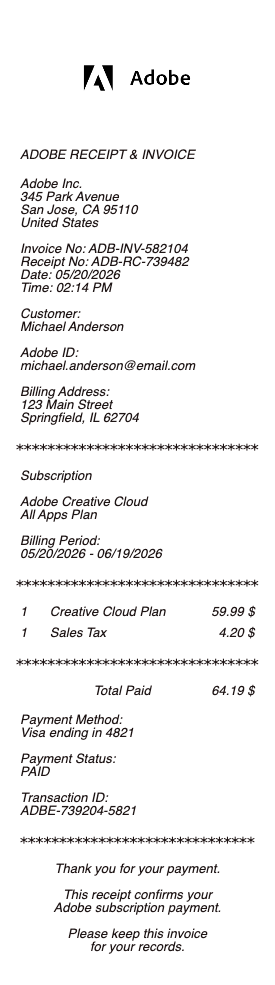
Adobe customer ID
Invoice number (format: SO12345678 or INV-2026-12345)
Billing date and service period
Adobe Systems Software Ireland Ltd (the EU billing entity) or Adobe Inc. (US entity) — varies by region
Customer email (Adobe doesn't populate full customer name in default invoice)
Product: Creative Cloud All Apps, Photography, Acrobat Pro, specific single apps (Photoshop, Illustrator, Premiere Pro), Adobe Express Premium, Adobe Stock, Adobe Sign
Quantity (number of licenses, especially for Teams plans)
Amount
Tax applied by region (US sales tax by state, EU VAT, GST for Australia/Canada/India)
Total and payment method (last four)
Notably missing: full customer name (Adobe only shows email), full billing address, customer business name unless explicitly added, internal PO number.
The Annual Commitment Trap and Cancellation Fees
Adobe's most-disputed billing practice: monthly billing on annual commitment plans. Sign up for Creative Cloud at $54.99/month with an annual plan, cancel in month 3, owe 50% of the remaining 9 months as a cancellation fee (~$247). The cancellation fee appears as a separate invoice. Many users discover this only when they try to cancel. For corporate expense reports, the cancellation fee invoice should be categorized as a contract penalty, not as standard subscription cost — your finance team may need clarification documentation.
Adobe Teams, Enterprise, and Volume Licensing
For Adobe Teams subscriptions (multi-license plans starting at 1 seat), the invoice is workspace-level: shows total seat count, plan name, total amount, but doesn't break down by individual user. Adobe Enterprise and ETLA (Enterprise Term License Agreement) invoices come from Adobe Sales directly — usually annual or multi-year contracts with custom payment terms (NET 30, wire transfer, etc.). For these, the invoice format may differ entirely from consumer Adobe invoices and is typically issued by your Adobe account rep.
Adobe Stock, Sign, and Add-On Subscriptions
Adobe Stock subscriptions ($29.99/month for 10 images, $79.99 for 40, $199 for 350) generate separate invoices from Creative Cloud. Adobe Sign ($14.99–$29.99/month) similarly. If you have multiple Adobe products, you may have multiple monthly charges from "Adobe Systems" on your card statement that look like duplicates but represent different products. Document each separately for expense reporting.
Adobe Tax IDs for International VAT Recovery
Adobe charges VAT/GST internationally: 20% UK VAT, 19–25% EU VAT, 10% Australian GST, 5% Canadian GST plus HST/PST, 18% Indian GST. For VAT-registered businesses, you can add your business VAT/Tax ID to your Adobe billing settings — future invoices will include it for tax recovery. Add it via account.adobe.com → Plans → Manage plan → Billing details → Tax ID. Past invoices cannot be retroactively corrected to include your VAT ID — generate clean replacement invoices for past months if VAT recovery requires it.
Generate a Replacement Adobe Receipt
Use the generator above to recreate an Adobe receipt with all line items your finance team needs: invoice number, billing date, product (Creative Cloud, Acrobat Pro, Stock, Sign, etc.), service period, quantity, tax, total, payment method, and your business name and tax ID. Download as PDF or PNG instantly.
Adobe Annual Plan vs Monthly Plan — Which Receipt You Actually Want
Adobe's pricing hides a major fork. Annual Plan, Paid Monthly (their standard offering at ~$54.99/month for Creative Cloud All Apps) is technically an annual commitment with monthly payments — cancel early and owe 50% of remaining months. Annual Plan, Prepaid (~$599.88 upfront) is the same commitment paid in one charge. Monthly Plan (~$87.99/month, no commitment) is significantly more expensive but cancellable anytime. The invoice shows which plan you have — for corporate expense reports flagging unusual subscription costs, document the plan type clearly.
Adobe Customer Name Gap — Why Invoices Default to Personal Email
Adobe's default invoice template populates the Customer field with your account email, not your business name. For freelancers and contractors expensing Adobe Creative Cloud to a client, this creates a problem: the invoice technically shows the subscription as billed to "yourname@gmail.com" rather than your business or client. The fix: add your business name and billing address in account.adobe.com → Plans → Manage plan → Billing details. Past invoices cannot be retroactively corrected — for past months, generate a properly-formatted replacement invoice with the correct customer name.
Adobe vs Figma vs Canva — Receipt Format Comparison
For designers comparing design-tool subscription receipts: Adobe shows minimal default information (email only as customer); Figma shows full business name when configured plus tax ID for international users; Canva shows the cleanest invoice format with full customer details and itemized features. For corporate expense reports tracking multiple design tools, the format differences matter — Adobe invoices typically require manual correction or supplemental documentation when Figma and Canva invoices pass through automated expense systems without issue.
Adobe Acrobat Pro and PDF Receipts — A Recursive Setup
Adobe Acrobat Pro ($19.99/month standalone, included in Creative Cloud All Apps) is itself often used to receive and process PDF receipts from other vendors. The Acrobat Pro subscription receipt is itself a PDF — saved from account.adobe.com. For business expense reports tracking the cost of expense-management tools themselves, document Acrobat Pro as a productivity expense rather than as a design tool — it often qualifies differently for tax categorization than Creative Cloud All Apps.
Generate an Adobe Receipt — Free, No Login
Our Adobe receipt generator creates clean, expense-ready invoices for any Adobe product — Creative Cloud All Apps, Photography, Single Apps (Photoshop, Illustrator, Premiere Pro, InDesign, After Effects, Lightroom), Acrobat Pro, Adobe Stock, Adobe Sign, Adobe Express Premium, and Teams/Enterprise licenses. Add your business name and full billing address (Adobe's default doesn't include these), VAT or Tax ID for international recovery, plan type (Annual Paid Monthly, Annual Prepaid, or Monthly), quantity for Teams plans, service period, and total. Especially useful for past invoices issued to your personal email when you needed business name documentation, VAT recovery on international Adobe charges where your business Tax ID is missing, annual commitment cancellation fee invoices needing clear categorization, Adobe Stock and Sign subscription receipts that look like duplicate Creative Cloud charges, and Teams plan invoices that need per-user allocation. Download as PDF or PNG instantly.
Frequently
asked questions
Everything you need to know about the product and billing.
Where do I find my Adobe invoice?
Go to account.adobe.com → sign in → click Plans in the left sidebar → click Manage plan on the relevant subscription → scroll to Payment history at the bottom → click any past charge to download the PDF invoice. Adobe retains payment history for the lifetime of your active account, but cancelled accounts lose access — download invoices before cancelling if you need tax records.
Why does Adobe charge me a cancellation fee?
Adobe's standard plan is 'Annual Plan, Paid Monthly' — technically a 12-month commitment with monthly payments. Cancel before completing the year and you owe 50% of the remaining months as a cancellation fee. This appears as a separate invoice. Many users don't realize this until they try to cancel. For corporate expense reports, categorize the cancellation fee invoice as a contract penalty, not as standard subscription cost — finance teams may need clarification documentation.
Can I add my company name and tax ID to my Adobe invoice?
Yes, but only for future invoices. Go to account.adobe.com → Plans → Manage plan → Billing details → add Customer Name, Address, and Tax/VAT ID. Past invoices cannot be retroactively edited. For past months where you need the business name or VAT ID for tax recovery, generate properly-formatted replacement invoices with the correct information documented.
What's the difference between Adobe Annual Paid Monthly, Annual Prepaid, and Monthly plans?
Annual Paid Monthly (~$54.99/month for Creative Cloud All Apps) is a 12-month commitment paid in monthly installments — cancel early and owe 50% of remaining months. Annual Prepaid (~$599.88 upfront) is the same commitment paid in one charge. Monthly Plan (~$87.99/month, no commitment) is significantly more expensive but cancellable anytime with no penalty. The invoice shows which plan type applies. For corporate expense reports, document the plan type clearly.
Why do I have multiple Adobe charges on my card from the same company?
Adobe products are often billed separately. Creative Cloud All Apps, Adobe Stock subscriptions ($29.99–$199/month), Adobe Sign ($14.99–$29.99/month), and Acrobat Pro standalone all generate separate monthly invoices. They may look like duplicates on your card statement but represent different products. Each requires its own invoice for expense reporting. Document each charge separately.
Can I claim VAT back on my international Adobe subscription?
Yes, if you're a VAT-registered business in a country where Adobe charges VAT (UK, EU, Australia, Canada, India, etc.). Adobe charges 20% UK VAT, 19–25% EU VAT, 10% Australian GST, etc. For VAT recovery, add your business VAT/Tax ID in account.adobe.com — future invoices will include it. Past invoices missing your VAT ID can be supplemented by generating clean replacement invoices with the correct VAT/Tax ID documented, alongside the original Adobe-issued invoice.