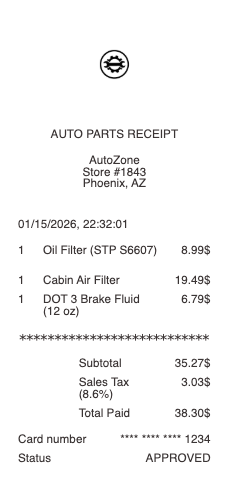
Overview of an Auto Parts Receipt
An auto parts receipt is the proof-of-purchase document issued when you buy vehicle parts, fluids, tools, or accessories. It comes from auto parts retailers — AutoZone, O'Reilly Auto Parts, NAPA, Advance Auto Parts, Pep Boys, CarQuest, Rock Auto — as well as independent garages and dealership parts counters. Unlike a general retail receipt, an auto parts receipt is built around precise part identification: each line links a SKU or manufacturer part number to a specific vehicle fit, warranty period, and (for some items) a refundable core deposit.
What an Auto Parts Receipt Includes
A complete auto parts receipt typically shows:
store name, address, and store number
date, time, and register or transaction ID
itemized list of parts with descriptions and SKU / manufacturer part numbers
quantities and unit prices for each item
subtotal, sales tax, and total
payment method (card last 4, cash, account number for commercial customers)
core charge line items where applicable (refundable deposits on batteries, alternators, starters)
warranty terms or warranty reference codes for tracked parts
cashier or sales rep ID
Retail vs Commercial Auto Parts Receipts
Retail receipts use standard pricing, list any loyalty or rewards account activity, and show consumer warranty terms. Commercial receipts — issued under a trade account at any major chain — use the business name, account number, and trade-discount pricing, often with net-30 billing terms rather than card payment. The line-level data is the same; the framing differs.
Why the Receipt Matters for Warranty and Returns
Auto parts more than most categories rely on the receipt. Many manufacturer warranties (lifetime brake pads, battery replacements, alternator cores) require the original receipt or a verifiable purchase record. A receipt with the correct SKU lets the warranty desk match the part on the shelf to your purchase in seconds. Without it, retailers may still locate the order through a rewards account or phone number, but the receipt is the canonical record.
Core Charges Explained
If you buy a battery, alternator, or starter, the receipt will likely show a "core charge" — a refundable deposit, typically $10 to $40, that you get back when you return the old part for recycling. The core charge appears as a separate line item so it's clear what part of the total is recoverable.
Lost Auto Parts Receipts — How to Recover Them
For warranty claims or expense records, most major retailers can reprint a receipt if you provide the date of purchase and either the payment card used or the rewards account / phone number on file. For independent shops, contact the shop directly with the approximate date and a part description. For personal documentation needs where reprint isn't possible, a template can reconstruct the original receipt details for your records.
Legitimate Uses for a Reconstructed Auto Parts Receipt
This template is intended for legitimate documentation purposes — replacing a lost receipt for an expense report, reconstructing a faded thermal receipt for a tax record, producing a mockup for design or testing work, or maintaining a personal vehicle maintenance log. It is not intended for fraudulent representation.
Brand names referenced (AutoZone, O'Reilly Auto Parts, NAPA, Advance Auto Parts, Pep Boys, and others) are trademarks of their respective owners. Any Receipt Generator is not affiliated with or endorsed by any of these retailers. Templates are provided for legitimate documentation use only.