Best Buy Receipt

Add custom logo
Edit line items
Choose payment method
Add/remove elements
Customize business information
Choose font

Overview of a Best Buy Receipt

A Best Buy receipt shows the details of an electronics purchase made at a Best Buy store. It is commonly used for returns, warranty claims, product verification, and expense records.

Unlike general retail receipts, Best Buy receipts often include higher-value items such as electronics, accessories, and home tech products. These purchases may require additional details like serial numbers, product identifiers, or warranty information.

What a Best Buy Receipt Includes

A typical Best Buy-style receipt includes:

  • store name and location

  • date and time of purchase

  • transaction or receipt number

  • itemized list of products

  • product names and identifiers (e.g. model or serial numbers)

  • quantities and unit pricing

  • subtotal

  • sales tax

  • total amount paid

  • payment method

Many receipts also include barcode references and return policy details.

Key Characteristics of Best Buy Receipts

What makes this format distinct is its focus on high-value items and product traceability. Purchases often involve electronics that may require warranty support, servicing, or replacement.

Because of this, receipts may include additional identifiers and structured item descriptions to ensure products can be verified accurately over time.

Common Uses of Best Buy Receipts

Best Buy receipts are frequently used for:

  • product returns and exchanges

  • warranty validation and service claims

  • tracking electronics purchases for business or personal use

  • keeping records of high-value items

Because electronics purchases often involve warranties or support plans, accuracy is critical. Product names, pricing, and transaction details must be clearly listed to ensure the receipt can be verified when needed.

Structure and Format

The format is designed to clearly display each item, especially when purchases involve multiple components or bundles. It supports both immediate transactions and long-term use, particularly for items that may require servicing or replacement.

When This Format Is Useful

A Best Buy-style receipt format is useful when you need a structured layout for electronics purchases with clear itemization and support for warranty-related details.

Legal Notice & Acceptable Use

A note on legitimate use. This template is for independent and small store operators issuing receipts to their own customers, and for shoppers reconstructing a record of an in-store purchase they actually made and paid for. Producing a receipt for goods that were not purchased, inflating the amount, or fabricating documentation to support a return, refund, store credit, warranty claim, expense report, business deduction, or insurance claim against a major retailer is fraud and is not what this tool is for. The only valid receipt for any return at a Walmart, Target, Costco, Home Depot, Best Buy, Macy’s, or other chain retailer is the original receipt issued by that retailer’s own POS system.

Best Buy is a trademark of Best Buy Co., Inc.. Any Receipt Generator is not affiliated with, endorsed by, sponsored by, or associated with Best Buy. This template is provided for legitimate uses such as reconstructing lost receipts, expense reporting, and creative projects.
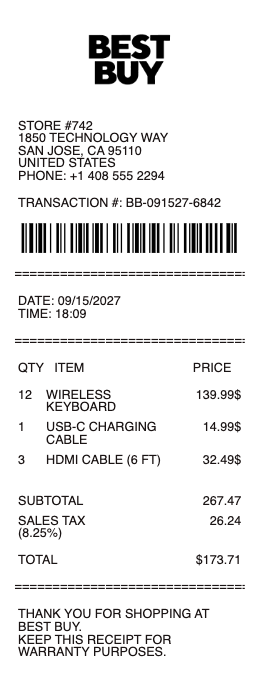
Best Buy Receipt

Best Buy Receipt Generator and Editor

Any Receipt Generator includes a free Best Buy-style receipt template you can fill in directly in your browser. The format mirrors what Best Buy prints at checkout — the yellow-tag store header, the SKU and model number on each line, the Geek Squad and Total Tech plan add-ons, and the return policy footer. Edit every field and download as PDF, PNG, or JPG.

Best Buy Return Policy and the Receipt

Best Buy's return window is 15 days for most items with a receipt, or 60 days for Total Tech and My Best Buy Plus members. Without a receipt, Best Buy can look up the purchase using the credit card, debit card, or My Best Buy account on file — usually within an extended return window. Items returned without proof of purchase may receive store credit only.

Best Buy Receipt Lookup

Best Buy customers can look up an old receipt through the My Best Buy account on bestbuy.com under Order History, or by visiting a store with the credit card used for the purchase. Online orders and pickup orders always email a receipt automatically; in-store transactions only email a copy when you scan or provide your My Best Buy member ID at checkout.

Best Buy Order Number and Gift Receipts

The order number on a Best Buy receipt is a 16-digit transaction reference printed near the top, used for returns, support tickets, and warranty claims. Gift receipts can be issued at the time of purchase by asking the cashier — they confirm the transaction without showing the price, useful for gifting electronics, appliances, and accessories.

Responsible Use

This Best Buy-style template is provided for legitimate documentation, expense recovery, design, and educational use only. Best Buy is a trademark of Best Buy Co., Inc.; Any Receipt Generator is not affiliated with Best Buy. Users are fully responsible for the accuracy and intended use of generated files.

Frequently
asked questions

Everything you need to know about the product and billing.

What is Best Buy's return policy without a receipt?
Without a receipt, Best Buy can usually look up the purchase by credit card, debit card, or My Best Buy account on file and process the return within an extended window. Without any record of purchase, returns are typically limited to store credit and may be capped by total dollar value.
Can I look up an old Best Buy receipt?
Yes. Sign in to My Best Buy on bestbuy.com to see Order History with full receipts for online and in-store purchases tied to your account. In-store purchases are only logged in your account if you scanned your My Best Buy ID at checkout.
How long is the Best Buy return window with a receipt?
Best Buy's standard return window is 15 days for most items with a receipt. My Best Buy Plus / Total Tech members get an extended 60-day window. Cell phones and connected devices have a 14-day window. Some categories (final-sale, opened software) cannot be returned.
Where is the order number on a Best Buy receipt?
The order number is a 16-digit transaction reference printed near the top of the Best Buy receipt, just below the store address. It is used for returns, support tickets, and warranty claims with the manufacturer or Geek Squad.
Does Best Buy email receipts?
Yes. Online and store-pickup orders automatically email a receipt to the address on the My Best Buy account. In-store purchases email a digital receipt only when you scan or provide your My Best Buy member ID at checkout.
Can I get a gift receipt from Best Buy?
Yes. Ask the cashier for a gift receipt at the time of purchase. The gift receipt confirms the transaction without showing the price, so the recipient can return or exchange the item without seeing what you paid.