Need a Booking.com receipt for an expense report, reimbursement, or VAT recovery? Booking.com is the world's largest hotel booking platform — and one of the most-confused receipt sources for business travelers. The platform issues two different documents: a booking confirmation from Booking.com (showing the total you paid them) and a separate hotel folio from the property (showing incidentals only). Generate a clean, consolidated Booking.com-style receipt in seconds using our tool above.
Booking.com Receipt
Add custom logo
Edit line items
Choose payment method
Add/remove elements
Customize business information
Choose font
Why Booking.com Receipts Confuse Business Travelers
Every hotel page we built — Hyatt, Marriott, Holiday Inn, Best Western — flagged third-party booking as a major pain point. Booking.com is the dominant third-party booker, with over 28 million accommodation listings globally. The problem: when you book through Booking.com, the receipt flow splits:
Booking.com issues a confirmation showing the total amount you paid (or will pay), the property, dates, and the Booking.com confirmation number
The hotel issues a folio at checkout for any on-site incidentals (parking, meals, minibar, paid Wi-Fi, resort fees not bundled in the original rate)
Some Booking.com rates are "Pay at Property" — Booking.com just confirms the reservation, the hotel charges you directly
Some Booking.com rates are "Pay Online" — Booking.com charges your card upfront via a virtual card or your real card
For corporate expense reports, you need to understand which payment mode applied to know which document is the "receipt."
Where to Find Your Booking.com Receipt
Sign in at booking.com/myreservations (or use the Booking.com app)
Click the past stay → Manage booking
Click Print confirmation or Print receipt (option name varies by booking type)
Save as PDF
Booking.com retains reservations for about 3 years in your account. The receipt PDF shows the booking confirmation, property details, dates, total paid (if Pay Online), and your Booking.com number. It does NOT include sales tax breakdown, hotel taxes, or itemized line items the way a hotel folio does — this is where corporate expense reports often hit friction.
What's on a Booking.com Receipt vs Hotel Folio
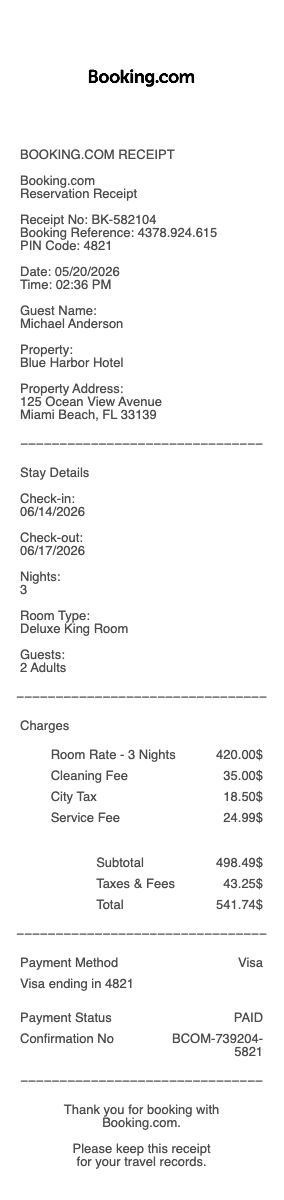
Booking.com confirmation includes:
Booking.com confirmation number and PIN
Property name and address
Check-in/check-out dates
Room type and number of guests
Cancellation policy
Total cost (if Pay Online)
Booking.com customer service contact
What's missing that corporate expense systems require:
Itemized nightly rate breakdown
Tax broken out by jurisdiction (city occupancy tax, state sales tax, tourism assessment)
Resort or destination fees (if applicable)
VAT registration number (for international stays needing VAT recovery)
The hotel's billing address (Booking.com is in the Netherlands; the hotel is wherever it physically is)
Pay Online vs Pay at Property — Receipt Implications
Pay Online bookings: Booking.com charges your card upfront. The "receipt" is the Booking.com confirmation showing the amount paid. The hotel never sees your real card — they receive payment via Booking.com's virtual card or settlement system. For VAT recovery and corporate expense, the receipt issuer is technically Booking.com B.V. (the Netherlands entity), not the hotel.
Pay at Property bookings: Booking.com just confirms the reservation; the hotel charges your card at checkout and issues a regular hotel folio. The Booking.com confirmation is supplementary documentation, not the actual payment receipt — the hotel folio is the primary receipt.
VAT Recovery on International Booking.com Stays
For business travelers with VAT-registered companies, international hotel stays may qualify for VAT recovery. The complication with Booking.com: the booking confirmation comes from Booking.com B.V. (a Dutch entity), not from the local hotel. Some tax authorities accept Booking.com confirmations for VAT recovery; others require the actual hotel folio with the property's local VAT registration ID. For maximum recoverability, request the hotel folio at checkout regardless of how you paid Booking.com — you may need both documents.
Cancellations, Refunds, and Disputed Charges
Booking.com refund policies vary by rate: refundable rates (free cancellation up to a specified date) vs non-refundable rates (charged in full at booking, no refund). If you cancelled a refundable rate, Booking.com issues a refund — sometimes 7–14 business days to appear on your card. The original receipt remains valid as a record of the cancelled booking. For disputed charges (e.g. the hotel was misrepresented or unavailable), Booking.com's customer service handles disputes through a separate ticket system — keep all original confirmations as evidence.
Genius Loyalty Program and Member Rates
Booking.com Genius is a free loyalty program offering 10–20% off select properties. Genius discounts appear as a line item in the rate breakdown. Higher levels (Genius Level 2, Level 3) unlock additional perks like free breakfast, room upgrades, and free airport transfers — which may appear as $0 line items on the booking confirmation. For travel-policy reporting where benefit value matters, save the original booking page screenshot showing the Genius level applied.
Generate a Clean Booking.com Receipt
Use the generator above to recreate a Booking.com-style receipt with all line items your finance team needs: booking confirmation number, property name and address, dates, itemized nightly rate, taxes by jurisdiction, resort fees, payment method, total paid. Download as PDF or PNG instantly.
Booking.com vs Expedia vs Hotels.com — Why Receipt Formats Differ
The big three OTAs (online travel agencies) have meaningfully different receipt formats. Booking.com confirmations are minimal — booking number, property, dates, total — without itemized taxes. Expedia typically shows more line itemization including tax breakdown. Hotels.com shows Rewards Nights credits earned. All three are common in corporate travel; finance teams should accept any of them, but the receipt formats are different enough that ARiverside-style expense systems sometimes flag them inconsistently. Document the booking source clearly on your expense report.
Booking.com Virtual Card Payments and Why Hotels Sometimes Charge Anyway
For Pay Online bookings, Booking.com pays the hotel via a virtual card (a one-time-use Mastercard or Visa number generated for that booking). The hotel never sees your real card. However: hotels can still charge incidentals (parking, restaurant, minibar) to your real card at checkout, and some hotels accidentally double-charge by running both the virtual and real cards. If you see two charges from the same hotel, contact Booking.com customer service first (1-888-850-3958 US) — they can verify which charge was theirs and dispute the duplicate with the property.
Booking.com B.V. — The Receipt Entity for International Tax Purposes
Booking.com is owned by Booking Holdings, headquartered in Norwalk, CT, but the operational entity issuing receipts is Booking.com B.V., based in Amsterdam, Netherlands. For European VAT-registered businesses, this matters: the VAT charged on the service fee (if any) is Dutch VAT, not local VAT. Some companies' VAT recovery processes only accept invoices from local entities — in those cases, the Booking.com confirmation may not qualify, and you'd need to use the hotel folio instead. Document carefully if VAT recovery is in scope.
Cancellation Receipts and Refund Documentation
If you cancelled a Booking.com reservation, Booking.com sends a separate cancellation confirmation showing the cancellation date, original booking details, and the refund amount (or $0 if non-refundable). Keep this confirmation alongside the original booking — for corporate accounting, both documents are needed to show the net spend was $0 on a cancelled refundable booking. For non-refundable cancellations, the original receipt remains valid as a record of the spend (the booking was paid but the stay didn't happen).
Generate a Booking.com Receipt — Free, No Login
Our Booking.com receipt generator creates a clean, expense-ready receipt with every line item Booking.com's minimal default confirmation lacks: booking confirmation number, property name and full address, itemized nightly rate breakdown, taxes by jurisdiction (city occupancy, state sales tax, tourism assessment), resort or destination fees, Genius loyalty discount applied, payment method (real card or virtual card), and total paid. Especially useful when Booking.com's default confirmation lacks itemization required by corporate expense systems, when international stays need VAT-formatted documentation, when Pay Online bookings split payment between virtual card and real card, when reconciling cancellation refunds against original bookings, and when finance teams require the hotel name and address rather than Booking.com B.V. as the receipt entity. Download as PDF or PNG instantly.
Frequently
asked questions
Everything you need to know about the product and billing.
How do I download my Booking.com receipt?
Sign in at booking.com/myreservations (or use the Booking.com app) → click the past stay → Manage booking → Print confirmation or Print receipt. Booking.com retains reservations for about 3 years. The PDF shows booking confirmation, property, dates, total paid — but does NOT include itemized tax breakdown, which corporate expense systems often require. Generate a clean replacement with itemization if your finance team needs more detail.
What's the difference between Pay Online and Pay at Property on Booking.com?
Pay Online means Booking.com charges your card upfront. The 'receipt' is the Booking.com confirmation showing the total paid. The hotel never sees your real card — they receive payment via Booking.com's virtual card. Pay at Property means Booking.com just confirms the reservation; the hotel charges your card at checkout and issues a regular hotel folio. The Booking.com confirmation is supplementary in this case — the hotel folio is the primary receipt for expense purposes.
Can I get a VAT receipt for an international hotel stay booked through Booking.com?
Sometimes. Booking.com confirmations come from Booking.com B.V. (Netherlands entity) with Dutch VAT on the service fee — not the local VAT of the destination country. Some tax authorities accept Booking.com confirmations for VAT recovery; others require the actual hotel folio with the property's local VAT registration ID. For maximum recoverability, request the hotel folio at checkout regardless of how you paid Booking.com. You may need both documents.
Why do I have two charges from the same hotel I booked through Booking.com?
For Pay Online bookings, Booking.com pays the hotel via a virtual card. The hotel can still charge your real card for incidentals (parking, restaurant, minibar) at checkout. Sometimes hotels accidentally double-charge by running both the virtual and real cards. If you see two charges from the same hotel, contact Booking.com customer service at 1-888-850-3958 (US) — they verify which charge was theirs and dispute the duplicate with the property.
How does the Booking.com Genius loyalty discount appear on my receipt?
Booking.com Genius (free to join) gives 10–20% off select properties at Level 1, with more perks at Levels 2 and 3 (free breakfast, room upgrades, airport transfers). The Genius discount appears as a separate line in the rate breakdown. Free perks (breakfast, upgrades) appear as $0 line items. For travel-policy reporting that tracks elite benefit value, save the original booking page screenshot showing the Genius level.
Are Booking.com, Expedia, and Hotels.com the same company?
No, but they're all in the OTA space and have similar functionality. Booking.com is owned by Booking Holdings (Norwalk, CT-headquartered). Expedia and Hotels.com are both owned by Expedia Group (Seattle-headquartered). Each issues receipts in a different format — Booking.com is the most minimal, Expedia typically shows more tax itemization, Hotels.com shows Rewards Nights earned. For corporate expense reports, document which OTA was used so finance can apply the correct receipt expectations.