Domino’s Receipt
Add custom logo
Edit line items
Choose payment method
Add/remove elements
Customize business information
Choose font
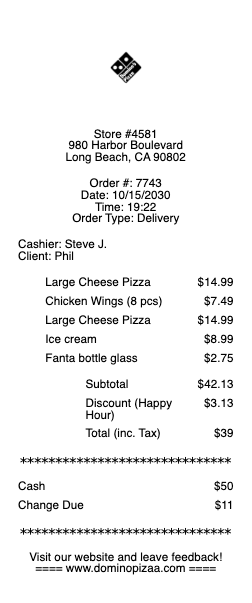
A Domino’s receipt shows the details of a pizza order made for delivery, takeaway, or in-store pickup. It is commonly used for reimbursements, per diem claims, and personal expense tracking. A typical Domino’s receipt includes the store number, order number, items, tax, delivery fee if applicable, and total paid.
This Domino’s receipt example follows a realistic delivery-style format. It includes a pizza, side, delivery charge, and sales tax. The structure works well for business meals, travel expenses, and everyday orders.
Use a Domino’s receipt when you need proof of a pizza delivery or pickup purchase.
This Pizza Hut receipt example follows a realistic quick-service pizza format. It includes a pizza, side item, drink, sales tax, and a clear total. The structure works well for dine-in or takeaway records.
Use a Pizza Hut receipt when you need proof of a pizza purchase for work or personal records.
Efficient Documentation with Our Receipt Maker Any Receipt Generator is an online receipt generator for creating professional, customizable receipts directly in your browser. It is used by freelancers, small businesses, and individuals who need to create a receipt with clear, well-structured payment documentation. Instead of building documents manually, our receipt maker allows you to choose a receipt template, edit every field, and download a formatted file in seconds.
Users often search for a reliable receipt generator or a free receipt maker to handle their billing needs. This platform is designed to meet those use cases with a comprehensive library of options, accurate formatting, and instant export options. As a dedicated receipt maker, we provide tools for retail purchases, groceries, rental payments, and more.
Each template includes editable fields for business names, addresses, dates, items, totals, taxes, fees, and payment types. You can upload a logo, adjust spacing, and modify layout elements as needed. Receipts can be downloaded in PDF, PNG, or JPG format, making them easy to store, share, or print. The entire process takes less than a minute, making Any Receipt Generator an efficient solution for creating receipts online.
Each design includes editable fields for business names, dates, items, and taxes. You can upload a logo and adjust the layout as needed. The entire process takes less than a minute, making our receipt maker the most efficient solution for creating receipts online.
Legal Disclaimer: Any Receipt Generator does not validate, certify, or verify the authenticity of any generated documents. This tool is intended strictly for legitimate administrative and bookkeeping purposes. Use of this tool for the creation of fraudulent documentation or to engage in any unlawful activity is strictly prohibited. Users assume full legal responsibility for the accuracy and intended use of the files they generate.
Frequently
asked questions
Everything you need to know about the product and billing.
What is an online receipt generator?
Any Receipt Generator is an online receipt generator that lets you create clean, customizable receipts directly in your browser.
Can I edit every detail on a receipt?
Yes. All fields can be customized, including business information, line items, dates, totals, and payment details.
What file formats can I download?
Receipts can be exported in PDF, PNG, or JPG format.
Can I upload a logo?
Yes. You can upload your own logo and adjust spacing and layout elements.
Does it work on mobile?
Yes. The editor works on phones, tablets, and desktop devices.
Is Any Receipt Generator free to use?
Yes. You can create and export receipts for free. Watermark-free downloads are available with a paid upgrade.