An itemized receipt shows every individual product or service purchased — quantity, unit price, line total — rather than just a single bundled total. It's the format required for corporate expense reports, IRS audits, insurance reimbursement, FSA/HSA claims, and any tax-deductible business purchase. With 200+ monthly US searches for "itemized receipt maker" alone (CPC $150) and a much larger cluster across itemized-related queries, this is one of the highest-commercial-intent receipt templates. Generate a clean itemized receipt in seconds with our tool above.
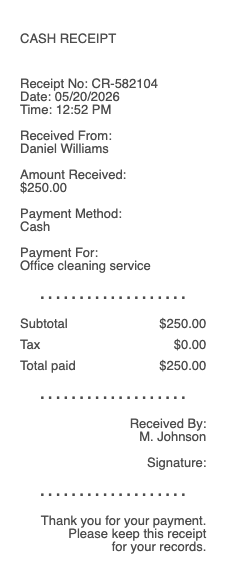
Itemized Receipt
Add custom logo
Edit line items
Choose payment method
Add/remove elements
Customize business information
Choose font
What Makes a Receipt "Itemized" (And Why It Matters)
An itemized receipt lists each purchase line by line: SKU or description, quantity, unit price, line subtotal. A non-itemized receipt shows only the total. The difference is enormous for any purchase that needs to be documented for someone else — finance team, tax preparer, insurance adjuster, IRS auditor.
Most retail point-of-sale systems automatically produce itemized receipts, but several common situations result in non-itemized or partially-itemized receipts:
Restaurant credit-card slips that show only "Food & Beverage: $X"
Bar tabs where the bartender combines drinks into a single line
Hotel charges signed to a room where the front desk bills as "Restaurant" only
Service businesses (plumbers, contractors) that issue invoices showing only "Services Rendered: $X"
Cash transactions where the seller writes a single total on a piece of paper
For these scenarios, an itemized replacement receipt is often required by the entity asking for documentation.
When You Need an Itemized Receipt
Corporate expense reports. Most companies require itemized receipts for any single expense over $25 (sometimes $75). SAP Concur, Expensify, Ramp, and Brex all flag non-itemized receipts as policy violations. Without an itemized breakdown, the expense reviewer can't verify what was purchased — only that money was spent.
IRS audits and Schedule C deductions. The IRS specifies that business expense documentation must show the date, amount, place, and nature of the expense. "Nature of the expense" requires itemization for meals, supplies, equipment, and services. A receipt showing only "$485 — Office Depot" is not sufficient; it must list what was purchased.
FSA and HSA reimbursement. Flexible Spending Accounts and Health Savings Accounts require itemized receipts for medical expense reimbursement. The receipt must show each item (prescription, copay, supply), the date, and the cost. Generic receipts showing "Pharmacy: $80" are routinely rejected by FSA administrators like WageWorks, HealthEquity, and Optum.
Insurance claims. Vehicle damage claims, travel insurance reimbursement, and homeowner's claims all require itemized documentation. Adjusters need to verify each item's value separately.
50/50 split rentals and shared expenses. Two people splitting a meal, a vacation, or a roommate purchase need itemized receipts to allocate costs fairly.
What Belongs on an Itemized Receipt
Business or seller name and address
Date and time of the transaction
Receipt or transaction number
Line items, each with: description, quantity, unit price, and line total
Subtotal before tax
Sales tax, itemized by jurisdiction if multiple apply (state, local, district)
Tips or gratuity as a separate line (for restaurants, services)
Total amount paid
Payment method: cash, last four of card, check number, gift card, store credit
Return policy (especially for retail)
Itemized vs Non-Itemized — When Each Is Acceptable
Itemized is required for: business expense reports above $25-$75, IRS Schedule C deductions, FSA/HSA claims, insurance claims, B2B invoicing, divorce or estate accounting, audits at the federal/state/local level.
Non-itemized may be acceptable for: personal records under your own threshold, tipping at a bar where you have no need for receipts, small cash transactions under $25 you don't need to document.
For business use, the rule is simple: when in doubt, itemize. The cost of itemizing is zero. The cost of NOT itemizing is a rejected expense report or a tax deduction lost during audit.
Itemized Receipt Formats — Restaurant vs Retail vs Service
Restaurant itemized receipts show each food and drink ordered separately, with modifiers (extra cheese, no onions) noted under their respective line. Tip line is separate. Tax line shows sales tax only — many states exempt tip from sales tax, so the format matters for accounting.
Retail itemized receipts list each SKU with description and price. Discounts appear as negative line items (e.g., "Member discount: -$5.00"). Promotional bundles list both the bundle price and the implied individual items.
Service business itemized receipts describe each service rendered: labor hours (with hourly rate), materials used (with unit cost), travel charges, equipment rental, and any disposal or environmental fees. For mechanics, electricians, plumbers, and contractors, the itemized format is critical for warranty claims and insurance reimbursement.
How to Get an Itemized Receipt When One Wasn't Provided
If the seller gave you a non-itemized receipt and you need an itemized one, the standard approach:
Return to the place of purchase, ask for an itemized reprint (most POS systems can produce one within their retention window)
For credit card purchases, use the transaction details to identify what was bought — your statement plus an itemized recreation can satisfy most reimbursement systems
Generate a replacement itemized receipt with the original amount, date, and as much detail as you can reconstruct — pair with the original card statement
For restaurant meals specifically, ask the restaurant for an itemized check copy — they keep records for typically 30-90 days
Generate an Itemized Receipt Online
Use the generator above to create a clean, properly-formatted itemized receipt with every line item your finance team or tax preparer requires. Add the business name, transaction date, individual items with quantities and unit prices, subtotal, sales tax broken out, total, and payment method. Download as PDF or PNG instantly.
Itemized Receipts for Restaurant Meals — The Tip and Tax Trap
The most-disputed itemized receipt category in corporate expense reports is restaurant meals. The complication: restaurants typically print TWO receipts at the table — the itemized check (showing each food and drink) and the credit-card slip (showing only the total + tip line). Most diners take the credit-card slip and leave the itemized check behind. Result: when the finance team asks for itemization, the diner only has the slip. Always grab both papers from the table. If you only have the credit-card slip, generating a replacement itemized receipt with the original restaurant name, date, and total works as supplementary documentation — though for amounts over $75 finance teams may require the original itemized check.
FSA and HSA — Why "Pharmacy: $80" Gets Rejected
Health spending accounts (FSAs, HSAs, HRAs) require itemized documentation per IRS Publication 502. The required line items: date of service, type of service (Rx name, doctor visit code, copay amount), and the amount paid. A pharmacy receipt showing only "Pharmacy: $80" doesn't satisfy this — it could be cosmetics, vitamins, or non-eligible items. FSA administrators (WageWorks, HealthEquity, Optum, FlexBank) routinely reject non-itemized pharmacy receipts. The fix: pharmacies will print a year-end "qualified medical expenses" summary on request, or you can generate an itemized replacement with the specific drugs/services and dates you can reconstruct.
Itemized Receipts for Concur, Expensify, Ramp, and Brex
The modern corporate expense systems all use OCR to auto-extract receipt data — and they're trained on itemized formats. A non-itemized receipt entering Concur, Expensify, Ramp, or Brex gets flagged for manual review, slowing your reimbursement by days or weeks. Worse, repeated submissions of non-itemized receipts can trigger policy violation flags on your account. Best practice: at the moment of any business purchase, request itemization (paper or email PDF). If the seller can't provide it on the spot, generate a clean replacement before submitting to expense.
Itemized vs Detailed Invoice — Two Different Documents
Confusingly, B2B vendors sometimes provide a "detailed invoice" instead of an "itemized receipt." The two overlap but aren't identical. An invoice requests payment (issued before money changes hands); an itemized receipt confirms payment with itemization. For corporate accounting, the standard chain is: invoice → payment → itemized receipt. Some finance teams accept the invoice alone if it includes "PAID" or a payment date stamp. Most prefer both. If you only have one, generate the missing document with matching data — they should reconcile to the penny.
Generate an Itemized Receipt — Free, No Login
Our itemized receipt generator creates a clean, audit-ready receipt with every line item your finance team, FSA administrator, IRS auditor, or insurance adjuster requires. Add the business name and address, transaction date, individual line items (description, quantity, unit price, line total), subtotal, sales tax broken out by jurisdiction, optional tip line, total, and payment method. Works for restaurant meals where you only got the credit-card slip, retail purchases where the receipt faded, service business invoices that lacked itemization, FSA/HSA reimbursement when the pharmacy receipt was generic, and corporate expense submissions that need Concur/Expensify-ready format. Download as PDF or PNG instantly — no login required.
Frequently
asked questions
Everything you need to know about the product and billing.
What is an itemized receipt?
An itemized receipt lists every individual product or service purchased — quantity, unit price, and line total — rather than just a single bundled total. It's the format required for corporate expense reports above $25-75, IRS Schedule C deductions, FSA/HSA medical reimbursement, insurance claims, and most B2B documentation. Most retail point-of-sale systems automatically produce itemized receipts; restaurant credit-card slips, service business invoices, and cash transactions often don't.
When do I need an itemized receipt?
You need an itemized receipt for: corporate expense reports above your company's threshold (typically $25-75), IRS-audited business deductions, FSA/HSA medical reimbursement claims, insurance claims (vehicle, travel, homeowner's), B2B invoicing, and any time someone other than you needs to verify what was purchased. For personal records under your own threshold, a non-itemized total is usually fine.
How do I get an itemized receipt when the restaurant only gave me the credit card slip?
Restaurants print two receipts at the table — the itemized check showing each food and drink, and the credit-card slip showing only the total + tip line. Most diners take only the slip. If you need itemization later: return to the restaurant within 30-90 days (their typical retention window) and ask for a reprint, or generate a replacement itemized receipt with the original restaurant name, date, total, and items you can reconstruct from memory. Always grab both papers from the table going forward.
Why does my FSA keep rejecting my pharmacy receipt?
FSA and HSA administrators (WageWorks, HealthEquity, Optum, FlexBank) require itemized documentation per IRS Publication 502. The receipt must show the date of service, type of service or specific drug name, and amount paid. A pharmacy receipt showing only 'Pharmacy: $80' doesn't satisfy this requirement — it could include non-eligible items (cosmetics, vitamins). Request a printed itemized 'qualified medical expenses' summary from your pharmacy, or generate a replacement itemized receipt with the specific eligible items.
What's the difference between an itemized receipt and a detailed invoice?
An invoice requests payment (issued before money changes hands); an itemized receipt confirms payment with itemization. For corporate accounting, the standard chain is: invoice → payment → itemized receipt. Some finance teams accept the invoice alone if it includes a 'PAID' or payment date stamp. Most prefer both. If you only have one, generate the missing document — both should reconcile to the penny.
Can I submit an itemized receipt via my expense system if the receipt I have is non-itemized?
Modern expense systems (Concur, Expensify, Ramp, Brex) use OCR to extract receipt data and are trained on itemized formats. A non-itemized receipt gets flagged for manual review, delaying reimbursement by days or weeks. Best practice: generate a clean itemized replacement matching the original charge, and submit both alongside your card statement for full transparency. The replacement should be honest reconstruction of what was purchased — not a fabrication.