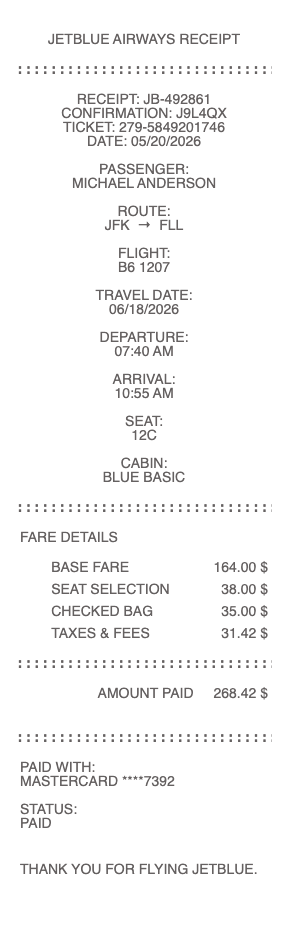
Need a JetBlue receipt for an expense report, baggage reimbursement, Mint cabin upgrade, or EvenMore Space documentation? JetBlue's receipt portal has improved in recent years, but ancillary purchases (baggage, seat selection, in-flight Wi-Fi, snacks) still arrive as separate transactional emails — and many travelers never get them. Generate a clean, properly-itemized JetBlue receipt in seconds using our tool above.
JetBlue Airlines Receipt
Add custom logo
Edit line items
Choose payment method
Add/remove elements
Customize business information
Choose font
How JetBlue Splits Receipts Across Multiple Systems
Like most major airlines, JetBlue doesn't issue a single consolidated receipt for an entire trip. Charges spread across at least four systems:
Flight booking receipt — emailed when you book; pull from jetblue.com → Manage Trips
EvenMore Space / Mint upgrades — separate receipt if added after booking
Baggage fees — paid online appears with the booking; paid at the airport often only as a printed slip
In-flight Wi-Fi (Fly-Fi) — free for all passengers, no receipt needed
In-flight food and beverage purchases — emailed to the address you enter at the seat-back screen
For business travelers, this fragmentation creates the standard problem: ancillary charges that should be reimbursable get rejected because the receipt is missing.
Where to Find a JetBlue Flight Receipt
The official path:
Go to jetblue.com → Manage Trips
Enter your 6-character confirmation code (or 13-digit ticket number starting with 279) and last name
Click Print Itinerary or View Receipt
JetBlue retains itineraries for about 11 months after travel — older flights require a call to TrueBlue Member Services (1-800-538-2583) or a written request, which can take 7–14 business days.
JetBlue Baggage Receipts
JetBlue charges $40 for the first checked bag, $50 for the second, $150 for oversized, and $100+ for overweight. Mosaic and Mint passengers get free bags. For business travelers needing reimbursement:
Bags paid online during check-in: appears on the same Manage Trips receipt page
Bags paid at the kiosk: kiosk prints a paper receipt only
Bags paid at the counter: gate agent prints a paper receipt
Oversized/overweight assessed at the gate: paper-only
The paper-only receipts are easy to lose, fade on thermal paper, or get rejected by OCR-based expense systems. Generate a clean digital version for expense submission with the original date, amount, and confirmation number.
JetBlue Mint, EvenMore Space, and Premium Cabin Upgrades
JetBlue Mint is the premium transcontinental and international product ($800–$2,500+ depending on route) — receipts appear with the original booking when included from the start, but Mint upgrades purchased after booking (using TrueBlue points or cash) generate a separate confirmation. EvenMore Space ($25–$200 depending on route, more legroom and early boarding) and EvenMore Speed add-ons similarly issue separate receipts. For corporate expense, document the original fare plus each upgrade separately — finance teams often need to categorize them differently.
TrueBlue Award Tickets — Why Your JetBlue Receipt Shows Near-$0
Booked with TrueBlue points? Your receipt shows the cash portion only — typically $5.60 TSA fee for domestic, plus international taxes if applicable. The TrueBlue points used are tracked in your account but do not appear on the receipt as a dollar value. For expense reports, only the cash portion is reimbursable. Save your TrueBlue booking confirmation separately to document the points redemption.
JetBlue Vacations — Bundled Receipt Issues
JetBlue Vacations packages (flight + hotel) issue a single combined receipt showing the bundled price without itemizing flight versus hotel versus car. For corporate expense reports that reimburse flight and lodging at different rates, this creates a categorization problem. Request an itemized receipt via JetBlue Vacations customer service (7–14 day turnaround), or generate a clean version with separate line items based on the package details.
Generate a Clean JetBlue Receipt
Use the generator above to create a properly-itemized JetBlue receipt with confirmation number, flight segments, fare class, EvenMore Space charges, baggage line items, TSA fees, and payment method. Download as PDF or PNG.
TrueBlue Mosaic Status and Receipt Implications
JetBlue's Mosaic elite program (the only tier above standard TrueBlue) provides perks worth documenting on your folio: two free checked bags, EvenMore Space available at no charge, dedicated security lines, priority boarding, free same-day flight changes, and a $50 statement credit for in-flight purchases on the JetBlue Mastercard. These benefits typically appear as $0 line items on your booking. For travel-policy reporting where "value received" matters (some Fortune 500 corporate travel policies track elite benefit value separately), keep the original Mosaic confirmation alongside your receipt.
JetBlue's Fare Bundles — Blue, Blue Plus, Blue Extra, and Mint
JetBlue prices by bundle, not just by cabin: Blue (basic, no bag), Blue Plus (1 free bag), Blue Extra (1 free bag + early boarding + free same-day change), Mint (premium cabin with lie-flat seats on select routes). The fare bundle should appear on the receipt as the "fare class" or "fare family" — and matters for expense policy compliance. Some corporate policies require Blue Plus or higher; others mandate Blue (basic) only and refuse to reimburse upgrades. Document the bundle clearly on your receipt to avoid expense rejection.
JetBlue + American Airlines Northeast Alliance Codeshare Receipts
Through the JetBlue + American Airlines Northeast Alliance (still being unwound but in effect for some bookings), a flight ticket may show a JetBlue flight number but be operated by American — or vice versa. The receipt comes from the marketing carrier (the airline whose flight number you booked), not the operating carrier. This matters for baggage receipts, which come from whichever airline you actually flew. For complete trip documentation, you may need receipts from two airlines for a single journey.
JetBlue Wi-Fi (Fly-Fi) — Free but Sometimes Receiptless
JetBlue offers free in-flight Wi-Fi (Fly-Fi) to all passengers on all flights — no purchase required, no receipt issued. This is one of the few airlines where Wi-Fi is a perk, not a charge. For corporate Wi-Fi reimbursement, document that JetBlue includes Wi-Fi at no charge (no receipt needed, no reimbursement either). For other JetBlue in-flight services that DO charge (premium snack boxes, alcoholic drinks beyond complimentary), the seat-back system emails the receipt to the address you enter when paying — easy to miss if you skip the prompt or mistype.
Generate a JetBlue Receipt for Expense Reports — Free, No Login
Our JetBlue receipt generator creates a clean, expense-ready receipt covering every JetBlue charge type: base fare (Blue, Blue Plus, Blue Extra, or Mint bundle), EvenMore Space upgrades, EvenMore Speed, baggage line items, TSA and government taxes, in-flight purchases, and payment method. Especially useful when you've lost a paper baggage receipt printed at the kiosk or gate, when EvenMore Space upgrade emails went to spam or the wrong address, when a Mint upgrade purchased separately needs documentation, or when JetBlue Vacations bundled packages need flight-versus-hotel itemization. Download as PDF or PNG instantly.
Frequently
asked questions
Everything you need to know about the product and billing.
How do I get a copy of my JetBlue receipt?
Go to jetblue.com → Manage Trips, enter your 6-character confirmation code (or 13-digit ticket number) and last name. Click Print Itinerary or View Receipt. JetBlue keeps itineraries for about 11 months — for older flights, call TrueBlue Member Services at 1-800-538-2583 or submit a written request (7–14 business days).
Where's my JetBlue baggage receipt?
If paid online during check-in, it's on the same Manage Trips receipt page as your ticket. If paid at the kiosk or counter, it was printed on thermal paper — your only copy. If you've lost it, call TrueBlue Member Services for a duplicate, or generate a clean replacement with the original date, amount, and confirmation number for expense submission.
Does JetBlue charge for Wi-Fi?
No — JetBlue Fly-Fi is free for all passengers on all flights. There's no Wi-Fi receipt because there's no charge. For corporate Wi-Fi reimbursement on JetBlue flights, document that Wi-Fi is included at no charge. Other airlines charge $8–$15 per segment, but JetBlue is the rare exception.
What's the difference between Blue, Blue Plus, Blue Extra, and Mint on my receipt?
These are JetBlue's fare bundles. Blue is basic (no bag, no early boarding). Blue Plus includes 1 free bag. Blue Extra adds early boarding and free same-day change. Mint is the premium cabin with lie-flat seats on transcontinental and international routes. The bundle should appear on your receipt as the fare family or fare class — corporate travel policies often specify which bundles are reimbursable.
Why does my TrueBlue points booking receipt show only a few dollars?
TrueBlue award tickets show the cash portion only — typically $5.60 TSA fee for domestic flights, plus international taxes if applicable. The TrueBlue points used are tracked in your account but don't appear as a dollar value on the receipt. For expense reports, only the cash portion is reimbursable. Save your TrueBlue booking confirmation separately to document the points redemption.
How do I get separate flight and hotel receipts for a JetBlue Vacations package?
JetBlue Vacations issues a single bundled receipt showing the package total without breaking out flight versus hotel versus car. Request an itemized receipt via JetBlue Vacations customer service (7–14 business days), or generate a clean version with separate flight and hotel line items based on the package confirmation details for faster expense submission.