PayPal Receipt

Add custom logo
Edit line items
Choose payment method
Add/remove elements
Customize business information
Choose font

Overview of a PayPal Receipt

A PayPal receipt confirms a digital transaction processed through PayPal. It documents a payment made between two PayPal accounts, a payment to an online merchant, or a money transfer between individuals. PayPal generates receipts automatically for every transaction and delivers them by email along with a permanent transaction record visible in the account dashboard.

What a PayPal Receipt Includes

A standard PayPal receipt shows:

  • PayPal transaction ID (the canonical reference for any dispute or refund)

  • date and time stamped in the sender's time zone

  • sender name and PayPal account email

  • recipient name and PayPal account email or business profile

  • payment amount and currency (PayPal supports 25+ currencies)

  • payment type (Goods and Services vs Friends and Family vs Merchant)

  • fees deducted (recipient-side for commercial payments)

  • funding source (PayPal balance, bank account, debit/credit card, PayPal Credit)

  • order or invoice number if linked to a merchant transaction

PayPal Goods and Services vs Friends and Family

PayPal receipts distinguish between two main payment types. Goods and Services payments include buyer protection, charge a fee to the recipient (typically 2.99% + a fixed fee in the US), and qualify for chargebacks and dispute resolution. Friends and Family payments have no buyer protection, no fee for domestic transfers, and cannot be disputed. The receipt clearly labels which type was used — important for both tax records and dispute eligibility.

Common Uses of PayPal Receipts

PayPal receipts are commonly used for:

  • proof of payment to a freelancer, contractor, or service provider

  • expense documentation for business reimbursement

  • tax records — especially 1099-K reporting for sellers

  • dispute or chargeback evidence within the 180-day window

  • merchant order tracking on eBay, Etsy, and similar marketplaces

  • international transfer documentation for currency or audit reasons

Legal Notice & Acceptable Use

A note on legitimate use. This template is for independent and small store operators issuing receipts to their own customers, and for shoppers reconstructing a record of an in-store purchase they actually made and paid for. Producing a receipt for goods that were not purchased, inflating the amount, or fabricating documentation to support a return, refund, store credit, warranty claim, expense report, business deduction, or insurance claim against a major retailer is fraud and is not what this tool is for. The only valid receipt for any return at a Walmart, Target, Costco, Home Depot, Best Buy, Macy’s, or other chain retailer is the original receipt issued by that retailer’s own POS system.

PayPal is a trademark of PayPal Holdings, Inc. Any Receipt Generator is not affiliated with, endorsed by, sponsored by, or associated with PayPal. This template is provided for legitimate uses such as reconstructing lost receipts, expense reporting, and creative projects.
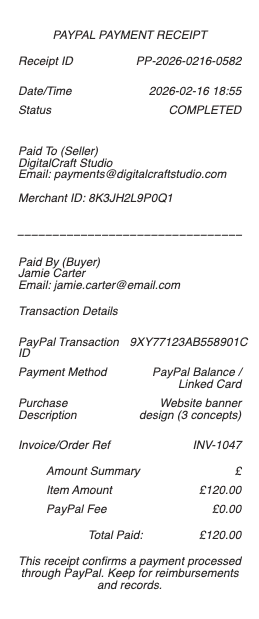
PayPal Receipt

PayPal Receipt Generator and Editor

Any Receipt Generator includes a free PayPal-style receipt template you can fill in directly in your browser. The format mirrors the standard PayPal transaction receipt — the PayPal header, transaction ID, sender and recipient handles, payment-type label (Goods and Services or Friends and Family), funding source, and total. Edit every field and download as PDF, PNG, or JPG.

How to Print or Download a PayPal Receipt

To print a receipt from PayPal, sign in at paypal.com, open Activity, click the specific transaction, and choose Print or Download PDF. The mobile app uses the same Activity tab — tap a transaction and select Share or Download. Email receipts are sent automatically at the time of every PayPal transaction and remain in your inbox as a permanent record.

How to Spot a PayPal Receipt Email Scam

Fake PayPal receipt emails are common scams. A genuine PayPal receipt always comes from service@paypal.com or noreply@paypal.com, references your actual PayPal account name, lists a verifiable transaction ID, and links only to paypal.com (never to a shortened or third-party link). If a "receipt" arrives for a payment you did not make, log in to paypal.com directly — not through the email link — to verify or report it.

PayPal Confirm Receipt and Payment Receipt Look

A standard PayPal payment receipt shows: PayPal transaction ID, date, sender name and email, recipient name and email, the payment amount and currency, the payment type (Goods and Services vs Friends and Family), the funding source (PayPal balance, bank, card, or PayPal Credit), and any merchant order number. The Confirm Receipt button appears in PayPal disputes when a buyer needs to confirm they received goods or services.

Responsible Use

This PayPal-style template is provided for legitimate documentation, expense recovery, design, and educational use only. PayPal is a trademark of PayPal Holdings, Inc.; Any Receipt Generator is not affiliated with PayPal. Users are fully responsible for the accuracy and intended use of generated files.

Frequently
asked questions

Everything you need to know about the product and billing.

How do I print a receipt from PayPal?
Sign in at paypal.com, open Activity, click the transaction, and choose Print or Download PDF. The mobile app uses the same Activity tab — tap a transaction and select Share or Download. PayPal also emails a receipt automatically at the time of every transaction.
What does a real PayPal receipt look like?
A genuine PayPal receipt shows the PayPal transaction ID, date, sender and recipient names with emails, payment amount and currency, payment type (Goods and Services vs Friends and Family), funding source, and any merchant order number. It comes from service@paypal.com or noreply@paypal.com.
How can I tell if a PayPal receipt email is a scam?
A real PayPal receipt always comes from service@paypal.com or noreply@paypal.com, lists your real PayPal account name, includes a verifiable transaction ID, and links only to paypal.com. If a "receipt" arrives for a payment you did not make, sign in to paypal.com directly to verify or report it.
What is the Confirm Receipt button in PayPal?
Confirm Receipt appears in PayPal disputes when a buyer needs to confirm they received the goods or services. Clicking it releases the held payment to the seller. If the button is missing, the dispute may already be resolved or escalated to claim — check the dispute status in the Resolution Center.
Can I get a PayPal receipt for a donation?
Yes. PayPal automatically emails a receipt for any donation made through PayPal Giving Fund or directly to a registered nonprofit. The receipt includes the recipient organization, the amount, and a transaction reference suitable for tax-deduction records.
How do I look up an old PayPal receipt?
All PayPal transactions are stored permanently in your PayPal account. Sign in, open Activity, and filter by date or amount to find the transaction. Email receipts from past payments also remain in your email inbox unless you deleted them.