The complete guide to every kind of Spotify receipt — from the viral music "receipt" trend showing your top-played songs, to actual Spotify Premium payment invoices for expense reports, to Spotify for Artists royalty statements and gift card receipts. Below you can generate a real Spotify payment receipt instantly, or learn how to create a music stats receipt with the right third-party tool.
Spotify Receipt
Add custom logo
Edit line items
Choose payment method
Add/remove elements
Customize business information
Choose font
The 5 Types of Spotify Receipts (And Which One You Actually Want)
"Spotify receipt" is one of the most overloaded search terms on the internet. Depending on what you're looking for, the answer is completely different. Here are the five distinct types of Spotify receipts, in order of how often people search for them:
Music Stats Receipt — the viral social media trend showing your top songs and artists styled like a grocery receipt. Generated by third-party tools like Receiptify, not Spotify itself.
Spotify Premium Payment Receipt — the official invoice for your monthly subscription charge. Used for expense reports, reimbursement, and tax documentation.
Spotify Gift Card Receipt — the proof-of-purchase you receive when buying a Spotify gift card, either digitally or in-store.
Spotify for Artists Royalty Statement — the payout breakdown musicians and labels receive from Spotify (technically a statement, not a receipt, but searched as one).
Spotify Wrapped Receipt — the year-in-review summary Spotify generates each December, sometimes mistakenly called a "receipt."
The Viral Spotify Music Receipt — How It Started and How to Make One
The Spotify music receipt format was popularized in 2020 by a Northeastern University student who built Receiptify — a web app that pulls your Spotify listening data through the official Spotify API and renders your top 10, 25, or 50 tracks in the style of a long thermal-printer receipt. Each track appears as a "line item" with the song name, artist, and listening duration as the "price." The format includes a fake transaction ID, a "cashier" name (your Spotify display name), a subtotal, and a "thank you" footer.
The format exploded on TikTok and Instagram in 2021 and has continued to trend every year around Spotify Wrapped season. Several alternatives have since launched (ReceiptiPie, Stats.fm, Music Bingo Receipts), and there are now Receiptify apps in both the App Store and Google Play.
Important: The music receipt is purely a visual graphic. It cannot be used as a financial document, an expense receipt, or a proof of payment. If that's what you need, you want a Spotify Premium payment receipt — covered in the next section.
Spotify Premium Payment Receipt — Where to Find It and What's On It
Spotify does not automatically email a receipt for each monthly Premium renewal — only the initial signup confirmation. To get the actual payment receipt for a specific charge, you have to download it manually:
Go to spotify.com and log in
Click your profile icon → Account
In the left sidebar, select Manage your plan
Scroll down to Payment history
Click the date of any past charge — a downloadable PDF invoice opens
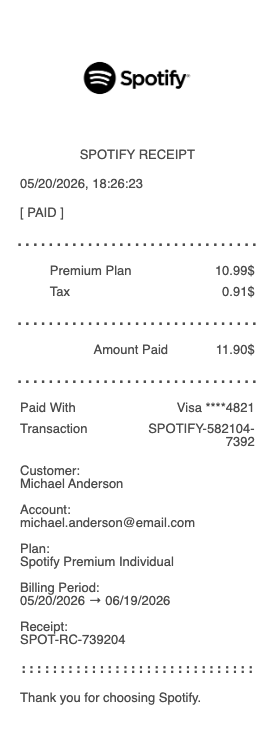
Each Spotify invoice PDF contains the legally required billing fields: Spotify USA Inc. as the merchant, the billing address you registered with, the plan name (Individual, Duo, Family, Student, or Premium Mini), the billing period, amount charged, applicable sales tax by state, and the last four digits of the card or PayPal account used. The PDF carries a unique invoice number you can reference in expense reports.
What If Your Spotify Payment Receipt Is Missing Detail?
A common frustration: company finance teams sometimes reject Spotify's PDF invoice because it lacks an itemized breakdown, doesn't show the customer's name (only an account email), or uses a sales-tax-by-state line that confuses non-US reviewers. In those situations, our generator on this page produces a clean, professional Spotify-style payment receipt with every field your finance team needs — itemized line, customer name, full address, tax breakdown, and payment method. Use it as a supplemental document alongside the official Spotify invoice, never as a replacement.
Spotify Gift Card Receipts
If you bought a Spotify gift card, the receipt you receive depends on where you purchased it:
Spotify.com gift card — emailed digital receipt from orders@spotify.com with the card amount and recipient.
Retailer (Target, Walmart, CVS, etc.) — printed receipt at checkout. The Spotify gift card is treated as a regular merchandise SKU.
Amazon or other online retailer — order confirmation email and an invoice accessible from your order history.
If you've lost a Spotify gift card receipt and need a replacement for reimbursement, our generator can recreate the basic structure using the original purchase date and amount.
Spotify for Artists Royalty Statements
Musicians, labels, and rights-holders receive monthly royalty statements through their distributor (DistroKid, CD Baby, TuneCore, etc.) — not directly from Spotify. These statements show streams, revenue per stream by country, and total payout. They are technically royalty statements, not receipts, but many artists search for "Spotify receipt" when they mean this document. If you need to generate a payment summary for tax purposes, distributors typically provide downloadable annual statements in PDF or CSV.
Generate Your Spotify Receipt Below
Use the generator at the top of this page to create a clean Spotify Premium payment receipt for expense reports, reimbursement, or personal record-keeping. Choose your plan tier, billing period, and amount — then download as PDF or PNG instantly. No login required.
Why the Spotify Music Receipt Went Viral — A Cultural Anatomy
The Spotify music receipt taps into a very specific Gen Z and Millennial impulse: quantified self-expression. Sharing your top tracks as a "receipt" is a way of saying "this is who I am" without literally listing your favorite bands — the receipt format adds ironic distance and a nostalgic, analog texture (the dot-matrix font, the perforated edges) that pairs well with intentionally low-effort social posts. It has become a recurring genre on dating apps, where people post their Receiptify as a personality test, on study TikTok, where the receipt sits next to a notebook and matcha latte, and during the December Spotify Wrapped season, where music receipts compete for visual originality. Unlike Spotify Wrapped itself, the Receiptify format runs year-round, generates instantly, and lets you choose a custom time window (last month, last 6 months, or all-time).
What Data Does Receiptify Actually Access?
If you've ever clicked "Log in with Spotify" on Receiptify or a similar music receipt tool, you've granted that app access to your Spotify account via the official Spotify Web API. The specific scopes Receiptify requests are user-top-read (your most-played tracks and artists) and user-read-private (your basic profile). It does not get access to your email, payment method, password, or the ability to modify your playlists. Spotify lets you revoke this access at any time at spotify.com/account/apps. If you're cautious about API access, you can also use the desktop-only "Your Library" stats inside the Spotify app, but the formatted "receipt" visual is only available through third-party tools.
Spotify Family Plan — How to Generate Receipts for Each Household Member
The Spotify Family plan costs $19.99/month for up to six accounts, billed entirely to the account owner. This creates a real expense-reporting problem: if a roommate, partner, or adult child wants to reimburse you for their share, the official Spotify invoice only shows the full $19.99 charge — not a per-person split. Our generator lets you create an individual Spotify Family share receipt for each household member, showing their portion of the monthly cost (typically $3.33 or $4.00 depending on how many accounts are active). This is especially useful for shared-household budgeting apps like Splitwise, Tricount, or simply documenting recurring Venmo requests. Always use these alongside the original Spotify invoice for transparency.
Spotify Invoices Outside the US — VAT, Local Tax, and Currency
Spotify operates under different billing entities depending on your country: Spotify USA Inc. for US accounts, Spotify Ltd. for UK, and Spotify AB for most of Europe. This matters for international expense claims: a Spotify invoice from a UK account will show GBP pricing and a 20% UK VAT line, while a German invoice will show 19% Mehrwertsteuer, and a US invoice shows sales tax by state. If you're a digital nomad, an expat, or a freelancer billing international clients, you may need to recreate a Spotify receipt in your home country's format and currency for reimbursement. Our generator supports multiple currencies and tax formats — useful when the auto-generated PDF from Spotify's site is in the wrong jurisdiction.
Spotify Wrapped Receipt vs. Receiptify — They're Not the Same
Spotify Wrapped is Spotify's official year-in-review marketing campaign, released every early December. It generates an animated, in-app summary of your listening from January through October. Wrapped is not delivered as a "receipt" — it's a series of vertically-scrolling story cards. Some people screenshot a single Wrapped slide showing top tracks and call it a "Spotify Wrapped receipt," but that's a colloquial misuse. Receiptify, by contrast, is a third-party, year-round tool that renders your top tracks in actual receipt format. The two are often confused but serve different purposes: Wrapped is a marketing experience, Receiptify is a creator/sharing tool. If you want either for purely visual purposes, those are the right tools. If you need a real Spotify payment receipt for accounting, expense reports, or reimbursement — the generator at the top of this page handles that in seconds, no login required.
Frequently
asked questions
Everything you need to know about the product and billing.
Is the viral Spotify receipt the same as a real Spotify invoice?
No. The viral 'Spotify receipt' you've seen on Instagram and TikTok is a music stats visual created by third-party tools like Receiptify — it shows your top-played songs in receipt format but is not a financial document. A real Spotify invoice is a PDF you download from your Spotify account under Manage your plan > Payment history, and it shows actual charges, dates, and your payment method.
Is Receiptify safe to use with my Spotify account?
Receiptify uses Spotify's official Web API and only requests the 'user-top-read' and 'user-read-private' scopes — meaning it can see your top tracks and basic profile, but cannot access your password, email, payment method, or modify your playlists. You can revoke access anytime at spotify.com/account/apps. That said, always check the URL — only use the real Receiptify at receiptify.herokuapp.com and the official mobile apps.
How do I split a Spotify Family Plan receipt between household members?
Spotify's $19.99 Family plan invoice is billed entirely to one account, with no per-member breakdown. To split it fairly, divide $19.99 by the number of active accounts (typically 3–6). Our generator can create individual share receipts for each household member showing their portion — useful for Splitwise, Venmo reimbursement, or roommate budgeting. Keep the original Spotify PDF as the source of truth, and use the share receipts as supplements.
Can I get a Spotify receipt with a customer name on it?
Spotify's auto-generated PDF invoices show your account email but often do not include a separate billing name field — which can cause issues if your company finance team requires a named receipt. You have two options: edit your billing name inside your Spotify account before the next renewal so future invoices show it, or use our generator to produce a properly named Spotify-style receipt as a supplement to the official one.
Does the Spotify mobile app show payment receipts?
The Spotify mobile app does not show downloadable PDF invoices — you must access your billing history through a web browser at spotify.com. Open the site (not the app), log in, go to Account > Manage your plan > Payment history, and download each invoice as PDF. If you signed up for Spotify through Apple's App Store or Google Play in-app purchase, the receipt comes from Apple or Google instead — check your App Store > Account > Purchase History or Google Pay history.
Why is my Spotify receipt charged in a different currency or by a foreign company name?
Spotify bills through different legal entities by region: Spotify USA Inc. for the United States, Spotify Ltd. for the UK, and Spotify AB for most of continental Europe. If you travel, move countries, or have an old account from another region, your invoice may still show the original billing entity and currency. To fix this permanently, contact Spotify support to migrate your account billing region — your future invoices will then match your current country.