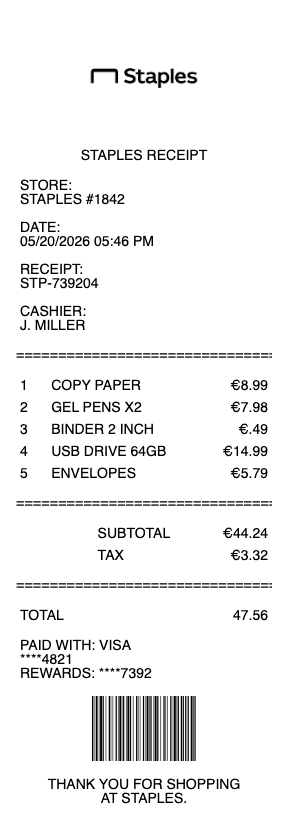
Lost a Staples receipt, missed the digital-receipt prompt at checkout, or need an itemized record for an office-supply expense report? Staples only stores in-store receipt lookups for about 90 days — older receipts are essentially unrecoverable through official channels. Use our generator above to create a clean, professional Staples receipt with all the line items your finance team needs: products, taxes, Staples Rewards, payment method, and store location.
Staples Receipt
Add custom logo
Edit line items
Choose payment method
Add/remove elements
Customize business information
Choose font
Why Staples Receipts Get Lost — and What Actually Works
Staples introduced digital receipts at checkout several years ago, but the system has a quiet flaw: the cashier asks if you want an emailed receipt, you say yes, you type in an email — and depending on the store's POS version, it either sends, fails silently, or sends to an old address tied to your Staples Rewards profile. Many shoppers walk out assuming they have a digital backup that never arrived.
The fallback options are limited:
If you're a Staples Rewards member, recent purchases (typically last 90 days) appear in your account at staples.com/account
For older purchases or non-Rewards transactions, Staples can sometimes pull a duplicate from the original card transaction — but only if you call your specific store within 90 days, and only some stores can do it
After 90 days, the receipt is effectively gone from Staples' searchable system
For expense reports with tight submission deadlines or older purchases that fell outside the window, generating a clean replacement receipt with the exact products, amount, and date is the standard workaround.
What's on a Complete Staples Receipt
A Staples receipt your finance team will accept includes:
Store number and location (the 4-digit store code plus city/state)
Date and time of purchase
Transaction number (also called register receipt ID)
Line items with SKU, product name, quantity, and unit price
Subtotal, sales tax (varies by state, typically 5–9%)
Staples Rewards earned if applicable (1% back for regular members, 2% for Plus, 5% for Premier)
Coupons or promotional discounts as separate line items
Payment method (last four of card, or "cash")
Return policy note (Staples allows returns within 14 days for tech, 30 days for office supplies, with receipt)
Staples Copy & Print Center — A Separate Receipt System
The Print & Marketing Services counter inside Staples uses a different point-of-sale system from the retail floor. If you bought office supplies and got something printed during the same visit, you may have walked out with two separate receipts. Print jobs (business cards, banners, posters, document copies) are receipted by the Copy & Print team and may not appear in your Staples Rewards purchase history at all — that history typically only reflects retail purchases. For corporate clients submitting print costs as a business expense, the lost Copy & Print receipt is a frequent issue.
UPS Shipping Inside Staples — Separate Transaction
Most Staples stores host a UPS shipping counter. Shipping charges paid at this counter go through UPS's POS, not Staples' — meaning the receipt is UPS-branded and won't show up in your Staples Rewards account or Staples receipt lookup. If you shipped a package from Staples and need the receipt, contact UPS customer service with the tracking number, or use our generator to create a clean UPS-style shipping receipt.
Staples Business Advantage — Corporate Invoicing Is Different
If your company has a Staples Business Advantage account (the B2B program), receipts and invoices are emailed monthly via the Business Advantage portal — not as individual transaction receipts. This works well for budgeting but is a problem when an individual purchase needs to be tied to a specific project, client, or expense code. Pull individual invoices from the Business Advantage portal at staplesadvantage.com if your finance team needs single-transaction documentation rather than the monthly statement.
Tech Repair, EasyTech, and Subscription Services
Staples sells more than just products — tech repair (EasyTech), Microsoft 365 subscriptions, Avast antivirus licenses, Quill printer-ink subscriptions, and shipping bundles all generate service-style receipts, not product receipts. These receipts have different line items: service description, contract period, monthly or annual recurring price, and any setup fees. If you need a clean receipt for a Staples-purchased software subscription for a business expense claim, the generator on this page lets you choose service-style line items.
Generate a Replacement Staples Receipt
Use the generator above to recreate a Staples receipt in seconds. Enter the store location, date, line items, taxes, and payment method — download as PDF or PNG. Pair with your card statement or bank transaction for full audit transparency on any expense submission.
The Staples 90-Day Receipt Window — Why Older Receipts Disappear
Most retailers struggle with receipt retention, but Staples is unusually restrictive. The chain's in-store POS system retains transaction lookup data for approximately 90 days — after that, even calling the original store with your card and the exact date often won't recover the receipt. This is a problem for quarterly and annual expense reconciliation, where a purchase made in January may need a receipt submitted in April for an end-of-quarter expense window. Staples Rewards members get slightly better luck (purchase history in the account portal), but non-members and cash payers are out of luck. The standard workaround used by frequent business shoppers: generate a clean replacement receipt with the original date, products, and amount, then submit it alongside the matching card statement line.
Staples Rewards vs. Plus vs. Premier — Receipts Look Different
Staples Rewards has three tiers and each shows differently on receipts. Standard Rewards (free): 1% back in rewards on qualifying purchases — the receipt shows the rewards earned as a separate line. Plus ($49/year): 2% back plus free shipping benefits, with rewards shown alongside. Premier ($99/year): 5% back, free copies, more perks — the receipt has additional rewards line items reflecting the higher percentage. If your company reimburses Staples purchases, the rewards earned are typically not reimbursable as personal income — but documenting them clearly on the receipt prevents confusion during audits about whether the "total" includes or excludes rewards value.
Print, Copy, and Marketing Services — Documentation for Business Clients
Staples Print & Marketing Services handles business cards, banners, posters, signage, custom postcards, document scanning, and large-format printing. Receipts from this counter typically include: project description, paper/finish specification, quantity, unit price, design fee (if applicable), tax, and turn-time surcharge for rush jobs. Corporate clients regularly need these receipts for client-billable expense reporting, marketing budget tracking, or freelance project documentation. The Copy & Print POS does not sync with Staples Rewards, meaning a lost print receipt has no online backup — call the store within 90 days or generate a replacement with the project specs.
Tax-Exempt Purchases and Nonprofit Receipts
Schools, nonprofits, and government entities purchasing through Staples often use tax exemption — but the receipt format differs. A tax-exempt receipt shows the sales tax line as $0 with a "Tax exempt" or "Exempt #" notation, plus the organization's tax-exempt ID number. For these receipts to be valid for accounting and audit purposes, the exemption number must match what's on file with Staples. If a cashier processed a purchase as standard (with tax) when it should have been tax-exempt, you'll need to request a corrected receipt from the store within their refund window — or, if outside that window, generate a documented replacement showing the correct tax-exempt status for your records.
Generate a Staples Receipt for Office Expense Reports — Free, No Login
Our Staples receipt generator creates a clean, expense-ready receipt with every field your finance team requires: store number and location, transaction ID, itemized SKU lines, sales tax broken out by jurisdiction, Staples Rewards earned, coupon discounts, and payment method. Choose between retail-style receipts (office supplies, tech, furniture) and service-style receipts (Print & Marketing, EasyTech repair, subscription software). Especially useful when Staples' 90-day in-store lookup window has expired, when the digital-receipt prompt at checkout failed silently, when a Print & Marketing receipt was lost on the way out, or when you need an itemized record for a tax-exempt nonprofit purchase. Download as PDF or PNG instantly — no login required. Always submit alongside your card statement or bank transaction line for a complete audit trail.
Frequently
asked questions
Everything you need to know about the product and billing.
How long does Staples keep receipts on file?
Staples' in-store POS system retains transaction lookup data for approximately 90 days. After that, even the original store typically cannot recover the receipt from your card or transaction date. Staples Rewards members may see a slightly longer history in their account portal, but for non-members and cash payers, anything older than 90 days is effectively gone. For older expense submissions, generating a replacement receipt with the original purchase details is the practical solution.
I asked for a digital receipt at checkout but never got it — what now?
This is a common Staples issue. The POS sometimes fails silently or routes the receipt to an outdated email tied to your Staples Rewards profile. First, check your spam folder and any old email addresses linked to your Rewards account. If you're a Rewards member, log into staples.com/account to see if the purchase appears in your history. If neither works and the purchase is recent, call the store directly. After 90 days, the practical option is to generate a clean replacement receipt matching your card statement charge.
Are Staples Print & Marketing Services receipts different from regular Staples receipts?
Yes. The Print & Marketing Services counter inside Staples uses a separate POS system from the retail floor. Print receipts typically include project description, paper/finish specs, quantity, unit price, design fees, tax, and any rush charges. These receipts do not sync with your Staples Rewards purchase history, so a lost print receipt has no online backup — you'd need to call the store within their 90-day window or generate a replacement.
How do I get a receipt for a UPS shipment paid for inside a Staples store?
UPS shipping at Staples runs through UPS's POS system, not Staples' — meaning the receipt is UPS-branded and won't appear in your Staples account. If you've lost a UPS-via-Staples shipping receipt, contact UPS customer service with the tracking number to request a duplicate. For lost tracking numbers, our generator can create a clean UPS-style shipping receipt with the original date and destination details.
Does my Staples Business Advantage account show individual receipts?
Staples Business Advantage (the B2B corporate program) issues monthly invoices rather than per-transaction receipts. You can pull individual invoices from the Business Advantage portal at staplesadvantage.com, but the standard monthly statement is the default delivery. If your finance team requires single-transaction documentation tied to a specific expense code, project, or client, request individual invoices from the portal or generate a replacement receipt with the exact line items.
What's the difference between Staples Rewards, Plus, and Premier on a receipt?
Three tiers, each shown differently. Standard Rewards (free) earns 1% back, shown as a rewards-earned line at the bottom. Plus ($49/year) earns 2% back plus shipping benefits. Premier ($99/year) earns 5% back and includes free copies. The receipt should clearly indicate which tier was used and the rewards earned on that transaction. If your employer reimburses Staples purchases, document the rewards earned separately so they're not mistakenly counted as personal income or as a discount on the reimbursable total.