Subway Receipt

Add custom logo
Edit line items
Choose payment method
Add/remove elements
Customize business information
Choose font

A Subway receipt shows the details of a quick-service meal purchased at a Subway restaurant. It is commonly used for reimbursements, per diem claims, and personal expense tracking. A typical Subway receipt includes the store number, order number, customized sandwich items, tax, and total paid. This Subway receipt example follows a realistic build-your-own format. It includes a footlong sandwich with add-ons, a side, sales tax, and a compact layout suited for fast transactions. Use a Subway receipt when you need clear proof of a fast food purchase with customized items. This KFC receipt example follows a realistic counter-order format. It includes a combo meal, sides, tax, and a compact layout suited for quick-service transactions. Use a KFC receipt when you need clear proof of a fast food purchase for work or personal records.

Where to Find the Store Number on a Subway Receipt

The store number on a Subway receipt appears near the top, directly under the store address, formatted as "Store #" followed by a 5-digit identifier (for example, "Store #12345"). The same number also prints in the small footer block of the receipt next to the cashier or transaction ID. This number identifies the specific Subway franchise location and is what you reference when calling about a return, a missing item, a complaint, or a duplicate-receipt request. Franchisees may also use the store number on the back of the receipt for guest-feedback surveys.

Legal Notice & Acceptable Use

A note on legitimate use. This template is for independent and small store operators issuing receipts to their own customers, and for shoppers reconstructing a record of an in-store purchase they actually made and paid for. Producing a receipt for goods that were not purchased, inflating the amount, or fabricating documentation to support a return, refund, store credit, warranty claim, expense report, business deduction, or insurance claim against a major retailer is fraud and is not what this tool is for. The only valid receipt for any return at a Walmart, Target, Costco, Home Depot, Best Buy, Macy’s, or other chain retailer is the original receipt issued by that retailer’s own POS system.

Subway is a trademark of Subway IP LLC. Any Receipt Generator is not affiliated with, endorsed by, sponsored by, or associated with Subway. This template is provided for legitimate uses such as reconstructing lost receipts, expense reporting, and creative projects.
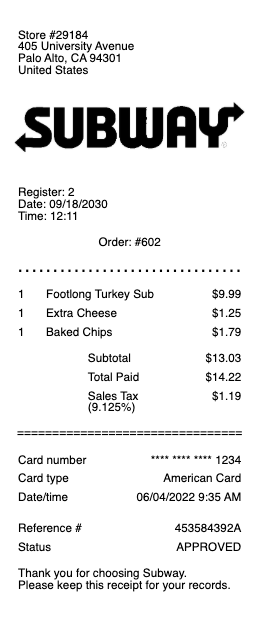
Subway Receipt

Subway Receipt Generator and Editor

Any Receipt Generator includes a free Subway-style receipt template you can fill in directly in your browser. The format mirrors what Subway prints at the register: the franchise store header with the 5-digit store number, the customized sandwich line items, the MyWay Rewards block, and the bottom payment line. Edit every field and download as PDF, PNG, or JPG.

Customizing Your Subway Receipt Template

Adjust the Subway template to match the specific order. Set the 5-digit Subway store number, edit the customized sandwich names with bread choices, proteins, cheeses, and topping notes, add sides and drinks, apply sales tax, update the total, and edit the MyWay Rewards line if applicable. The receipt format works for in-store, mobile order, and delivery.

Why People Use a Subway Receipt Template

The most common reasons include reconstructing a lost Subway receipt for a business lunch expense report, recreating a faded thermal receipt for tax records, generating a mockup for design or testing work, and maintaining a personal Subway purchase log for budgeting or reimbursement tracking.

Subway Receipt Format Reference

A standard Subway receipt opens with the franchise location header and the 5-digit store number, lists each sandwich with its bread, protein, and topping choices, applies state and local sales tax, prints the MyWay Rewards points earned, and shows the payment method at the bottom. The store number also appears in the footer for surveys and complaints. Our template reproduces every field editably.

Responsible Use

This Subway-style template is provided for legitimate documentation, expense recovery, design, and educational use only. Subway is a trademark of Subway IP LLC; Any Receipt Generator is not affiliated with Subway. Users are fully responsible for the accuracy and intended use of generated files.

Frequently
asked questions

Everything you need to know about the product and billing.

Where is the store number on a Subway receipt?
The 5-digit Subway store number prints at the top of the receipt, just below the store address. It also appears in the footer near the cashier ID and is used for guest feedback surveys and complaints.
Can I look up an old Subway receipt?
Most Subway transactions are tracked through the Subway MyWay Rewards app. If you scanned your Rewards account at purchase, the receipt is accessible in the Order History tab of the app.
What is MyWay Rewards on a Subway receipt?
Subway MyWay Rewards is the loyalty program. The receipt shows points earned for the order, your running balance, and any rewards redeemed. Points are typically 4 per dollar with bonus offers throughout the year.
Does Subway email receipts?
Subway emails receipts for mobile and delivery orders placed through the Subway app or Subway.com. In-store orders generate a printed receipt; an email is only sent if you order ahead or use the MyWay app.
Can I return a Subway purchase with the receipt?
Subway food items are not typically returnable, but receipts are used for refunds on incorrect orders, missing items, or quality complaints. Contact the specific store directly with the receipt store number.
What does "Subway store ID" mean on a receipt?
The Subway store ID is the 5-digit franchise identifier at the top of the receipt. It uniquely identifies the specific Subway location and is the reference for surveys, complaints, refunds, and franchisee feedback.