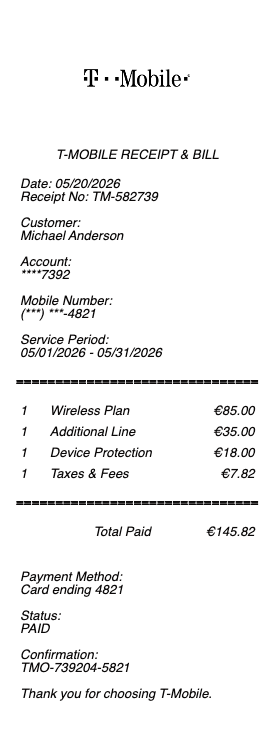
Need a T-Mobile receipt or bill for an expense report, tax deduction, or device purchase reimbursement? T-Mobile's all-inclusive plan pricing (taxes and fees bundled into the advertised rate, unlike Verizon and AT&T) makes their bills cleaner to read — but business expense systems still expect itemized documentation. Generate a clean T-Mobile bill or store receipt in seconds using our tool above.
T-Mobile Receipt & Bill
Add custom logo
Edit line items
Choose payment method
Add/remove elements
Customize business information
Choose font
T-Mobile's "Taxes and Fees Included" Pricing — A Receipt Advantage
T-Mobile is the only major US carrier to include taxes and fees in the advertised monthly plan price (since 2017, "Taxes and Fees Included" became their standard). For business expense reports, this matters: a Magenta plan advertised at $80/line means you actually pay $80/line — not $80 plus 12–18% in surcharges and taxes like Verizon and AT&T. Your T-Mobile bill total matches the advertised price exactly (minus AutoPay and Magenta MAX discounts), making expense reconciliation simpler.
Where to Find Your T-Mobile Bill
Open the T-Mobile app (or sign in at t-mobile.com)
Tap Bills → Bill History
Select a past month → Download PDF
T-Mobile retains billing history for approximately 24 months in the app (longer than Verizon's 16 months). For older bills, call 1-877-746-0909 — typical response 3–5 business days. The longer retention window helps annual tax record reconstruction.
What's on a Complete T-Mobile Bill
Account number and billing period
Account holder name and billing address
Phone numbers/lines (per-line breakdown)
Plan tier per line: Essentials, Go5G Plus, Go5G Next, Magenta, Magenta MAX, T-Mobile Connect, Home Internet, Business Unlimited
Equipment Installment Plan (EIP) payments — if you're financing a device over 24–36 months
Protection 360 (T-Mobile's device protection program)
AutoPay discount ($5/line for postpaid)
Magenta MAX / Go5G Next bundled perks — Netflix, Apple TV+, MLB.TV, ViX (the bundled streaming is reflected on bill)
One-time charges — activation, plan changes, accessory purchases
Promotional credits — Keep & Switch, trade-in credits, BOGO offers (typically applied over 24 months)
Total amount due
T-Mobile Tuesdays and Bundled Perks — They Don't Reduce Your Bill
T-Mobile Tuesdays (free weekly perks like a free coffee, movie tickets, gas discounts) and bundled streaming (Netflix on Magenta MAX, Apple TV+ on Go5G Plus, MLB.TV on Magenta) provide real retail value — but they don't reduce your monthly bill. Instead, they're included in the plan price you already pay. For self-employed expense submissions tracking the "value received," save the original plan terms documentation alongside your bills if your reporting requires it.
T-Mobile Business Accounts
T-Mobile Business has its own billing portal at t-mobile.com/business. Business bills show the company name as account holder, include tax-exempt status for nonprofit/government, and can itemize lines by cost center or department. Business Unlimited and Business Advanced plans have different pricing tiers and may include features like advanced security, dedicated business support, and Microsoft 365 bundling. For corporate finance teams, the business billing portal supports CSV exports and itemized chargeback reports.
T-Mobile Device Receipts and Trade-In Credits
Device purchase receipts come from t-mobile.com/orders (online) or as paper receipts from T-Mobile stores. T-Mobile aggressively offers trade-in credits — often up to $1,000 trade-in toward a new flagship phone. The credit is typically applied as 24–36 monthly bill credits, not as upfront device price reduction. The device receipt shows full retail price; the monthly bill shows the credit being applied. For tax purposes and corporate expense, the net cost over time is what's actually paid — keep both the device receipt and at least one monthly bill showing the credit application.
T-Mobile Home Internet and Business Internet
T-Mobile 5G Home Internet ($50–$70/month for residential, $50–$200/month for business) generates its own bill separate from wireless service if billed to a different account. The receipt shows: gateway equipment lease (or one-time purchase), monthly service plan, taxes-included pricing, and any service-credit refunds for outages. For home-office tax deductions, T-Mobile Home Internet receipts qualify under the business-use-of-home rules — keep clean monthly records.
Generate a Replacement T-Mobile Receipt
Use the generator above to create a clean T-Mobile bill or device purchase receipt covering all line items. Download as PDF or PNG.
T-Mobile vs Verizon vs AT&T Bill Format — Why T-Mobile Is Easier to Expense
Verizon and AT&T bills itemize taxes and surcharges as separate line items added on top of the plan rate — a 4-line Magenta-equivalent plan on Verizon shows the base rate plus ~$80–$120 in surcharges and taxes per month. T-Mobile bundles taxes and fees into the advertised rate, so what you see is what you pay. For corporate expense reports that flag inconsistent totals, T-Mobile's predictable bill is significantly easier to reconcile month over month. The trade-off: T-Mobile's advertised plans look more expensive at first glance — but the apples-to-apples total is often lower.
T-Mobile Magenta MAX, Go5G Plus, Go5G Next — Why Plan Names Keep Changing
T-Mobile rebrands its consumer plans frequently. Magenta and Magenta MAX (older naming) are largely succeeded by Go5G, Go5G Plus, and Go5G Next (current naming as of 2026). Old plans are typically grandfathered — existing customers can keep their old plan but new sign-ups use current plan names. Your bill shows whichever plan name was assigned at sign-up. For expense reports referencing specific plan tiers, document the exact plan name visible on the bill (it may not match T-Mobile's current marketing).
Keep & Switch and Trade-In Credit Apportionment
T-Mobile's Keep & Switch program reimburses up to $800 in early termination fees when you switch from another carrier. The reimbursement comes as a one-time prepaid Mastercard or monthly bill credits, not as a check. Similarly, trade-in credits ($300–$1,000 toward a new device) are applied as bill credits over 24–36 months. For expense reports, the device receipt shows full retail price while monthly bills show the credit applied. Track both documents for complete cost documentation — especially for self-employed tax filings.
T-Mobile Business Itemization for Cost Centers and Departments
T-Mobile Business accounts support cost-center itemization through the t-mobile.com/business portal. Account administrators configure custom labels for each phone line (e.g. "Sales NYC," "Engineering," "Customer Support") via Account Manager → Lines. Once configured, each monthly bill shows itemized totals per label. For corporate finance teams running monthly internal chargebacks, this is essential — manual allocation of 50+ lines without labels is significant overhead. T-Mobile also supports CSV bill export for accounting system imports.
Generate a T-Mobile Bill or Receipt — Free, No Login
Our T-Mobile receipt generator creates clean, expense-ready bills and device receipts with every line item: account number, billing period, per-line plan rates (Essentials through Go5G Next), Equipment Installment Plan payments, Protection 360, AutoPay discount, promotional/trade-in credits applied over 24–36 months, T-Mobile Home Internet, Business Unlimited tiers, and total due. Especially useful for self-employed tax record reconstruction, Verizon/AT&T comparison documentation, Keep & Switch credit reconciliation, T-Mobile Business cost-center itemization, replacing lost in-store device receipts, and tracking grandfathered Magenta plan documentation. Download as PDF or PNG instantly.
Frequently
asked questions
Everything you need to know about the product and billing.
How do I download my T-Mobile bill?
Open the T-Mobile app (or sign in at t-mobile.com) → tap Bills → Bill History → select a past month → Download PDF. T-Mobile retains billing history for about 24 months (longer than Verizon's 16 months). For older bills, call 1-877-746-0909 — typical response 3–5 business days.
Why does my T-Mobile plan price match the advertised rate exactly?
T-Mobile is the only major US carrier to include taxes and fees in the advertised monthly plan price (since 2017's 'Taxes and Fees Included' commitment). A Go5G Plus plan advertised at $90/line means you pay $90/line — no added 12–18% in surcharges and taxes like Verizon and AT&T. AutoPay discount ($5/line) is applied separately. For expense reports, this makes T-Mobile bills easier to reconcile.
Can I deduct my T-Mobile phone bill as a business expense?
Yes, if you're self-employed, the IRS allows you to deduct the business-use portion — typically 50–100% depending on usage. Schedule C filers need monthly T-Mobile bills as documentation. T-Mobile's 24-month bill retention helps annual tax record reconstruction. If you're missing months, generating clean replacement bills with the original charge amounts is standard practice.
How do I get a receipt for a phone I bought at a T-Mobile store?
Device receipts come from t-mobile.com/orders (online purchases) or as paper receipts handed to you at the store. T-Mobile store paper receipts fade on thermal paper. The device receipt should show retail price, IMEI, sales tax, trade-in value applied if any, and the down payment for any Equipment Installment Plan. For corporate expense reports, generate a clean replacement if the original is lost or unreadable.
Why is my T-Mobile trade-in credit applied over 24 months instead of upfront?
T-Mobile trade-in credits ($300–$1,000 toward a new device) are applied as monthly bill credits over 24–36 months, not as upfront device price reduction. A '$800 trade-in' appears as ~$22–$33/month for 24–36 months. The device receipt shows full retail price; monthly bills show the credit applied. For expense reports, document both — net cost over time is what you're actually paying.
What's the difference between a personal T-Mobile account and T-Mobile Business?
T-Mobile Business accounts live at t-mobile.com/business with separate billing portal, plan tiers (Business Unlimited, Business Advanced), cost-center itemization, and CSV bill export for accounting. Business bills show the company name as account holder and support tax-exempt status for nonprofits/government. If you're a small business owner using a personal account but expensing as business, generate a clean replacement with the correct business name documented.