Uber Receipt

Add custom logo
Edit line items
Choose payment method
Add/remove elements
Customize business information
Choose font

Overview of an Uber Receipt

An Uber receipt summarizes a completed ride and is typically delivered by email or available within the app. It reflects a trip-based transaction rather than a traditional product purchase.

Instead of listing items, the receipt focuses on the journey itself, capturing key trip details and how the total fare was calculated.

What an Uber Receipt Includes

A typical Uber-style receipt includes:

  • pickup and drop-off locations

  • date and time of the ride

  • distance and duration

  • fare breakdown (base fare, time, distance)

  • service fee and taxes

  • total amount paid

  • payment method

Some receipts may also include the driver’s name and vehicle type.

Key Characteristics of Uber Receipts

What makes this format distinct is its dynamic pricing structure. The total fare depends on multiple factors such as distance, time, demand, and any surge pricing applied during the ride.

Each trip is unique, and the receipt reflects a detailed breakdown of how the final price was calculated.

Common Uses of Uber Receipts

Uber receipts are widely used for:

  • submitting travel expenses

  • tracking ride costs

  • verifying trip details

  • keeping records for tax or work purposes

They are commonly required for business travel reimbursements and accounting documentation.

Structure and Format

The format is designed for digital use. Receipts are typically accessed through the app or email and can be downloaded, shared, or attached to expense systems with ease.

When This Format Is Useful

An Uber-style receipt format is useful when you need a clean, trip-based breakdown of a ride-sharing transaction with clear pricing and route details.

Legal Notice & Acceptable Use

A note on legitimate use. This template is for independent and small store operators issuing receipts to their own customers, and for shoppers reconstructing a record of an in-store purchase they actually made and paid for. Producing a receipt for goods that were not purchased, inflating the amount, or fabricating documentation to support a return, refund, store credit, warranty claim, expense report, business deduction, or insurance claim against a major retailer is fraud and is not what this tool is for. The only valid receipt for any return at a Walmart, Target, Costco, Home Depot, Best Buy, Macy’s, or other chain retailer is the original receipt issued by that retailer’s own POS system.

Uber is a trademark of Uber Technologies, Inc.. Any Receipt Generator is not affiliated with, endorsed by, sponsored by, or associated with Uber. This template is provided for legitimate uses such as reconstructing lost receipts, expense reporting, and creative projects.
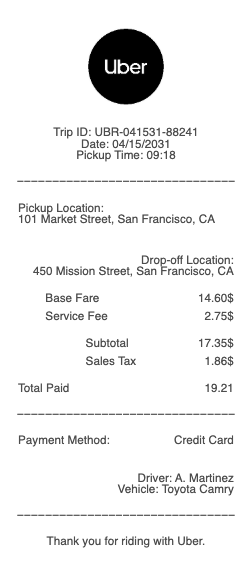
Uber Receipt

Uber Receipt Generator and Editor

Any Receipt Generator includes a free Uber-style receipt template you can fill in directly in your browser. The format mirrors what Uber emails after each ride — the trip summary header with pickup and dropoff times, the driver and vehicle details, the itemized fare breakdown, and the total. Edit every field and download as PDF, PNG, or JPG.

Customizing Your Uber Receipt Template

Adjust the Uber template to match the specific ride. Set the pickup and dropoff times and locations, choose the Uber product (UberX, UberXL, Black, Comfort, Pool, Eats), enter the driver name and the vehicle model, edit the base fare, distance and time charges, surge multiplier if applicable, tip, and total.

Why People Use an Uber Receipt Template

The most common reasons include reconstructing a lost or missing Uber email receipt for expense reports, recreating receipts for trips where the email failed to deliver, generating mockups for design or testing work, and maintaining a clean travel record for tax and mileage purposes.

Uber Receipt Format Reference

A standard Uber receipt opens with the trip date, a pickup and dropoff map summary, and a line-by-line fare breakdown: base fare, distance, time, booking fee, service fees, tolls, surge, tip, and total. The footer shows the Uber product type, driver name, vehicle, payment method, and the trip reference ID.

Responsible Use

This Uber-style template is provided for legitimate documentation, expense recovery, design, and educational use only. Uber is a trademark of Uber Technologies, Inc.; Any Receipt Generator is not affiliated with Uber. Users are fully responsible for the accuracy and intended use of generated files.

Frequently
asked questions

Everything you need to know about the product and billing.

Where can I find my old Uber receipts?
All Uber receipts are emailed to the address on your account and stored permanently in the Uber app under Activity. Tap any past trip to view, re-email, or download the receipt for that ride.
Why does my Uber receipt sometimes not arrive by email?
Uber receipts can fail to deliver due to email filters, an outdated account email, or temporary delivery issues. Receipts are always available in the Uber app — open Activity, tap the trip, and choose Resend Receipt.
What fees show up on an Uber receipt?
An Uber receipt shows the base fare, distance, time, booking fee, service fees, applicable tolls, surge multiplier when active, tip if added, and any promotion or credit applied. Each line is itemized separately.
Can I get an Uber receipt for a business expense?
Yes. Uber for Business users get receipts automatically formatted for expense reporting with the business name and project tag visible. Personal users can mark trips as business and route receipts to a separate email.
What is the trip ID on an Uber receipt?
The trip ID is a unique alphanumeric identifier (16+ characters) at the bottom of every Uber receipt. Uber support uses it to investigate complaints, refund requests, lost-item reports, and driver issues.
Can I edit an Uber receipt?
Uber receipts are issued by Uber and should not be altered. If a receipt is wrong, contact Uber support for a corrected version. For reconstruction, use a template that clearly labels output as such.