Walgreens Receipt

Add custom logo
Edit line items
Choose payment method
Add/remove elements
Customize business information
Choose font

Overview of a Walgreens Receipt

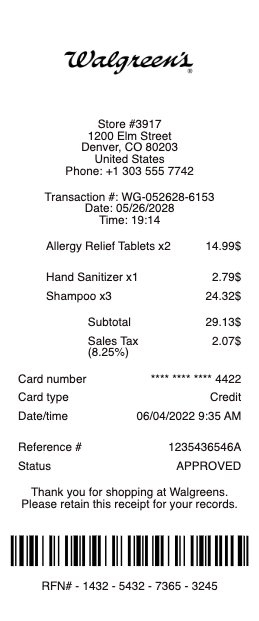
A Walgreens receipt reflects a hybrid retail and pharmacy transaction where everyday purchases and health-related items often appear in the same record. It is designed to capture not only what was bought, but also how savings, rewards, and pricing adjustments were applied across the transaction.

Unlike simpler retail formats, Walgreens receipts are typically longer and more detailed. The structure accommodates multiple pricing layers, including discounts, loyalty rewards, and promotional adjustments, which are often central to the final amount paid.

What a Walgreens Receipt Includes

A typical Walgreens-style receipt includes:

  • store name, number, and location

  • date and time of purchase

  • transaction or receipt number

  • register or cashier reference

  • itemized list of products (health, pharmacy, personal care, household)

  • quantities and unit prices

  • discounts, coupons, and promotional savings

  • loyalty or rewards program details (if applicable)

  • subtotal before savings and/or after discounts

  • sales tax

  • final total

  • payment method

In many cases, additional elements appear at the end of the receipt, such as:

  • summary of total savings

  • rewards points or balance updates

  • printed coupons or future offers

Key Characteristics of Walgreens Receipts

What makes this format distinct is the savings logic. Multiple discounts can apply to a single transaction, and the receipt reflects how each adjustment contributes to the final total. This creates a layered structure that requires clear separation between base price, savings, and payable amount.

The layout is functional rather than minimal. It prioritizes completeness over aesthetics, often resulting in longer receipts that contain both transaction data and follow-up offers.

Common Uses of Walgreens Receipts

The format is commonly used for:

  • tracking health and pharmacy-related expenses

  • insurance or reimbursement documentation

  • reviewing applied discounts and promotions

  • managing household and personal care spending

  • maintaining detailed purchase records

Because of the complexity, accuracy is critical. Each discount, tax line, and total must align correctly. Even small inconsistencies can make the receipt difficult to verify or unusable for reimbursement purposes.

Important Notice (Legal Use)

This example is provided strictly for illustrative, educational, and formatting purposes only. It does not represent an official Walgreens-issued document and does not confirm any real purchase or transaction.

It must not be used to:

  • misrepresent health or pharmacy purchases

  • fabricate insurance or reimbursement claims

  • manipulate discount or rewards records

  • create misleading financial documentation

Any receipt used in real scenarios must reflect a legitimate transaction and comply with applicable laws, store policies, and healthcare or reimbursement requirements.

When This Format Is Useful

If you need a format that reflects a detailed pharmacy and retail transaction with layered discounts and rewards, a Walgreens-style receipt provides a practical and widely recognized reference.

Walgreens Receipt
Efficient Documentation with Our Receipt Maker Any Receipt Generator is an online receipt generator for creating professional, customizable receipts directly in your browser. It is used by freelancers, small businesses, and individuals who need to create a receipt with clear, well-structured payment documentation. Instead of building documents manually, our receipt maker allows you to choose a receipt template, edit every field, and download a formatted file in seconds.
Users often search for a reliable receipt generator or a free receipt maker to handle their billing needs. This platform is designed to meet those use cases with a comprehensive library of options, accurate formatting, and instant export options. As a dedicated receipt maker, we provide tools for retail purchases, groceries, rental payments, and more.
Each template includes editable fields for business names, addresses, dates, items, totals, taxes, fees, and payment types. You can upload a logo, adjust spacing, and modify layout elements as needed. Receipts can be downloaded in PDF, PNG, or JPG format, making them easy to store, share, or print. The entire process takes less than a minute, making Any Receipt Generator an efficient solution for creating receipts online.
Each design includes editable fields for business names, dates, items, and taxes. You can upload a logo and adjust the layout as needed. The entire process takes less than a minute, making our receipt maker the most efficient solution for creating receipts online.
Legal Disclaimer: Any Receipt Generator does not validate, certify, or verify the authenticity of any generated documents. This tool is intended strictly for legitimate administrative and bookkeeping purposes. Use of this tool for the creation of fraudulent documentation or to engage in any unlawful activity is strictly prohibited. Users assume full legal responsibility for the accuracy and intended use of the files they generate.

Frequently
asked questions

Everything you need to know about the product and billing.

What is an online receipt generator?
Any Receipt Generator is an online receipt generator that lets you create clean, customizable receipts directly in your browser.
Can I edit every detail on a receipt?
Yes. All fields can be customized, including business information, line items, dates, totals, and payment details.
What file formats can I download?
Receipts can be exported in PDF, PNG, or JPG format.
Can I upload a logo?
Yes. You can upload your own logo and adjust spacing and layout elements.
Does it work on mobile?
Yes. The editor works on phones, tablets, and desktop devices.
Is Any Receipt Generator free to use?
Yes. You can create and export receipts for free. Watermark-free downloads are available with a paid upgrade.