An ACH payment receipt confirms a transfer moved through the Automated Clearing House — the US bank network behind direct deposit, direct debit, and most recurring online payments. Unlike a wire (instant, same-day, irrevocable) or a card charge, ACH moves in batches over one to a few business days and can be returned, so its receipt carries different details. This page explains what it shows and how to read it.
ACH Payment Receipt
Add custom logo
Edit line items
Choose payment method
Add/remove elements
Customize business information
Choose font
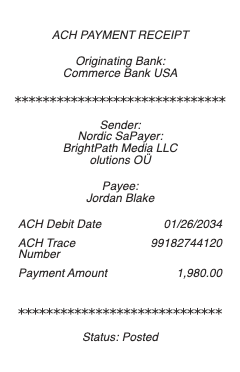
What’s on an ACH Payment Receipt
Payer and payee names, and the amount
Bank routing and account numbers — usually masked to the last few digits
Transaction type — ACH debit (pulled from you) or ACH credit (pushed to you)
A trace number identifying the transaction in the network
Effective/settlement date — often 1–3 business days out, not instant
The originating company’s name and ID for a business debit
Status — pending, settled, or returned
ACH vs Wire vs Card — Why the Receipt Differs
All three move money, but the receipt reflects very different rails. An ACH transfer settles in batches over 1–3 business days (or same-day ACH for an extra fee), costs little or nothing, and — critically — can be returned or reversed for insufficient funds or an unauthorized debit. A wire is same-day, effectively irreversible, and carries a bigger fee. A card payment authorizes instantly but settles later and can be charged back. That is why an ACH receipt shows a settlement date and status rather than an instant “paid” — the money is scheduled, not gone the moment you click. Understanding this timing is the whole point of the receipt: a pending ACH is a promise, not a completed transfer.
Recurring Debits, Authorization, and NACHA Rules
ACH is the backbone of recurring payments — rent, utilities, subscriptions, loan and insurance auto-pay — and each requires your authorization on file before a company can debit your account. The network runs under NACHA rules, and the receipt or confirmation typically references the authorization and the originator so you can recognize the charge. If a debit is wrong or unauthorized, those same rules give you a return window to dispute it through your bank, and the trace number is what identifies the exact transaction. For recurring setups, keep the confirmation that shows the amount, frequency, and originator — it is your proof of what you agreed to, and your reference if a charge later differs from it.
Return Codes, Status, and Getting a Copy
Because ACH can fail after the fact, a receipt’s status matters more than on instant methods. A returned ACH comes back with a return code — R01 for insufficient funds, R02 for a closed account, R03 for no account found, among others — and knowing your payment returned (not just “sent”) prevents a missed rent or bill. Your bank or the payment platform provides the confirmation, and the transaction appears in your online banking history with its trace number and settlement date, downloadable as a statement line. For business or bookkeeping use, that record — payer, payee, amount, trace number, and date — is the document to keep, since it ties the payment to a specific NACHA trace the bank can look up.
Related money transfer receipts: see also our bank transfer receipt guide and our Wise receipt guide.
Create an ACH Payment Receipt
Our generator produces a clean ACH payment confirmation — payer and payee, masked account details, amount, trace number, and settlement date — as a PDF for your records or a bookkeeping file when you need a legible copy.
Use it responsibly: recreate only real transfers that actually occurred, with their true amounts and dates. Fabricating an ACH receipt to fake a rent payment, invent proof of funds, or support a false claim is fraud — the authoritative record is the bank’s own settlement data and trace number, which any party can verify. This tool is for legitimate record-keeping only.
Frequently asked questions
Everything you need to know about the product and billing.
What does an ACH payment receipt show?
The payer and payee, the amount, masked routing and account numbers, whether it is an ACH debit or credit, a trace number, the effective/settlement date (often 1–3 business days out), the originating company for a business debit, and the status.
How is ACH different from a wire transfer?
ACH settles in batches over 1–3 business days, costs little, and can be returned or reversed. A wire is same-day and effectively irreversible but carries a larger fee. That is why an ACH receipt shows a settlement date and status rather than an instant “paid.”
What is a trace number on an ACH receipt?
A unique identifier assigned to the transaction within the ACH network. Your bank can use it to look up the exact transfer, which makes it the key reference if you ever need to confirm, trace, or dispute a payment.
Can an ACH payment be reversed?
Yes — unlike a wire, an ACH debit can be returned for insufficient funds, a closed account, or lack of authorization within a window set by NACHA rules. This is why the receipt’s status (pending, settled, or returned) matters.
What do ACH return codes like R01 mean?
They explain why a payment failed: R01 is insufficient funds, R02 a closed account, R03 no account found, among others. Seeing the code tells you a payment returned rather than settled, so you can fix it before missing a bill.
How do I get a copy of an ACH payment receipt?
It appears in your online banking history with the trace number and settlement date, downloadable as a statement line, and your bank or payment platform issues a confirmation. That record is the document to keep for bookkeeping or proof.